
Maestro Planner
Maestro Planner: A focused web workspace for assigning, logging, and reviewing student practice. Ranked #13 of 23 in Music Practice Software by our editors (7.9/10); pricing: Free plan; best for teachers assigning and reviewing student practice.
At a glance
- Editor score7.9 / 10
- PricingFree plan
- Best forTeachers assigning and reviewing student practice
- Free planYes
- Paid from$100/yr
- Practice plansYes
- Facts checked20 Sep 2026
Where it wins
- Teacher-created assignments cover pieces, scales, exercises, and technique work.
- Session logs capture duration, tempo, improvements, weak spots, and notes.
- Review views, trends, streaks, and milestones show practice follow-through.
Where it doesn't
- Web-only access limits use to browser-based workflows.
- It does not provide verified recording or performance feedback.
- Studio pricing is aimed at multi-teacher and larger organizations.
Our verdict on Maestro Planner
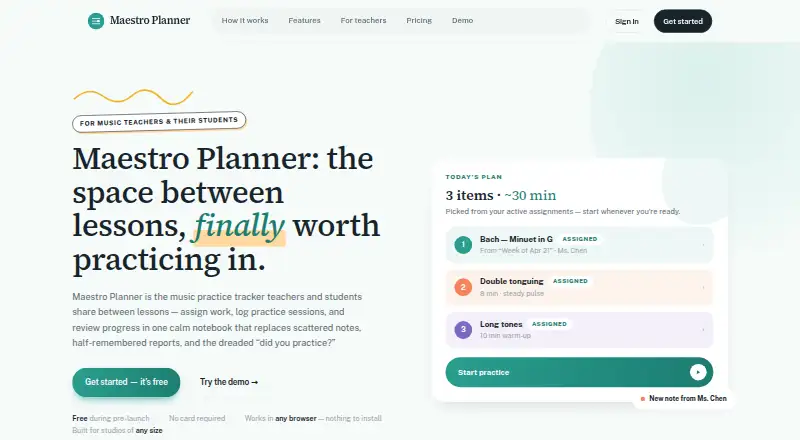
Maestro Planner is a browser-based music practice tracker for music teachers and their students. Teachers create assignments linked to practice items, while students log sessions with duration, tempo, improvements, weak spots, and notes. Students can review assignment history, track item-level trends, and maintain practice-day streaks and milestones. Teacher-student linking uses invite codes, creating a shared workflow for practice between lessons. It suits individual teachers, students, and larger studios that want structured assignment and progress tracking.
Pricing is organized around teacher access and student inclusion. Teacher Free costs $0 per month or $0 per year and includes core assignment and practice tracking plus linked student management. Teacher Pro costs $10 per month or $100 per year, adding unlimited student and assignment capacity, billing-managed access, and all current teacher workflows. Studio costs $79 per month or $790 per year and includes Teacher Pro capabilities, unlimited capacity with studio-level billing, and a design for multi-teacher and larger organizations. Students are included via the teacher at $0, with practice items, session logging, assignment visibility, and history, so no separate student subscription is required.
The product’s main strength is the depth of its shared practice record: teachers get recent-session and assignment-follow-through views, while students get histories, item trends, streaks, and milestones. That makes it a practical fit for teachers who want more visibility than assignment lists alone provide. Its boundaries are equally clear. Maestro Planner is web-only and does not offer verified recording or performance feedback, so teachers seeking audio-based assessment or performance review should choose another tool. Pick it for structured teacher-student practice management; skip it if recorded performance evaluation is central to the workflow.
Questions about Maestro Planner
Does Maestro Planner have a free plan? Yes: the Teacher Free plan is free; paid plans start at $10/mo (Teacher Pro).
How much does Maestro Planner cost? Maestro Planner lists 2 paid plans; the lowest is Teacher Pro at $10/mo.
What does Maestro Planner run on? Web. It runs in the cloud.
Who is Maestro Planner built for? Solo users, small businesses and mid-market companies (our editorial estimate).
Your product? Our editors can test Maestro Planner in depth and publish a review, labelled as paid · from $149/mo →
Maestro Planner pricing
All 4 Maestro Planner plans and prices →
Maestro Planner fact sheet
| Free plan | Yes |
|---|---|
| Paid from | $100/yr |
| Practice plans | Yes |
| Progress tracking | Yes |
| Performance feedback | Not verified |
| Repertoire management | Yes |
| Recording and review | Not verified |
| Supported platforms | web |
| Deployment | Cloud |
| Platforms | Web |
| Support | Email, Docs |
| Built for | Solo, Small business, Mid-market (editorial estimate) |
| Pricing | Free plan (source) |
| Website | maestroplanner.com |
| Facts checked | 20 Sep 2026 |
Alternatives to Maestro Planner
- Better PracticeA broad music practice workspace for structured teaching and student accountability.9.4
- PractisA focused practice workspace with detailed tracking for musicians and teacher-led study.9.3
- ExerzisorA broad teaching platform for structured music programs, with pricing handled through sales.9.1



See all Maestro Planner alternatives →
Used Maestro Planner? Be the first to review it
The editor score above is our own research. What this page doesn't have yet is a reader's view — what you used Maestro Planner for, what worked and what didn't. No stars are seeded and no review is paid for; an editor reads every one before it appears.
Write a reviewTwo minutes · verified accounts only · read by an editor before it appears
Featured on iTechGuides

Maestro Planner is listed in our Music Practice Software directory. Add the badge to your site — it links back to this page.
<a href="https://www.itechguides.com/products/maestro-planner/"><img src="https://www.itechguides.com/best/badge/maestro-planner.svg" alt="Featured on iTechGuides" width="230" height="46"></a>
Reviewed by iTechGuides Editors · Editorial team · Updated Nov 2026
Advertiser disclosure: iTechGuides is reader-supported. Vendors can pay for top positions in our rankings and for a place on other products' pages, and we may earn a commission when you click some links. Bought places stand at the number bought; this page and our disclosure say so. Paying vendors may get a fuller, more detailed review from our editors, and that review can change their score. How we rank.
Last updated · How we research and update