
Macro Studio
Macro Studio: AI-assisted focus stacking with RAW support, batch processing, and broad exports. Ranked #8 of 24 in Focus Stacking Software by our editors (8.4/10); pricing: 30-day trial; best for users wanting AI-assisted all-in-one stacking.
At a glance
- Editor score8.4 / 10
- Pricing30-day trial
- Best forUsers wanting AI-assisted all-in-one stacking
- Free planNo
- Paid from$99 one-time
- RAW file supportYes
- Facts checked20 Sep 2026
Where it wins
- RAW support with automatic alignment and batch processing
- AI masking plus source-frame retouching tools
- Runs on macOS, Windows, and Linux with Lightroom Classic integration
Where it doesn't
- $99 one-time price may be high for occasional users
- No free plan is available
- 30-day trials are invite-only
Our verdict on Macro Studio
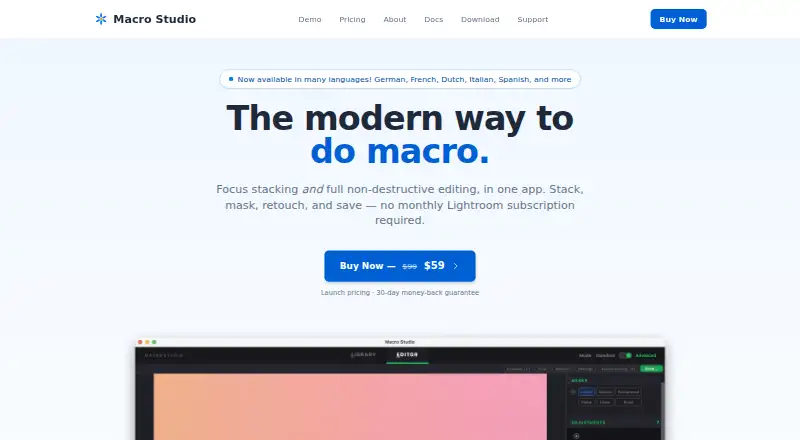
Macro Studio is a native desktop application for macro photographers who combine focus-bracketed images into sharp composites. It accepts RAW, TIFF, JPEG, and PNG files, then uses a unified stacking engine to align frames and produce a composite. The software is aimed at photographers who want stacking, editing, retouching, masking, and export tools in one application rather than a narrowly focused stacking utility. It runs on macOS, Windows, and Linux, while photos remain on the user’s machine.
Its workflow covers both automated and corrective work. Automatic alignment addresses scale, rotation, and translation, while Autostack processes folders of focus brackets. Source-frame retouching provides adjustable brush controls, and AI-assisted subject and background masking supports targeted edits. Non-destructive controls cover exposure, color, contrast, sharpness, and denoise adjustments. Built-in crop, straighten, comparison, and watermark tools extend the workflow beyond stacking. Lightroom Classic integration may also suit photographers who organize or prepare images there. Exports include TIFF, JPEG, and DNG.
Macro Studio 2026 costs $99 as a one-time purchase and includes all features, use on up to three machines per license, free updates within the 2026 version, and email support. A 30-day trial is available by invitation and requires no card, while there is no free plan. The price makes the product more suited to photographers who regularly create focus-stacked macro images and value an all-in-one desktop workflow. Buyers seeking occasional stacking, a free option, or a lower initial commitment should consider a simpler alternative instead.
Questions about Macro Studio
Is there a free trial of Macro Studio? Yes: a 30-day free trial; no card is needed.
What does Macro Studio run on? macOS, Windows and Linux. It runs as a desktop app.
What does Macro Studio integrate with? 1 integration: Adobe Lightroom Classic.
Does Macro Studio offer a money-back guarantee? Yes: 30 days.
Who is Macro Studio built for? Solo users, small businesses and mid-market companies (our editorial estimate).
Your product? Our editors can test Macro Studio in depth and publish a review, labelled as paid · from $149/mo →
Macro Studio pricing
All 1 Macro Studio plans and prices →
Macro Studio fact sheet
| Free plan | No |
|---|---|
| Paid from | $99 one-time |
| RAW file support | Yes |
| Automatic alignment | Yes |
| Batch processing | Yes |
| Manual retouching | Yes |
| Supported platforms | Not verified |
| Output formats | TIFF, JPEG, DNG |
| Free trial | 30 days · no card needed |
| Money-back guarantee | 30 days |
| Deployment | Desktop |
| Platforms | macOS, Windows, Linux |
| Support | Email, Docs |
| Built for | Solo, Small business, Mid-market (editorial estimate) |
| Integrations | 1 integrations: Adobe Lightroom Classic |
| Pricing | 30-day trial (source) |
| Website | macrostudio.pro |
| Facts checked | 20 Sep 2026 |
Macro Studio integrations
Macro Studio lists 1 integrations on its own site.
- Adobe Lightroom Classic
Alternatives to Macro Studio
- PlaneFuseA flexible local stacker for advanced photographers working across RAW and developed images.9.4
- ForgePixA free, open-source workstation for focus stacking, astrophotography, and related image workflows.9.3
- Shine StackerA capable free stacker with desktop controls, RAW support, and automation options.9.1

See all Macro Studio alternatives →
Macro Studio vs the competition
- Macro Studio vs PlaneFuse
- Macro Studio vs ForgePix
- Macro Studio vs Shine Stacker
- Macro Studio vs Aduku Stacker
- Macro Studio vs Helicon Focus
- Macro Studio vs Zerene Stacker

Compare Macro Studio with any tool side by side →
Used Macro Studio? Be the first to review it
The editor score above is our own research. What this page doesn't have yet is a reader's view — what you used Macro Studio for, what worked and what didn't. No stars are seeded and no review is paid for; an editor reads every one before it appears.
Write a reviewTwo minutes · verified accounts only · read by an editor before it appears
Featured on iTechGuides

Macro Studio is listed in our Focus Stacking Software directory. Add the badge to your site — it links back to this page.
<a href="https://www.itechguides.com/products/macro-studio/"><img src="https://www.itechguides.com/best/badge/macro-studio.svg" alt="Featured on iTechGuides" width="230" height="46"></a>
Reviewed by iTechGuides Editors · Editorial team · Updated Nov 2026
Advertiser disclosure: iTechGuides is reader-supported. Vendors can pay for top positions in our rankings and for a place on other products' pages, and we may earn a commission when you click some links. Bought places stand at the number bought; this page and our disclosure say so. Paying vendors may get a fuller, more detailed review from our editors, and that review can change their score. How we rank.
Last updated · How we research and update