
LightCut
LightCut: A free mobile editor for quick, AI-assisted DJI video creation. Ranked #62 of 153 in Video Editing Software by our editors (3.2/10); pricing: Free plan; best for DJI users wanting automatic mobile edits.
At a glance
- Editor score3.2 / 10
- PricingFree plan
- Best forDJI users wanting automatic mobile edits
- Free planYes
- Paid fromFree
- 4K exportYes
- Facts checked22 Sep 2026
Where it wins
- AI selects highlights and recommends video templates
- Wireless DJI connections enable previews without exporting first
- Free mobile apps include 4K export and core editing tools
Where it doesn't
- No desktop or web app for larger-screen editing
- Wireless features work with selected DJI devices
- Focused on solo mobile editing rather than collaboration
Our verdict on LightCut
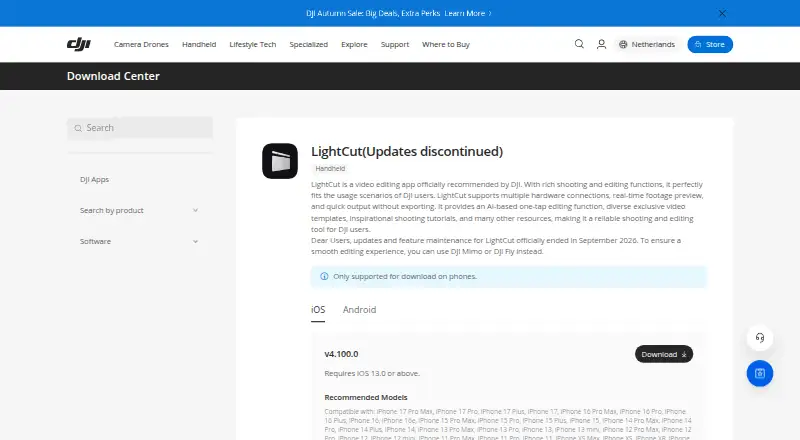
LightCut is a free mobile video editing application officially recommended by DJI. It is designed for DJI users, beginners, and creators who want to turn clips and photos into short videos on iOS or Android. Its core workflow centers on AI-powered One-Tap Editing, automatic highlight-moment selection, and AI-based template recommendations. Users can also trim, cut, merge, and adjust speed, then add music, stickers, filters, effects, transitions, and automatically matched sound effects.
Its strongest differentiator is the connection between editing and selected DJI hardware. LightCut can connect wirelessly to selected DJI drones, cameras, and handheld devices, providing real-time footage previews without exporting footage first. The app also includes shooting tutorials and Inspire Cam guidance, which broadens its role beyond post-production. DJI users who want a direct path from capture to short-form edit should find this focused workflow more relevant than a general-purpose editor.
The trade-off is its narrow, mobile-first scope. LightCut is available on iOS and Android, with no desktop or web app, so it is less suited to editors who need a larger-screen workflow. Its feature set covers common mobile editing needs, including effects, transitions, sound, templates, and 4K export, but its positioning does not include verified integrations or collaboration. Choose LightCut for free, automatic mobile edits and DJI device workflows; choose another video editor if desktop access, web editing, or collaboration is central to the project.
Your product? Our editors can test LightCut in depth and publish a review, labelled as paid · from $149/mo →
LightCut pricing
All 1 LightCut plans and prices →
LightCut fact sheet
| Free plan | Yes |
|---|---|
| Paid from | Free |
| Desktop app | No |
| Web app | No |
| Mobile app | Yes |
| 4K export | Yes |
| Team collaboration | Not verified |
| Included cloud storage | Not verified |
| Deployment | Mobile |
| Platforms | iOS, Android |
| Support | Email, Phone |
| Built for | Solo, Small business (editorial estimate) |
| Pricing | Free plan (source) |
| Website | dji.com |
| Facts checked | 22 Sep 2026 |
Alternatives to LightCut
- DaVinci ResolveA deep free editor with professional post-production tools across desktop and iPad.9.3
- Avid Media ComposerA deep editing suite with collaborative workflows, AI search, and a free entry option.9.2
- Final Cut ProA full-featured editor for Apple users who want desktop and iPad workflows.9.1


See all LightCut alternatives →
Also Ranked In
LightCut is ranked in 3 of our directories.
Used LightCut? Be the first to review it
The editor score above is our own research. What this page doesn't have yet is a reader's view — what you used LightCut for, what worked and what didn't. No stars are seeded and no review is paid for; an editor reads every one before it appears.
Write a reviewTwo minutes · verified accounts only · read by an editor before it appears
Featured on iTechGuides

LightCut is listed in our Video Editing Software directory. Add the badge to your site — it links back to this page.
<a href="https://www.itechguides.com/products/lightcut/"><img src="https://www.itechguides.com/best/badge/lightcut.svg" alt="Featured on iTechGuides" width="230" height="46"></a>
Reviewed by iTechGuides Editors · Editorial team · Updated Oct 2026
Advertiser disclosure: iTechGuides is reader-supported. Vendors can pay for top positions in our rankings and for a place on other products' pages, and we may earn a commission when you click some links. Bought places stand at the number bought; this page and our disclosure say so. Paying vendors may get a fuller, more detailed review from our editors, and that review can change their score. How we rank.
Last updated · How we research and update