
LifeZeus
LifeZeus: A broad virtual study room workspace with free private rooms and paid productivity upgrades. Ranked #20 of 37 in Virtual Study Room Apps by our editors (7.4/10); pricing: Free plan; best for integrated productivity rooms.
At a glance
- Editor score7.4 / 10
- PricingFree plan
- Best forIntegrated productivity rooms
- Free planYes
- Paid from$7.99/mo
- Accountability toolsYes
- Facts checked21 Sep 2026
Where it wins
- Private password-protected rooms with chat and activity sharing
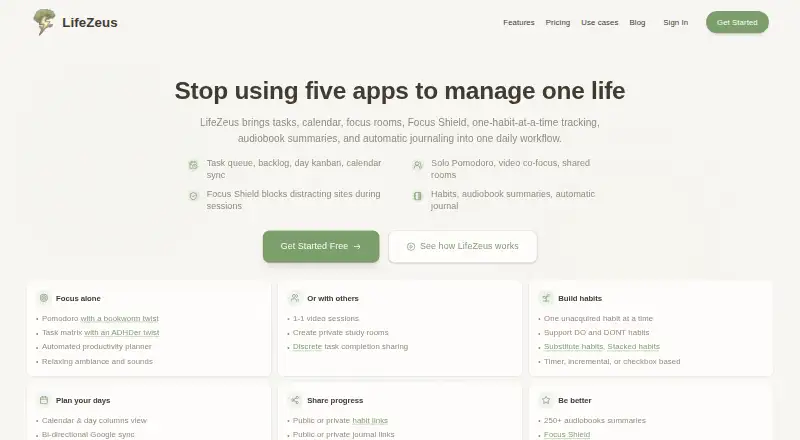
- Combines Pomodoro, tasks, habits, blocking, journaling, and video
- Integrates with calendars, project tools, and task managers
Where it doesn't
- Free plan limits video focus sessions to 100 minutes per week
- Advanced planning and habit features require a Premium plan
- Available on the web and through a Chrome extension
Our verdict on LifeZeus
LifeZeus is a web-based productivity platform for students, freelancers, remote workers, founders, and other individuals who want structured focus. It combines private password-protected study rooms with group chat, email invitations, shared goals, task visibility, real-time room activity, and one-on-one video focus sessions. Outside the room, it includes task planning, calendar synchronization, habit tracking, a Pomodoro timer, Focus Shield website blocking, an automated productivity journal, and audiobook summaries. That makes it suited to people who want study-room accountability alongside personal productivity tools rather than a standalone video coworking service.
The free plan includes 100 minutes of video focus sessions per week, a browser extension linked to focus time, basic task management, co-focus room access, and community access. Premium Monthly costs $11.99 per month and adds unlimited one-on-one sessions, unlimited co-focus rooms, advanced task and calendar features, additional habit features, and 250+ audiobook summaries. Premium Quarterly is $9.99 per month, while Premium Annual is $7.99 per month with the same listed Premium features. The paid tiers are most relevant for users who need unlimited room or video access and more developed planning and habit tools.
LifeZeus also fits workflows that already use GitHub, Jira, Todoist, ClickUp, Asana, Trello, Notion, Google Calendar, or Microsoft Outlook Calendar. Its feature breadth is a strength for users who want focus sessions, accountability, planning, habits, blocking, and reflection in one workspace. It may be less suitable for someone seeking only a simple timer or video room, since its value comes from combining several productivity systems. Choose it for integrated study and focus routines; choose a narrower tool when shared rooms are not central to your workflow.
Your product? Our editors can test LifeZeus in depth and publish a review, labelled as paid · from $149/mo →
LifeZeus pricing
All 4 LifeZeus plans and prices →
LifeZeus fact sheet
| Free plan | Yes |
|---|---|
| Paid from | $7.99/mo |
| Live coworking rooms | Yes |
| Private rooms | Yes |
| Video presence | Yes |
| Focus timer | Yes |
| Accountability tools | Yes |
| Room capacity | Not verified |
| Mobile app | Not verified |
| Deployment | Cloud, Browser extension |
| Platforms | Web, Chrome extension |
| Support | Email, Docs |
| Built for | Solo, Small business (editorial estimate) |
| Integrations | 9 integrations: GitHub, Jira, Todoist, ClickUp, Asana, Trello … See all → |
| Pricing | Free plan (source) |
| Website | lifezeus.com |
| Facts checked | 21 Sep 2026 |
LifeZeus integrations
LifeZeus lists 9 integrations on its own site.
- GitHub
- Jira
- Todoist
- ClickUp
- Asana
- Trello
- Notion
- Google Calendar
- Microsoft Outlook Calendar
See all LifeZeus integrations →
Alternatives to LifeZeus
- AcademyNCA broad study workspace combining live rooms, planning, accountability and AI tools.9.4
- OdakooA free, feature-rich browser study room with timers, planning, chat, and gamification.9.3
- BuggyverseA free web study room for accountability, planning, and focused group work.9.2



See all LifeZeus alternatives →
Used LifeZeus? Be the first to review it
The editor score above is our own research. What this page doesn't have yet is a reader's view — what you used LifeZeus for, what worked and what didn't. No stars are seeded and no review is paid for; an editor reads every one before it appears.
Write a reviewTwo minutes · verified accounts only · read by an editor before it appears
Featured on iTechGuides

LifeZeus is listed in our Virtual Study Room Apps directory. Add the badge to your site — it links back to this page.
<a href="https://www.itechguides.com/products/lifezeus/"><img src="https://www.itechguides.com/best/badge/lifezeus.svg" alt="Featured on iTechGuides" width="230" height="46"></a>
Reviewed by iTechGuides Editors · Editorial team · Updated Oct 2026
Advertiser disclosure: iTechGuides is reader-supported. Vendors can pay for top positions in our rankings and for a place on other products' pages, and we may earn a commission when you click some links. Bought places stand at the number bought; this page and our disclosure say so. Paying vendors may get a fuller, more detailed review from our editors, and that review can change their score. How we rank.
Last updated · How we research and update