
Lido
Lido: Turns varied documents into structured rows, with review, validation, and workflow options. Ranked #26 of 30 in Intelligent Document Processing Software by our editors (6.5/10); pricing: Free plan; best for teams extracting rows from PDFs and scans.
At a glance
- Editor score6.5 / 10
- PricingFree plan
- Best forTeams extracting rows from PDFs and scans
- Free planYes
- Paid from$29/mo
- Extraction modeAi
- Facts checked23 Sep 2026
Where it wins
- Extracts fields and tables from PDFs, scans, images, and other files
- Supports review, validation, routing, and API-based processing
- Exports structured data to Excel, CSV, and Google Sheets
Where it doesn't
- Listed integrations focus on Google Drive, OneDrive, Outlook, and Google Sheets
- Scale and Enterprise plans have substantial annual prices
- Mobile browsers are not supported
Our verdict on Lido
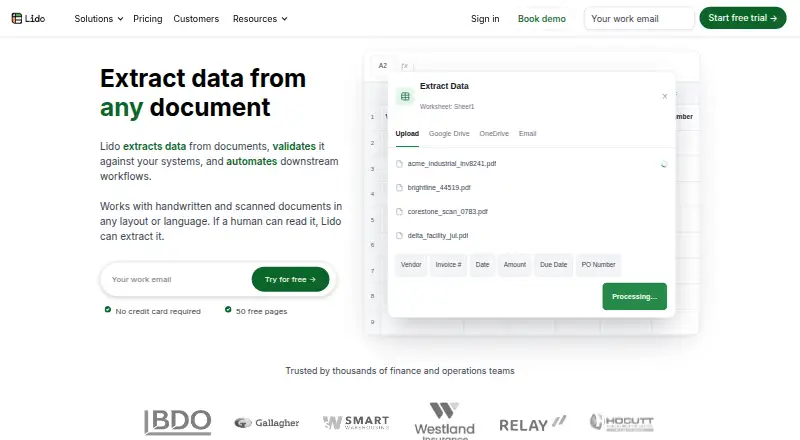
Lido turns documents into structured spreadsheet data for finance, operations, and other teams. It processes PDFs, scans, images, Word files, and email attachments, extracting fields and tables into rows and columns. The product supports handwritten and scanned documents, and its description says its AI extraction can handle changing layouts without templates. Teams can work in its spreadsheet interface, automate incoming files, or submit documents and retrieve results through an API.
Its workflow options are a notable part of the product. Extracted rows can be reviewed, fields or instructions adjusted, and data validated against internal systems. Files can arrive through cloud folders, mailboxes, or webhooks, then pass through workflow nodes to downstream systems. Outputs can be exported to Excel or CSV, or sent to Google Sheets. Listed integrations include Google Drive, OneDrive, Outlook, Lido Mailbox, webhooks, and Google Sheets; API access is also available. This should suit teams whose document extraction needs connect to that set of tools, while organizations depending on other prebuilt integrations may need to assess the fit.
Lido has a free plan, and Standard is $29 per month with support for converting any file type and exporting to Excel and CSV. Scale costs $7,000 per year and adds API and workflow access plus priority email and chat support. Enterprise is listed at $35,000 per year and adds custom ERP integrations, a dedicated US-based account manager, and live US-based onboarding and support. The annual tiers may make more sense for teams needing those workflow or enterprise services than for occasional conversion. Lido is cloud-based and lists SOC 2, HIPAA, GDPR, and two-factor authentication. Its product FAQ says mobile browsers are not supported, so it is a weaker fit for teams that need mobile-browser access.
Your product? Our editors can test Lido in depth and publish a review, labelled as paid · from $149/mo →
Lido pricing
Lido fact sheet
| Free plan | Yes |
|---|---|
| Paid from | $29/mo |
| OCR languages | Not verified |
| Extraction mode | Ai |
| Human validation | Yes |
| Workflow routing | Yes |
| API access | Yes |
| Deployment options | Cloud |
| Deployment | Cloud |
| Platforms | Web |
| Compliance & security | SOC 2, HIPAA, GDPR, 2FA |
| Support | Email, Live chat |
| Built for | Small business, Mid-market, Enterprise (editorial estimate) |
| Integrations | 6 integrations: Google Drive, OneDrive, Outlook, Lido Mailbox, webhooks, Google Sheets |
| Pricing | Free plan (source) |
| Website | lido.app |
| Facts checked | 23 Sep 2026 |
Lido integrations
Lido lists 6 integrations on its own site.
- Google Drive
- OneDrive
- Outlook
- Lido Mailbox
- webhooks
- Google Sheets
Alternatives to Lido
- ABBYY VantageEnterprise document processing with AI extraction, review, routing, and analytics.9.3
- IBM DatacapA broad enterprise capture platform for complex documents and controlled validation workflows.9.1
- OpenText Intelligent CaptureA broad capture suite for organizations standardizing document workflows across enterprise systems.9.0


Used Lido? Be the first to review it
The editor score above is our own research. What this page doesn't have yet is a reader's view — what you used Lido for, what worked and what didn't. No stars are seeded and no review is paid for; an editor reads every one before it appears.
Write a reviewTwo minutes · verified accounts only · read by an editor before it appears
Featured on iTechGuides

Lido is listed in our Intelligent Document Processing Software directory. Add the badge to your site — it links back to this page.
<a href="https://www.itechguides.com/products/lido/"><img src="https://www.itechguides.com/best/badge/lido.svg" alt="Featured on iTechGuides" width="230" height="46"></a>
Reviewed by iTechGuides Editors · Editorial team · Updated Oct 2026
Advertiser disclosure: iTechGuides is reader-supported. Vendors can pay for top positions in our rankings and for a place on other products' pages, and we may earn a commission when you click some links. Bought places stand at the number bought; this page and our disclosure say so. Paying vendors may get a fuller, more detailed review from our editors, and that review can change their score. How we rank.
Last updated · How we research and update