
Ledor
Ledor: A free, offline-first speed reader with strong import and text-to-speech options. Ranked #14 of 27 in Speed Reading Apps by our editors (8.0/10); pricing: Free plan; best for open-source readers wanting offline storage.
At a glance
- Editor score8.0 / 10
- PricingFree plan
- Best forOpen-source readers wanting offline storage
- Free planYes
- Paid fromFree
- Facts checked22 Sep 2026
Where it wins
- RSVP display highlights each word's Optimal Recognition Point
- Imports EPUBs and web articles by URL or Android share sheet
- Offline storage with statistics, bookmarks, and optional Google Drive sync
Where it doesn't
- iOS use requires building from source
- No verified comprehension exercises are provided
- Reading experience centers on RSVP rather than broader training tools
Our verdict on Ledor
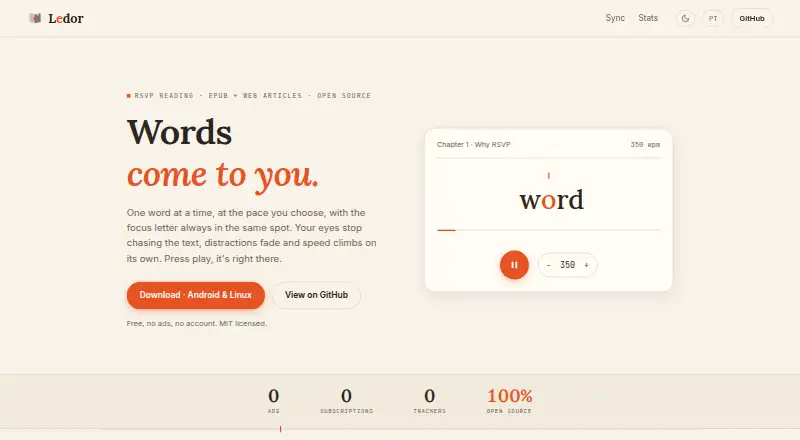
Ledor is an open-source speed-reading and e-reading application for people who want to read EPUB files and web articles across web, Linux, iOS, and Android. Its main mode uses Rapid Serial Visual Presentation (RSVP), displaying one word at a time with Optimal Recognition Point highlighting. Continuous e-reader mode and text-to-speech with word-synchronized highlighting give readers alternatives to the primary RSVP experience. The product is particularly suited to readers who value offline storage, local progress data, and an open-source application rather than a subscription service.
Content handling is one of Ledor's clearest strengths. EPUB import supports book-based reading, while web articles can be added by URL or through the Android share sheet. Offline-first local storage keeps books and reading progress available without relying on a connection. Bookmarks include context snippets, and reading statistics show WPM trends, giving readers ways to revisit passages and monitor pace over time. Optional Google Drive synchronization adds a cloud-based route for keeping data aligned, while the interactive RSVP demo provides a way to view the core reading approach before committing to the app.
Ledor is free and has no paid tiers to compare, which keeps access straightforward. Its platform footprint is broader than a single-device reader, but iOS use requires building from source, and the product's focus remains speed reading rather than a comprehensive comprehension-training system. Readers seeking EPUB and web imports, offline access, synchronized text-to-speech, and open-source availability should consider Ledor. Those who need verified comprehension exercises or a ready-to-install iOS release should choose an alternative.
Your product? Our editors can test Ledor in depth and publish a review, labelled as paid · from $149/mo →
Ledor pricing
Ledor fact sheet
| Free plan | Yes |
|---|---|
| Paid from | Free |
| Pacing methods | Rsvp |
| Comprehension exercises | Not verified |
| Content import | Yes |
| Advertised speed ceiling | Not verified |
| Guided training | Not verified |
| Supported platforms | web, linux, ios, android |
| Deployment | Desktop, Mobile |
| Platforms | Web, Linux, iOS, Android |
| Support | Community, Docs |
| Built for | Solo, Small business (editorial estimate) |
| Integrations | 1 integrations: Google Drive |
| Pricing | Free plan |
| Website | ledor.app |
| Facts checked | 22 Sep 2026 |
Ledor integrations
Ledor lists 1 integrations on its own site.
- Google Drive
Alternatives to Ledor
- SpreederA broad, cross-platform speed-reading toolkit with a useful free starting point.9.4
- FastReadiA feature-rich iOS reader for learners who want speed, comprehension, and study tools.9.3
- OutreadA focused Apple speed-reading app with guided training, imports and comprehension tools.9.2


Used Ledor? Be the first to review it
The editor score above is our own research. What this page doesn't have yet is a reader's view — what you used Ledor for, what worked and what didn't. No stars are seeded and no review is paid for; an editor reads every one before it appears.
Write a reviewTwo minutes · verified accounts only · read by an editor before it appears
Featured on iTechGuides

Ledor is listed in our Speed Reading Apps directory. Add the badge to your site — it links back to this page.
<a href="https://www.itechguides.com/products/ledor/"><img src="https://www.itechguides.com/best/badge/ledor.svg" alt="Featured on iTechGuides" width="230" height="46"></a>
Reviewed by iTechGuides Editors · Editorial team · Updated Oct 2026
Advertiser disclosure: iTechGuides is reader-supported. Vendors can pay for top positions in our rankings and for a place on other products' pages, and we may earn a commission when you click some links. Bought places stand at the number bought; this page and our disclosure say so. Paying vendors may get a fuller, more detailed review from our editors, and that review can change their score. How we rank.
Last updated · How we research and update