
Leave Me Alone
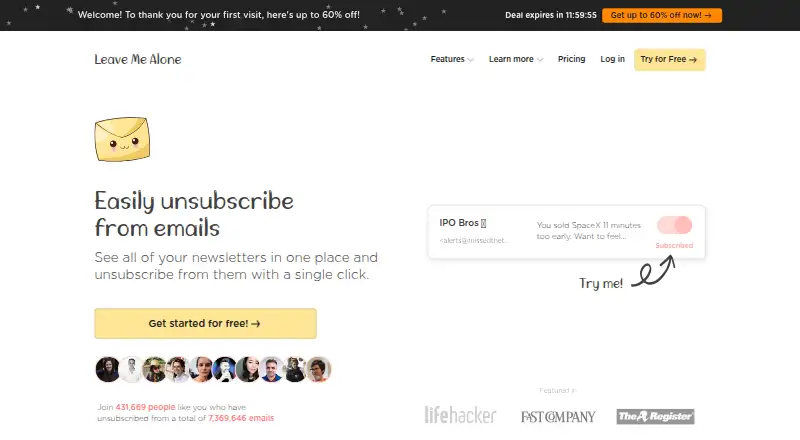
Leave Me Alone: A broad mailbox cleanup service with strong unsubscribe tools but no verified bulk deletion. Ranked #20 of 31 in Email Cleanup Software by our editors (6.1/10); pricing: Paid; best for broad mailbox unsubscribe and sender blocking.
At a glance
- Editor score6.1 / 10
- PricingPaid
- Best forBroad mailbox unsubscribe and sender blocking
- Free planNo
- Paid from$19 one-time
- Facts checked20 Sep 2026
Where it wins
- Supports Gmail, Outlook, iCloud, Yahoo Mail, and IMAP
- Combines unsubscribe, sender screening, blocking, and rollups
- Offers scheduling, custom filters, and private email addresses
Where it doesn't
- No free plan is listed
- No verified bulk deletion or archiving of existing mail
- Recurring plans display $0 per month with annual billing
Our verdict on Leave Me Alone
Leave Me Alone is an email-cleanup service from Squarecat for people managing subscription-heavy inboxes across multiple providers. It identifies subscription emails, supports bulk unsubscribe from mailing lists, and helps users screen unfamiliar senders, block spam and cold email, and create private email addresses. The service is available on the web and Android, making it relevant for individuals who want mailbox controls beyond standard unsubscribe links.
Provider coverage is a central strength. Leave Me Alone supports Gmail, Google Workspace, Outlook, Office 365, Hotmail, Live, MSN, Yahoo Mail, iCloud, AOL, Fastmail, Mail.com, and IMAP-compatible mailboxes. Its feature set extends beyond one-time cleanup: users can combine newsletters into scheduled Rollup digests, set do-not-disturb periods, prioritize senders, and apply custom filters. AI features are also included. This breadth suits users with several mailbox types or mixed personal and work accounts.
Pricing requires attention. The Seven Day Pass costs $19 one time and includes two email accounts, unlimited unsubscribes for seven days, Private Emails, Screener, Spam Blocker, and do-not-disturb mode. Casual Emailer displays $0 per month with annual billing for four email accounts, while Inbox Zero Hero displays $0 per month with annual billing for unlimited email accounts; both include unlimited unsubscribes and the listed cleanup tools. Leave Me Alone is a fit for ongoing unsubscribe management, sender control, and newsletter organization. Users whose main goal is verified bulk deletion or archiving of existing mail should choose a different type of cleanup tool.
Your product? Our editors can test Leave Me Alone in depth and publish a review, labelled as paid · from $149/mo →
Leave Me Alone pricing
All 3 Leave Me Alone plans and prices →
Leave Me Alone fact sheet
| Free plan | No |
|---|---|
| Paid from | $19 one-time |
| Bulk delete and archive | No |
| Unsubscribe tools | Yes |
| Supported email providers | Gmail, Google Workspace, Outlook, Office 365, Hotmail, Live, MSN, Yahoo Mail, iCloud, AOL, Fastmail, Mail.com, and IMAP-compatible mailboxes |
| Bulk action limit | Not verified |
| Automatic cleanup rules | Yes |
| Duplicate detection | Not verified |
| Money-back guarantee | 14 days |
| Deployment | Cloud, Mobile |
| Platforms | Web, Android |
| Compliance & security | GDPR |
| Support | Email, Docs |
| Built for | Solo, Small business (editorial estimate) |
| Integrations | 13 integrations: Gmail, Google Workspace, Outlook, Office 365, Hotmail, Live … See all → |
| Pricing | Paid (source) |
| Website | leavemealone.com |
| Facts checked | 20 Sep 2026 |
Leave Me Alone integrations
Leave Me Alone lists 13 integrations on its own site.
- Gmail
- Google Workspace
- Outlook
- Office 365
- Hotmail
- Live
- MSN
- Yahoo Mail
- iCloud
- AOL
- Fastmail
- Mail.com
- IMAP
See all Leave Me Alone integrations →
Alternatives to Leave Me Alone
- Clean EmailA broad mailbox cleanup service with bulk actions, unsubscribe tools, and automated rules.8.9
- Unroll.MeA free subscription manager for blocking senders and consolidating recurring email.7.9
- MailstromA mature web inbox manager for bulk cleanup, rules, unsubscribe, and multi-account control.7.9



See all Leave Me Alone alternatives →
Used Leave Me Alone? Be the first to review it
The editor score above is our own research. What this page doesn't have yet is a reader's view — what you used Leave Me Alone for, what worked and what didn't. No stars are seeded and no review is paid for; an editor reads every one before it appears.
Write a reviewTwo minutes · verified accounts only · read by an editor before it appears
Featured on iTechGuides

Leave Me Alone is listed in our Email Cleanup Software directory. Add the badge to your site — it links back to this page.
<a href="https://www.itechguides.com/products/leave-me-alone/"><img src="https://www.itechguides.com/best/badge/leave-me-alone.svg" alt="Featured on iTechGuides" width="230" height="46"></a>
Reviewed by iTechGuides Editors · Editorial team · Updated Oct 2026
Advertiser disclosure: iTechGuides is reader-supported. Vendors can pay for top positions in our rankings and for a place on other products' pages, and we may earn a commission when you click some links. Bought places stand at the number bought; this page and our disclosure say so. Paying vendors may get a fuller, more detailed review from our editors, and that review can change their score. How we rank.
Last updated · How we research and update