
LazyKiwi
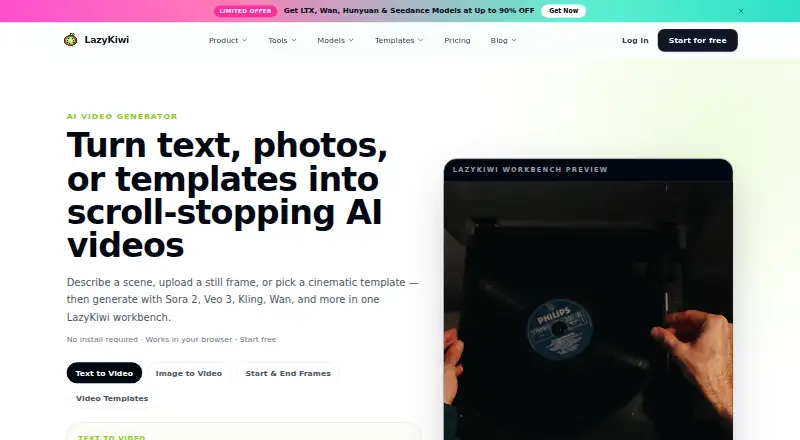
LazyKiwi: A flexible AI video workbench for cinematic intro experiments, not dedicated intro production. Ranked #15 of 30 in Video Intro Maker Software by our editors (5.9/10); pricing: Free plan · paid from $14/mo; best for AI-generated cinematic intro experiments.
At a glance
- Editor score5.9 / 10
- PricingFree plan · paid from $14/mo
- Best forAI-generated cinematic intro experiments
- Free planYes
- Paid from$14/mo
- Facts checked20 Sep 2026
Where it wins
- Text-to-video, image-to-video, and frame-transition workflows
- 300+ templates and effects with multiple video models
- MP4 exports in 16:9, 9:16, and 1:1, including 4K on Pro and above
Where it doesn't
- Broader creative studio focus is less intro-specific
- 4K output is documented for Pro and above
- Higher tiers are needed for priority queues and private visibility
Our verdict on LazyKiwi
LazyKiwi is a browser-based AI creative studio for creators, marketers, and small teams exploring video concepts. Its workbench generates clips from text prompts, still images, or start-and-end frames, with cinematic templates, multiple third-party video models, regeneration, and output comparison history. The broader platform also includes image generation, motion graphics, editing tools, and photo-based talking-avatar video generation. For intro makers, it is suited to experimentation across visual styles and formats rather than a narrowly focused intro workflow.
The published monthly plans show a free starting point with text-to-video, image-to-video, 300+ templates and effects, a standard generation queue, and 40 credits per month. Starter costs $14 per month and adds no-watermark exports. Basic costs $29 per month and adds a faster generation queue plus text, image, and video tools. Pro costs $75 per month and adds a priority queue, private visibility, early access to new models, and 4K output for the Intro Maker. Ultimate costs $120 per month and adds the highest priority queue, a high-volume creation workflow, and priority support. These tiers make queue speed, privacy, output quality, and volume the main upgrade considerations.
LazyKiwi’s strongest fit is for users who want several AI generation modes in one web workbench, including social-ready MP4 exports in 16:9, 9:16, and 1:1. The documented video-generation workflow supports outputs up to 60 seconds and 1080p, while the Intro Maker provides 4K output on Pro and above. Commercial use is supported, and the platform includes AI avatars alongside its core video tools. Choose LazyKiwi for cinematic intro experiments, model variety, and broader creative production; choose a more specialized intro tool if a focused intro-making workflow matters more than a general AI video studio.
LazyKiwi pricing
All 5 LazyKiwi plans and prices →
LazyKiwi fact sheet
| Free plan | Yes |
|---|---|
| Paid from | $14/mo |
| Max export resolution | Not verified |
| Transparent export | Not verified |
| Custom logo upload | Not verified |
| Brand kit | Not verified |
| Intro duration limit | Not verified |
| Free-plan watermark | Not verified |
| Money-back guarantee | 3 days |
| Deployment | Cloud, Browser extension |
| Platforms | Web |
| Support | |
| Built for | Solo, Small business, Mid-market (editorial estimate) |
| Pricing | Free plan · paid from $14/mo (source) |
| Website | lazykiwi.ai |
| Facts checked | 20 Sep 2026 |
Alternatives to LazyKiwi
- VideoboltA broad template library with flexible exports for branded intros and motion graphics.9.2
- Intro MakerA focused web tool for one-off logo and text intros with 720p to 4K60 downloads.8.2
- MakeWebVideoA focused option for logo animations and branded videos with pay-per-video pricing.7.9



See all LazyKiwi alternatives →
Also listed in
Used LazyKiwi? Be the first to review it
The editor score above is our own research. What this page doesn't have yet is a reader's view — what you used LazyKiwi for, what worked and what didn't. No stars are seeded and no review is paid for; an editor reads every one before it appears.
Write a reviewTwo minutes · verified accounts only · read by an editor before it appears
Featured on iTechGuides

LazyKiwi is listed in our Video Intro Maker Software directory. Add the badge to your site — it links back to this page.
<a href="https://www.itechguides.com/products/lazykiwi/"><img src="https://www.itechguides.com/best/badge/lazykiwi.svg" alt="Featured on iTechGuides" width="230" height="46"></a>
Reviewed by iTechGuides Editors · Editorial team · Updated Sep 2026
Advertiser disclosure: iTechGuides is reader-supported. We may earn a commission when you click some links. How we rank.
Last updated · How we research and update