
Lap Photo Manager
Lap Photo Manager: A capable free desktop manager for semantic search without cloud sync. Ranked #22 of 37 in Photo Management Software by our editors (7.4/10); pricing: Free plan; best for offline desktop users wanting semantic search.
At a glance
- Editor score7.4 / 10
- PricingFree plan
- Best forOffline desktop users wanting semantic search
- Free planYes
- Paid fromFree
- Face recognitionYes
- Facts checked20 Sep 2026
Where it wins
- On-device semantic and natural-language photo search
- RAW, JPEG/HEIC pairs, Live Photos, and Motion Photos
- Free, open-source apps for Windows, macOS, and Linux
Where it doesn't
- No cloud sync for sharing or cross-device libraries
- Desktop-only coverage with no mobile platform
- Editing tools focus on basic crop, rotate, and adjustments
Our verdict on Lap Photo Manager
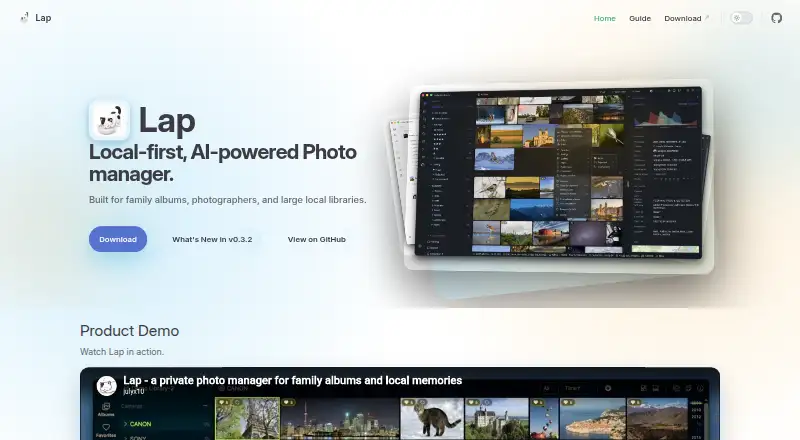
Lap Photo Manager is a free, open-source desktop application for families, photographers, and anyone managing a large local photo library. It works directly with existing folders and keeps photos on the user’s device rather than requiring cloud uploads. The application runs on Windows, macOS, and Linux, and combines library organization, AI-assisted discovery, metadata browsing, duplicate cleanup, map views, and basic editing in one local-first workspace.
Its standout capability is on-device natural-language and semantic search, supported by similar-image search and face clustering. Smart albums, collections, tags, ratings, and date-based imports with duplicate skipping provide several ways to organize a growing archive. Lap also handles RAW and JPEG/HEIC pairs, displays geotagged media on an interactive map, and supports playback for Apple Live Photos and Google Motion Photos. These features make it a strong fit for users who want richer discovery without sending their library to a cloud service.
The main trade-off is its local desktop focus. There is no cloud sync, so users who need automatic access across phones and computers, or a mobile photo workflow, should choose a product built around those capabilities instead. Lap’s editing tools cover crop, rotate, and adjustments rather than presenting a broad editing suite. Choose Lap for private, offline-oriented photo management with semantic search across major desktop operating systems; look elsewhere if mobile access, synchronized libraries, or cloud-based sharing are central requirements.
Your product? Our editors can test Lap Photo Manager in depth and publish a review, labelled as paid · from $149/mo →
Lap Photo Manager pricing
Lap Photo Manager fact sheet
| Free plan | Yes |
|---|---|
| Paid from | Free |
| Primary platform | Multi-platform |
| RAW photo support | Yes |
| Face recognition | Yes |
| AI-powered search | Yes |
| Metadata tools | Not verified |
| Cloud sync | No |
| Included storage | Not verified |
| Deployment | Desktop |
| Platforms | Windows, macOS, Linux |
| Support | Docs |
| Built for | Solo, Small business (editorial estimate) |
| Pricing | Free plan |
| Website | julyx10.github.io |
| Facts checked | 20 Sep 2026 |
Alternatives to Lap Photo Manager
- Google PhotosA capable photo library for automatic backup, smart search, editing, and sharing.9.4
- Apple PhotosA capable Apple-centered photo library with flexible storage and family sharing.9.3
- Amazon PhotosA capable photo library for Prime members who want full-resolution storage and broad device access.9.2



See all Lap Photo Manager alternatives →
Used Lap Photo Manager? Be the first to review it
The editor score above is our own research. What this page doesn't have yet is a reader's view — what you used Lap Photo Manager for, what worked and what didn't. No stars are seeded and no review is paid for; an editor reads every one before it appears.
Write a reviewTwo minutes · verified accounts only · read by an editor before it appears
Featured on iTechGuides

Lap Photo Manager is listed in our Photo Management Software directory. Add the badge to your site — it links back to this page.
<a href="https://www.itechguides.com/products/lap-photo-manager/"><img src="https://www.itechguides.com/best/badge/lap-photo-manager.svg" alt="Featured on iTechGuides" width="230" height="46"></a>
Reviewed by iTechGuides Editors · Editorial team · Updated Oct 2026
Advertiser disclosure: iTechGuides is reader-supported. Vendors can pay for top positions in our rankings and for a place on other products' pages, and we may earn a commission when you click some links. Bought places stand at the number bought; this page and our disclosure say so. Paying vendors may get a fuller, more detailed review from our editors, and that review can change their score. How we rank.
Last updated · How we research and update