
KidsFirst
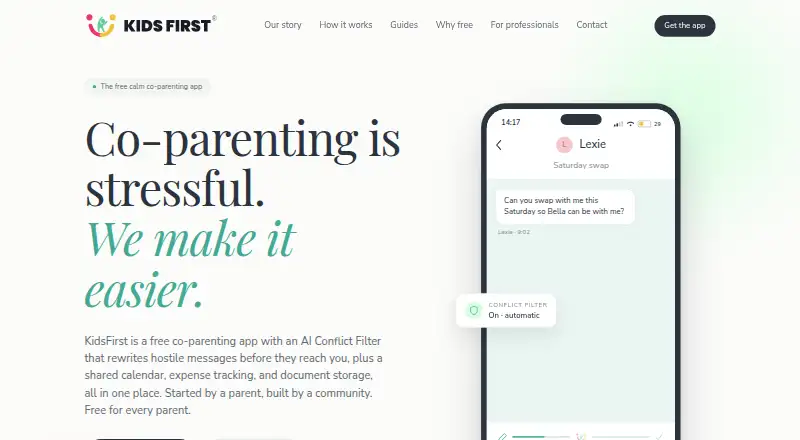
KidsFirst: A focused free iPhone app for structured co-parenting communication and basic records. Ranked #31 of 33 in Co-Parenting Apps by our editors (6.3/10); pricing: Free plan; best for free iPhone messaging and basic records.
At a glance
- Editor score6.3 / 10
- PricingFree plan
- Best forFree iPhone messaging and basic records
- Free planYes
- Paid fromFree
- Court reportsBasic
- Facts checked22 Sep 2026
Where it wins
- AI filtering and rewriting for aggressive or harmful messages
- Shared calendar, topic threads, expenses, and document storage
- Timestamped PDF exports and immutable sent-message records
Where it doesn't
- Available only as an iPhone app
- No calls, payments, or external calendar synchronization
- Court reporting is basic, with no advanced reports
Our verdict on KidsFirst
KidsFirst is a free co-parenting app for separated parents who need a structured place to communicate and organize shared responsibilities. Its feature set covers AI-assisted filtering and rewriting of aggressive or harmful messages, topic-based messaging threads, a shared custody calendar, expense tracking, document storage, and timestamped conversation exports. Both parents are included in the free plan, and the app is available on iPhone.
The communication and record-keeping tools are the clearest strengths. Parents can keep conversations organized by topic, receive email notifications for shared messages and events, and preserve sent messages as immutable records. Timestamped PDF exports can support a more formal record of conversations, while expense entries can include receipt uploads and visible splits. The shared calendar adds scheduling to the same workflow, and secure document storage keeps related files alongside messages and expenses.
KidsFirst is most suitable for families that want a no-cost iPhone app focused on communication, scheduling, expenses, and basic records. Its free plan includes the core feature set without a trial, credit card, ads, or paid tier, making the pricing straightforward. The trade-off is a narrow platform and workflow scope: it does not provide calls, payments, external calendar synchronization, integrations, or advanced reports. Families needing broader device coverage, built-in calling or payments, or more developed court-reporting tools should consider an alternative. For iPhone users seeking conflict-filtered messaging and shared co-parenting records, KidsFirst offers a focused option.
Your product? Our editors can test KidsFirst in depth and publish a review, labelled as paid · from $149/mo →
KidsFirst pricing
All 1 KidsFirst plans and prices →
KidsFirst fact sheet
| Free plan | Yes |
|---|---|
| Paid from | Free |
| Expense tracking | Yes |
| Document storage | Yes |
| Court reports | Basic |
| Payment processing | Not verified |
| Video calling | Not verified |
| Calendar sync | Not verified |
| Deployment | Mobile |
| Platforms | iOS |
| Support | |
| Built for | Solo, Small business (editorial estimate) |
| Pricing | Free plan (source) |
| Website | kidsfirst.app |
| Facts checked | 22 Sep 2026 |
Alternatives to KidsFirst
- OurFamilyWizardA documentation-focused co-parenting platform with broad records, payment, and calendar tools.9.4
- AppCloseA broad co-parenting toolkit with structured records and a 60-day trial.9.3
- TalkingParentsA mature co-parenting service for documented communication, scheduling, expenses, and records.9.2



See all KidsFirst alternatives →
Used KidsFirst? Be the first to review it
The editor score above is our own research. What this page doesn't have yet is a reader's view — what you used KidsFirst for, what worked and what didn't. No stars are seeded and no review is paid for; an editor reads every one before it appears.
Write a reviewTwo minutes · verified accounts only · read by an editor before it appears
Featured on iTechGuides

KidsFirst is listed in our Co-Parenting Apps directory. Add the badge to your site — it links back to this page.
<a href="https://www.itechguides.com/products/kidsfirst/"><img src="https://www.itechguides.com/best/badge/kidsfirst.svg" alt="Featured on iTechGuides" width="230" height="46"></a>
Reviewed by iTechGuides Editors · Editorial team · Updated Oct 2026
Advertiser disclosure: iTechGuides is reader-supported. Vendors can pay for top positions in our rankings and for a place on other products' pages, and we may earn a commission when you click some links. Bought places stand at the number bought; this page and our disclosure say so. Paying vendors may get a fuller, more detailed review from our editors, and that review can change their score. How we rank.
Last updated · How we research and update