Kid3
Kid3: A free, cross-platform metadata editor—not a tool for recording or multitrack audio editing. Ranked #124 of 128 in Audio Editing Software by our editors (3.0/10); pricing: Free plan; best for music library managers editing audio metadata.
At a glance
- Editor score3.0 / 10
- PricingFree plan
- Best forMusic library managers editing audio metadata
- Free planYes
- Paid fromFree
- Facts checked23 Sep 2026
Where it wins
- Batch-edits tags across multiple files
- Imports album data from gnudb.org, MusicBrainz, Discogs and Amazon
- Automates tasks through command-line, QML/JavaScript or D-Bus
Where it doesn't
- Does not provide multitrack editing or MIDI sequencing
- No noise reduction, video sync or cloud collaboration
- Focuses on metadata, not audio recording or sound editing
Our verdict on Kid3
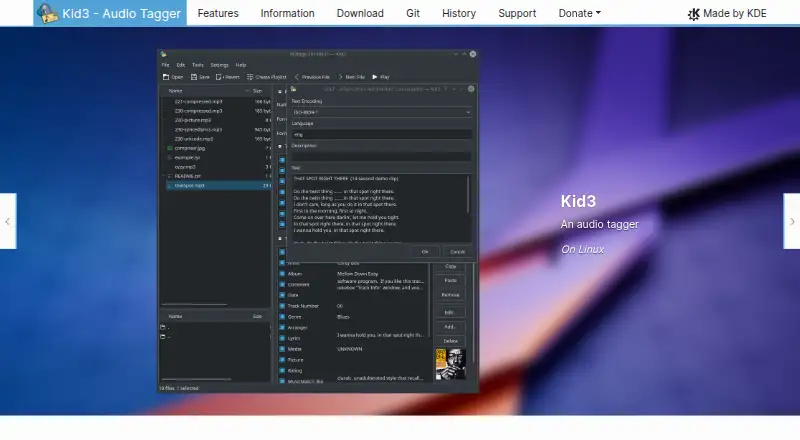
Kid3 is a desktop and mobile application for editing audio metadata, aimed at people organizing music libraries rather than recording or mixing audio. It edits ID3v1 and ID3v2 tags, converts between those versions, and supports other tag formats across MP3, FLAC, Ogg/Vorbis, Opus, MP4/AAC, WAV, AIFF and additional audio and tracker formats. Its free, open-source availability across Linux, Windows, macOS and Android makes it a practical fit for individuals and small collections that need consistent tags across files. It is not a multitrack editor or digital audio workstation.
Metadata workflows are the product’s strength. Kid3 can batch-edit multiple files, generate tags from filenames or filenames from tags, and rename folders using tag data. Album information can be imported from gnudb.org, MusicBrainz, Discogs and Amazon; users can also export tag data, create playlists, and edit, import and export synchronized lyrics. For repeatable workflows, it offers command-line, QML/JavaScript and D-Bus interfaces. These capabilities suit library cleanup and file organization, but they do not replace tools for recording, arranging or shaping sound.
The category fit is therefore narrow: Kid3 does not support multitrack editing, MIDI sequencing, noise reduction, video sync or cloud collaboration. Its free, cross-platform scope is useful when metadata management is the actual task, but buyers seeking an audio editor’s core production tools should choose a different product. Documentation is the listed support channel, so the experience is oriented toward self-guided use rather than a broader support offering. Pick Kid3 for tagging and organizing audio files; skip it if the goal is to edit the audio itself.
Your product? Our editors can test Kid3 in depth and publish a review, labelled as paid · from $99/mo →
Kid3 pricing
Kid3 fact sheet
| Free plan | Yes |
|---|---|
| Paid from | Free |
| Supported platforms | Linux, Windows, macOS, Android |
| Multitrack editing | No |
| MIDI sequencing | No |
| Third-party plugins | Not verified |
| Noise reduction | No |
| Video synchronization | No |
| Cloud collaboration | No |
| Deployment | Desktop, Mobile |
| Platforms | Linux, Windows, macOS, Android |
| Support | Docs |
| Built for | Solo, Small business (editorial estimate) |
| Integrations | 4 integrations: gnudb.org, MusicBrainz, Discogs, Amazon |
| Pricing | Free plan |
| Website | kid3.kde.org |
| Facts checked | 23 Sep 2026 |
Kid3 integrations
Kid3 lists 4 integrations on its own site.
- gnudb.org
- MusicBrainz
- Discogs
- Amazon
Alternatives to Kid3
- Pro ToolsA broad workstation for studios spanning music production, audio post, and immersive mixing.9.4
- REAPERA flexible desktop DAW with broad audio and MIDI tools and a one-time license from $60.9.3
- Logic ProA broad audio and MIDI workstation for Apple-based producers and video composers.9.2


Also Ranked In
Kid3 is ranked in 2 of our directories.
Used Kid3? Be the first to review it
The editor score above is our own research. What this page doesn't have yet is a reader's view — what you used Kid3 for, what worked and what didn't. No stars are seeded and no review is paid for; an editor reads every one before it appears.
Write a reviewTwo minutes · verified accounts only · read by an editor before it appears
Featured on iTechGuides

Kid3 is listed in our Audio Editing Software directory. Add the badge to your site — it links back to this page.
<a href="https://www.itechguides.com/products/kid3/"><img src="https://www.itechguides.com/best/badge/kid3.svg" alt="Featured on iTechGuides" width="230" height="46"></a>
Guides on audio editing software
- 10 Best Audio Editing Apps and DAWs for Android in 2026Aug 2026
- 7 Best Audio Editing Apps for macOSAug 2026
- Top 10 Audio Editing Software for Ubuntu 24.04Aug 2026
Reviewed by iTechGuides Editors · Editorial team · Updated Oct 2026
Advertiser disclosure: iTechGuides is reader-supported. Vendors can pay for top positions in our rankings and for a place on other products' pages, and we may earn a commission when you click some links. Bought places stand at the number bought; this page and our disclosure say so. Paying vendors may get a fuller, more detailed review from our editors, and that review can change their score. How we rank.
Last updated · How we research and update