
Keylabs
Keylabs: Advanced annotation, QA, automation, and exports with usage-based hourly pricing. Ranked #17 of 28 in Image Annotation Software by our editors (7.4/10); pricing: Paid; best for budget-conscious teams needing advanced annotation.
At a glance
- Editor score7.4 / 10
- PricingPaid
- Best forBudget-conscious teams needing advanced annotation
- Free planNo
- Paid from$1/unit usage-based
- Model-assisted labelingYes
- Facts checked20 Sep 2026
Where it wins
- Supports extensive 2D and 3D annotation types
- Includes model-assisted labeling, QA, and workflows
- Exports to COCO, YOLO, and Keylabs formats
Where it doesn't
- No free plan
- Hourly pricing may complicate budget forecasting
- Advanced capabilities may exceed simple labeling needs
Our verdict on Keylabs
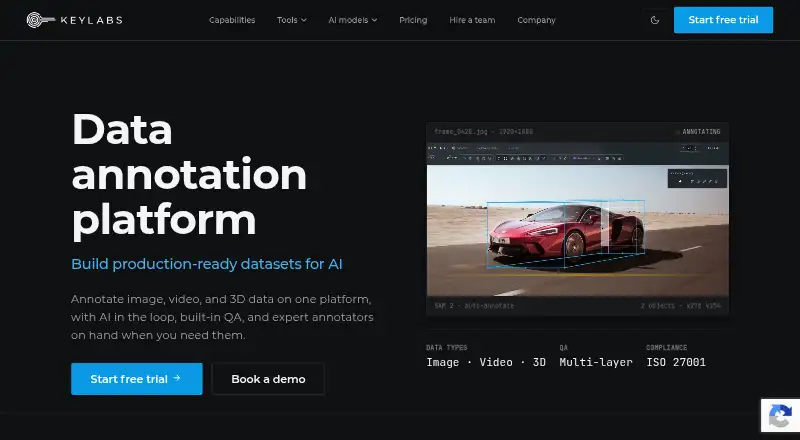
Keylabs is a data annotation platform for AI teams working with image, video, and 3D data. It combines manual labeling with model-assisted annotation, quality assurance, dataset management, and export tools. Teams can annotate bounding boxes, polygons, polylines, keypoints, segmentation, cuboids, meshes, bitmasks, and point clouds. Its role-based workflows and collaboration features make it suited to projects that need structured review rather than basic image marking.
Pricing is usage-based rather than per-user monthly pricing. The Startup plan costs $1 per hour and is designed for startups, individuals, or academies, with up to 10 non-admin users and 10 GB of storage. Business costs $2.3 per hour for growing businesses, supporting up to 50 non-admin users and 250 GB of storage. Pro costs $2.1 per hour for professional teams, with up to 300 non-admin users and 2 TB of storage. Enterprise is intended for ultimate teams and includes 50,000+ hours, unlimited users, and unlimited storage. This structure suits teams that can align spending with annotation activity.
The platform’s strongest differentiator is breadth. Model-assisted labeling can use pre-trained or custom machine-learning models, while automatic segmentation, video object tracking, multi-layer quality assurance, and annotator verification support larger or more complex datasets. Keylabs also connects to S3, Google Cloud Storage, and Azure, provides CLI and SDK tooling, and exports to Keylabs ZIP/JSON/PNG, COCO, and YOLO formats. Web and self-hosted deployment options, including on-premise deployment, broaden its fit for teams with infrastructure requirements. Choose Keylabs for advanced computer-vision workflows and programmatic integration; teams needing only occasional, simple labeling may prefer a narrower tool.
Your product? Our editors can test Keylabs in depth and publish a review, labelled as paid · from $149/mo →
Keylabs pricing
All 4 Keylabs plans and prices →
Keylabs fact sheet
| Free plan | No |
|---|---|
| Paid from | $1/unit usage-based |
| Annotation types | Bounding box, polygon, polylines, keypoints, semantic segmentation, instance segmentation, rotating bounding box, skeletal, cuboid, mesh, 3D point cloud, bitmask, custom annotation |
| Image formats | Not verified |
| Model-assisted labeling | Yes |
| Dataset export | Keylabs ZIP archive with JSON and PNG masks; COCO; YOLO; CSV filename mapping |
| Team collaboration | Yes |
| API access | Yes |
| Deployment | Cloud, Self-hosted |
| Platforms | Web |
| Compliance & security | GDPR, ISO 27001 |
| Support | Email, Docs |
| Built for | Small business, Mid-market, Enterprise (editorial estimate) |
| Integrations | 6 integrations: S3, Google Cloud Storage, Azure, SAM, YOLO, Roboflow |
| Pricing | Paid (source) |
| Website | keylabs.ai |
| Facts checked | 20 Sep 2026 |
Keylabs integrations
Keylabs lists 6 integrations on its own site.
- S3
- Google Cloud Storage
- Azure
- SAM
- YOLO
- Roboflow
Alternatives to Keylabs
- PixanoA flexible open-source choice for teams annotating 2D and 3D vision datasets.9.0
- CVATA broad CV workflow spanning manual, AI-assisted, collaborative, and programmatic annotation.8.9
- Label StudioFlexible image annotation with open-source deployment, AI assistance, and broad exports.8.8

See all Keylabs alternatives →
Also Ranked In
Keylabs is ranked in 2 of our directories.
Used Keylabs? Be the first to review it
The editor score above is our own research. What this page doesn't have yet is a reader's view — what you used Keylabs for, what worked and what didn't. No stars are seeded and no review is paid for; an editor reads every one before it appears.
Write a reviewTwo minutes · verified accounts only · read by an editor before it appears
Featured on iTechGuides
Keylabs is listed in our Image Annotation Software directory. Add the badge to your site — it links back to this page.
<a href="https://www.itechguides.com/products/keylabs/"><img src="https://www.itechguides.com/best/badge/keylabs.svg" alt="Featured on iTechGuides" width="230" height="46"></a>
Reviewed by iTechGuides Editors · Editorial team · Updated Oct 2026
Advertiser disclosure: iTechGuides is reader-supported. Vendors can pay for top positions in our rankings and for a place on other products' pages, and we may earn a commission when you click some links. Bought places stand at the number bought; this page and our disclosure say so. Paying vendors may get a fuller, more detailed review from our editors, and that review can change their score. How we rank.
Last updated · How we research and update