
Kerf
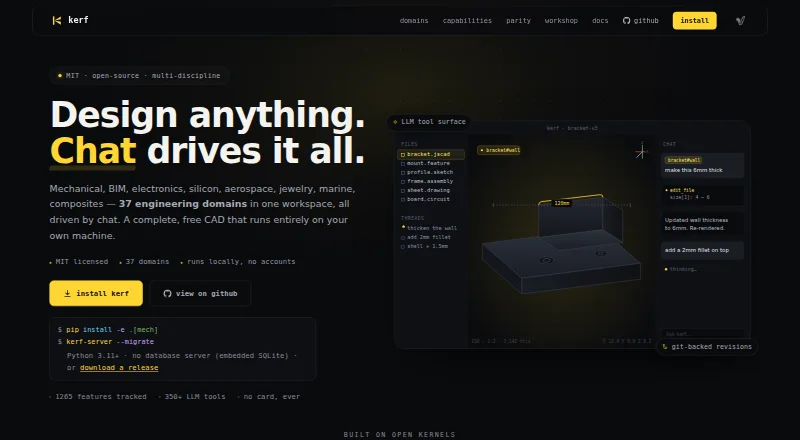
Kerf: A technical, open-source jewelry CAD system with modeling, rendering, and manufacturing export. Ranked #9 of 21 in Jewelry Design Software by our editors (7.9/10); pricing: Free plan; best for open-source technical jewelry makers.
At a glance
- Editor score7.9 / 10
- PricingFree plan
- Best forOpen-source technical jewelry makers
- Free planYes
- Paid fromFree
- Stone setting toolsYes
- Facts checked22 Sep 2026
Where it wins
- Free, MIT-licensed CAD with local and self-hosted workflows
- Jewelry modules cover rings, settings, gemstones, chains, and gem seats
- Exports STEP, STL, and 3MF for manufacturing preparation
Where it doesn't
- Its hybrid engineering focus may require more setup than jewelry-only suites
- The workflow spans many technical tools beyond dedicated jewelry design
- Chat-driven editing operates through an LLM tool layer
Our verdict on Kerf
Kerf is a free, MIT-licensed CAD system for designers, engineers, makers, and jewelry professionals who want an open-source technical workflow. Its jewelry-specific tools cover rings, gemstones, gem seats, settings, and chains, while parametric sketching and feature-tree modeling support more structured design work. Ring sizing, stone-setting tools, physically based rendering, and manufacturing export give it a practical path from concept to production preparation.
The published product details show a free model with no account or subscription requirement. Kerf runs across web, macOS, Linux, API, and self-hosted environments, giving teams flexibility over where the workflow lives. Its ecosystem includes JSCAD, OpenCascade, OpenCAMlib, GitHub, CalculiX, and FEniCSx. Local revisions, Git history, and Workshop publishing also suit makers who want versioned design files or a collaborative publishing workflow. Export support includes STEP, STL, and 3MF, while the category specifications also identify DXF and G-code support.
Kerf’s breadth is both its main advantage and its clearest trade-off. Alongside jewelry tools, it combines rendering, casting export, manufacturing preparation, and chat-driven editing through an LLM tool layer. The gem catalog includes more than 30 gemstone cuts and templates, adding useful structure for stone-focused designs. However, its broader engineering orientation may demand more setup than a dedicated jewelry suite. Choose Kerf if open-source ownership, parametric control, integrations, and manufacturing workflows matter most. A jewelry maker seeking a narrower, simpler tool focused only on jewelry production may prefer a dedicated alternative.
Your product? Our editors can test Kerf in depth and publish a review, labelled as paid · from $149/mo →
Kerf pricing
Kerf fact sheet
| Free plan | Yes |
|---|---|
| Paid from | Free |
| Parametric modeling | Yes |
| Ring sizing tools | Yes |
| Stone setting tools | Yes |
| Photorealistic rendering | Yes |
| Manufacturing export | Yes |
| Supported platforms | Hybrid |
| File export formats | STEP, STL, 3MF, DXF, G-code |
| Deployment | Self-hosted, Desktop |
| Platforms | Web, macOS, Linux |
| Support | Docs |
| Built for | Solo, Small business (editorial estimate) |
| Integrations | 6 integrations: JSCAD, OpenCascade, OpenCAMlib, GitHub, CalculiX, FEniCSx |
| Pricing | Free plan |
| Website | vulos.org |
| Facts checked | 22 Sep 2026 |
Kerf integrations
Kerf lists 6 integrations on its own site.
- JSCAD
- OpenCascade
- OpenCAMlib
- GitHub
- CalculiX
- FEniCSx
Alternatives to Kerf
- 3Design CADA jewelry-focused desktop CAD suite for professional modeling, rendering, and export.9.3
- MatrixGoldA full-featured jewelry CAD system for established studios and production workflows.9.1
- Jewelry CAD DreamA broad Windows CAD suite for production jewelry work, priced for serious professional use.8.8


Used Kerf? Be the first to review it
The editor score above is our own research. What this page doesn't have yet is a reader's view — what you used Kerf for, what worked and what didn't. No stars are seeded and no review is paid for; an editor reads every one before it appears.
Write a reviewTwo minutes · verified accounts only · read by an editor before it appears
Featured on iTechGuides

Kerf is listed in our Jewelry Design Software directory. Add the badge to your site — it links back to this page.
<a href="https://www.itechguides.com/products/kerf/"><img src="https://www.itechguides.com/best/badge/kerf.svg" alt="Featured on iTechGuides" width="230" height="46"></a>
Reviewed by iTechGuides Editors · Editorial team · Updated Oct 2026
Advertiser disclosure: iTechGuides is reader-supported. Vendors can pay for top positions in our rankings and for a place on other products' pages, and we may earn a commission when you click some links. Bought places stand at the number bought; this page and our disclosure say so. Paying vendors may get a fuller, more detailed review from our editors, and that review can change their score. How we rank.
Last updated · How we research and update