
Kate
Kate: A free, open-source editor with broad coding features across Linux, Windows, and macOS. Ranked #5 of 82 in Text Editors by our editors (9.0/10); pricing: Free plan; best for free cross-platform coding and text editing.
At a glance
- Editor score9.0 / 10
- PricingFree plan
- Best forFree cross-platform coding and text editing
- Free planYes
- Paid fromFree
- Multi-cursor editingYes
- Facts checked22 Sep 2026
Where it wins
- Supports syntax highlighting for more than 300 languages
- Combines multi-cursor editing, macros, projects, and split views
- Includes terminal, Git, LSP, DAP, plugins, and scripting
Where it doesn't
- Its documented integration surface is narrower than broader editor ecosystems
- Its programming features may exceed the needs of basic text editing
- Language and debugging workflows center on LSP and DAP support
Our verdict on Kate
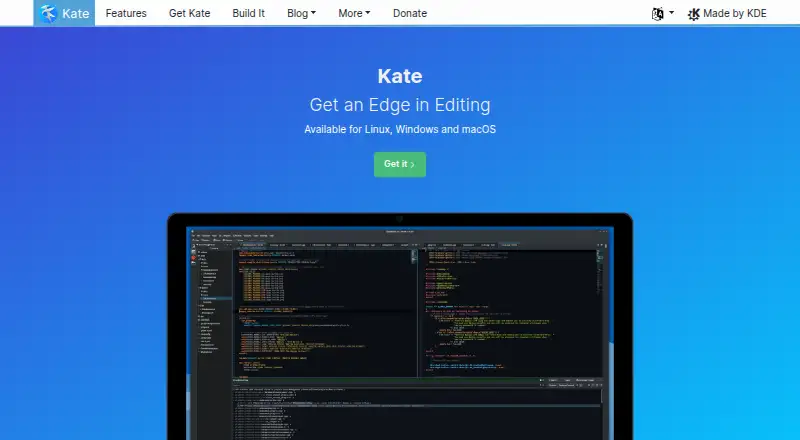
Kate is a free, open-source, multi-document text editor developed by KDE for programmers and others working with text files. It runs on Linux, Windows, and macOS, and supports tabs, horizontal or vertical split views, syntax highlighting for more than 300 languages, multiple cursors, rectangular selections, and keyboard macros. Project navigation, project-wide and folder-wide search, Vi mode, and large-file handling support more involved editing work.
For development workflows, Kate brings several useful tools into the editor. Its integrated terminal and shell integration keep command-line work close to the document, while Git integration supports repository-based editing. Language Server Protocol support adds language tooling, and Debug Adapter Protocol support covers debugging workflows. The editor also connects with HTTP, FTP, SSH, and WebDAV, and its plugin and JavaScript scripting extensibility provide additional ways to adapt the environment. These capabilities make Kate a practical fit for users who want one desktop application for editing, navigation, terminal work, and core development tasks.
Kate’s breadth is its main strength, but it is not aimed only at minimal text editing. Users seeking a focused plain-text editor may find project tools, language services, debugging support, macros, and terminal features unnecessary. Its documented integration surface is also narrower than broader editor ecosystems, so teams with specialized tooling requirements may prefer an alternative with a wider integration catalog. Choose Kate if free, open-source distribution, cross-platform availability, and built-in programming features matter more than a larger ecosystem of verified integrations.
Your product? Our editors can test Kate in depth and publish a review, labelled as paid · from $149/mo →
Kate pricing
Kate fact sheet
| Free plan | Yes |
|---|---|
| Paid from | Free |
| Supported platforms | Linux, BSD, Windows, macOS |
| Multi-cursor editing | Yes |
| Macro recording | Yes |
| Column editing | Yes |
| Large-file handling | Not verified |
| Extension support | Yes |
| Deployment | Desktop |
| Platforms | Windows, macOS, Linux |
| Support | Community, Docs |
| Built for | Solo, Small business, Mid-market, Enterprise (editorial estimate) |
| Integrations | 6 integrations: Git, Language Server Protocol, Debug Adapter Protocol, SSH, WebDAV, FTP |
| Pricing | Free plan |
| Website | kate-editor.org |
| Facts checked | 22 Sep 2026 |
Kate integrations
Kate lists 6 integrations on its own site.
- Git
- Language Server Protocol
- Debug Adapter Protocol
- SSH
- WebDAV
- FTP
Alternatives to Kate
- Visual Studio CodeA free, open-source editor with broad development features across desktop and web.9.4
- NeovimA free, open-source editor for keyboard-driven workflows and deep customization.9.3
- GNU EmacsA mature, highly customizable editor for users who value breadth and control.9.2


Kate vs the competition

Compare Kate with any tool side by side →
Also Ranked In
Kate is ranked in 5 of our directories.
Used Kate? Be the first to review it
The editor score above is our own research. What this page doesn't have yet is a reader's view — what you used Kate for, what worked and what didn't. No stars are seeded and no review is paid for; an editor reads every one before it appears.
Write a reviewTwo minutes · verified accounts only · read by an editor before it appears
Featured on iTechGuides

Kate is listed in our Text Editors directory. Add the badge to your site — it links back to this page.
<a href="https://www.itechguides.com/products/kate/"><img src="https://www.itechguides.com/best/badge/kate.svg" alt="Featured on iTechGuides" width="230" height="46"></a>
Reviewed by iTechGuides Editors · Editorial team · Updated Oct 2026
Advertiser disclosure: iTechGuides is reader-supported. Vendors can pay for top positions in our rankings and for a place on other products' pages, and we may earn a commission when you click some links. Bought places stand at the number bought; this page and our disclosure say so. Paying vendors may get a fuller, more detailed review from our editors, and that review can change their score. How we rank.
Last updated · How we research and update