
Karbon
Karbon: A capable Linux vector editor for SVG production, with broad path and layout tools. Ranked #6 of 51 in Vector Graphics Software by our editors (8.2/10); pricing: Free plan; best for linux desktop SVG production.
At a glance
- Editor score8.2 / 10
- PricingFree plan
- Best forLinux desktop SVG production
- Free planYes
- Paid fromFree
- SVG exportYes
- Facts checked20 Sep 2026
Where it wins
- Advanced path editing, Boolean operations, and shape effects
- Layers, snapping, gradients, patterns, and text-on-path tools
- Imports and exports common vector, image, and document formats
Where it doesn't
- Available for Linux rather than multiple desktop platforms
- Broader ecosystem integrations are not a central focus
- The interface may offer more tools than simple projects require
Our verdict on Karbon
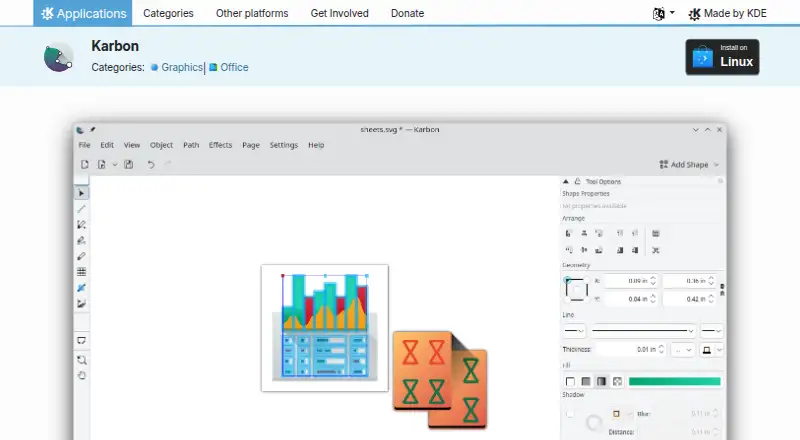
Karbon is an open-source desktop vector drawing application developed within the KDE ecosystem. It is designed for creating vector illustrations, diagrams, and other scalable artwork, serving both beginners exploring vector graphics and artists working on more complex compositions. Its toolset covers path, pencil, and calligraphy drawing; layers with thumbnails, grouping, visibility, and locking; gradients and patterns; predefined shapes; artistic text on paths; and customizable toolbars and dockers. The GPL-2.0-or-later license and free availability make it a practical option for Linux users who want desktop vector software without a paid plan.
For SVG production, Karbon offers substantial control over paths and document structure. Advanced on-canvas editing is complemented by Boolean operations, flattening, rounding, refining, and whirl or pinch effects. Snapping can target grids, guides, nodes, bounding boxes, and intersections, which supports more controlled construction. The format workflow is also broad: Karbon imports ODG, SVG, WPG, WMF, and EPS/PS files, and exports ODG, SVG, PNG, PDF, and WMF files. Plugin extensibility for tools, shapes, and dockers adds room for customization within its desktop workflow.
The main qualification is platform scope: the official application page identifies Linux as the installation platform, so Karbon is best suited to Linux-based creative work rather than teams needing the same application across several desktop systems. Its feature breadth favors users who need detailed vector editing, while someone seeking a narrowly focused, minimal SVG tool may find the available controls more than necessary. Choose Karbon for free, open-source Linux vector production with path and format flexibility; consider an alternative when cross-platform coverage or a wider connected software ecosystem is a priority.
Your product? Our editors can test Karbon in depth and publish a review, labelled as paid · from $149/mo →
Karbon pricing
Karbon fact sheet
| Free plan | Yes |
|---|---|
| Paid from | Free |
| SVG export | Yes |
| Browser app | Not verified |
| Desktop app | Yes |
| Real-time collaboration | Not verified |
| PDF export | Yes |
| Animation tools | Not verified |
| Maximum artboards | Not verified |
| Deployment | Desktop |
| Platforms | Linux |
| Pricing | Free plan |
| Website | apps.kde.org |
| Facts checked | 20 Sep 2026 |
Alternatives to Karbon
- Adobe IllustratorA deep vector design suite for teams that need advanced artwork and typography tools.9.4
- AffinityA broad free desktop suite for designers who need vector, pixel and layout tools together.9.2
- InkscapeA capable no-cost SVG editor for designers who want desktop flexibility.9.0



Karbon vs the competition
- Karbon vs Adobe Illustrator
- Karbon vs Affinity
- Karbon vs Inkscape
- Karbon vs CorelDRAW
- Karbon vs Lunacy
- Karbon vs Corel DESIGNER


Compare Karbon with any tool side by side →
Also Ranked In
Karbon is ranked in 2 of our directories.
Used Karbon? Be the first to review it
The editor score above is our own research. What this page doesn't have yet is a reader's view — what you used Karbon for, what worked and what didn't. No stars are seeded and no review is paid for; an editor reads every one before it appears.
Write a reviewTwo minutes · verified accounts only · read by an editor before it appears
Featured on iTechGuides

Karbon is listed in our Vector Graphics Software directory. Add the badge to your site — it links back to this page.
<a href="https://www.itechguides.com/products/karbon-vector-graphics-software/"><img src="https://www.itechguides.com/best/badge/karbon-vector-graphics-software.svg" alt="Featured on iTechGuides" width="230" height="46"></a>
Reviewed by iTechGuides Editors · Editorial team · Updated Oct 2026
Advertiser disclosure: iTechGuides is reader-supported. Vendors can pay for top positions in our rankings and for a place on other products' pages, and we may earn a commission when you click some links. Bought places stand at the number bought; this page and our disclosure say so. Paying vendors may get a fuller, more detailed review from our editors, and that review can change their score. How we rank.
Last updated · How we research and update