
Kanto Karaoke Player&Recorder
Kanto Karaoke Player&Recorder: A flexible desktop karaoke player for playback, recording, and live queue management. Ranked #14 of 30 in Karaoke Software by our editors (7.0/10); pricing: Free plan; best for windows users needing recording and format support.
At a glance
- Editor score7.0 / 10
- PricingFree plan
- Best forWindows users needing recording and format support
- Free planYes
- Paid from$49 one-time
- Vocal controlsYes
- Facts checked20 Sep 2026
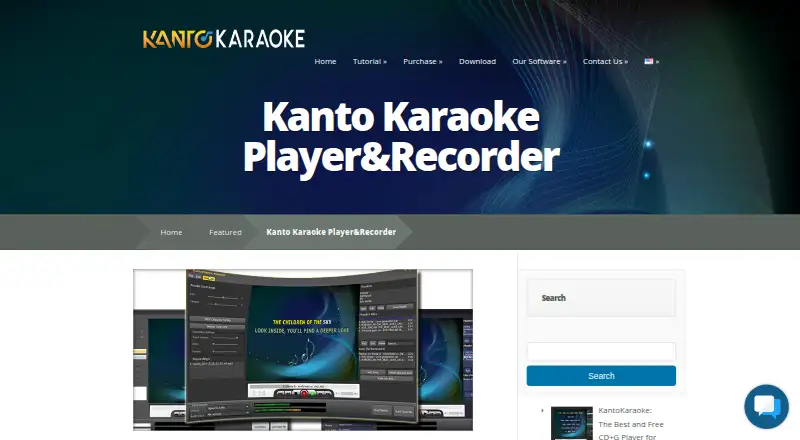
Where it wins
- Plays MIDI, KAR, MP3, CDG, and video karaoke files
- Records vocals and converts MIDI or KAR files to MP3
- Offers pitch, tempo, queue, and dual-screen lyric controls
Where it doesn't
- Free recording and MIDI-to-MP3 conversion are limited to 1 minute
- The $49 Standard license covers 1 PC and lasts 3 years
- Professional features such as singer rotation require an upgrade
Our verdict on Kanto Karaoke Player&Recorder
Kanto Karaoke Player&Recorder is desktop karaoke software for Windows and Mac. It is aimed at home singers, performers, and karaoke operators who need broad file-format playback alongside playlist and live-performance management. Supported formats include MIDI, KAR, MP3, CDG, and video karaoke files. The software also provides pitch and tempo controls, MIDI channel management, melody-track muting, vocal recording, and lyrics on a primary or dual screen.
The free Windows and Mac versions cover karaoke playback, playlist management, and live performance features, but recording and MIDI-to-MP3 conversion are limited to 1 minute. The Windows Standard Version (Personal) costs $49 as a one-time purchase and adds unlimited playlist songs, voice recording over music, and MIDI-to-MP3 conversion. Its license is valid for 3 years and covers 1 PC. The Professional Version adds music background and effects, song history, and a singer rotation list. On Mac, the Full Version Professional adds unlimited playlists, recording, conversion, dual-screen support, a singer playlist, a web browser, and free updates for 3 years.
Its strongest fit is a desktop setup that needs control over varied karaoke files, vocal performance, and live song flow. Pitch and tempo adjustment, crossfade, MIDI channel controls, and melody-track muting give performers more control than simple playback software. Professional features such as singer lists, song history, and background effects are more relevant to organized karaoke sessions. Users who only need occasional playback may find the free version sufficient, while singers who need unrestricted recording or conversion should choose a paid tier. Those seeking primarily browser-based karaoke may prefer a service designed around online access rather than desktop playback.
Questions about Kanto Karaoke Player&Recorder
Does Kanto Karaoke Player&Recorder have a free plan? Yes: the Free Version for Windows plan is free.
What does Kanto Karaoke Player&Recorder run on? Windows and macOS. It runs as a desktop app.
Who is Kanto Karaoke Player&Recorder built for? Solo users and small businesses (our editorial estimate).
Your product? Our editors can test Kanto Karaoke Player&Recorder in depth and publish a review, labelled as paid · from $149/mo →
Kanto Karaoke Player&Recorder pricing
All 5 Kanto Karaoke Player&Recorder plans and prices →
Kanto Karaoke Player&Recorder fact sheet
| Free plan | Yes |
|---|---|
| Paid from | $49 one-time |
| Supported platforms | Desktop |
| Vocal controls | Yes |
| Track creation | Yes |
| Offline use | Not verified |
| Performance recording | Yes |
| Lyrics display modes | Dual-screen |
| Deployment | Desktop |
| Platforms | Windows, macOS |
| Support | Email, Docs |
| Built for | Solo, Small business (editorial estimate) |
| Pricing | Free plan (source) |
| Website | kantokaraoke.com |
| Facts checked | 20 Sep 2026 |
Alternatives to Kanto Karaoke Player&Recorder
- SmuleA broad social karaoke platform with recording, effects, and AI voice tools.9.1
- KaraFunA flexible karaoke service with offline playback, vocal controls and remote control.8.8
- TKaraokeA capable local-library karaoke player with flexible keys and display support.8.5
See all Kanto Karaoke Player&Recorder alternatives →
Used Kanto Karaoke Player&Recorder? Be the first to review it
The editor score above is our own research. What this page doesn't have yet is a reader's view — what you used Kanto Karaoke Player&Recorder for, what worked and what didn't. No stars are seeded and no review is paid for; an editor reads every one before it appears.
Write a reviewTwo minutes · verified accounts only · read by an editor before it appears
Featured on iTechGuides

Kanto Karaoke Player&Recorder is listed in our Karaoke Software directory. Add the badge to your site — it links back to this page.
<a href="https://www.itechguides.com/products/kanto-karaoke-player-recorder/"><img src="https://www.itechguides.com/best/badge/kanto-karaoke-player-recorder.svg" alt="Featured on iTechGuides" width="230" height="46"></a>
Reviewed by iTechGuides Editors · Editorial team · Updated Nov 2026
Advertiser disclosure: iTechGuides is reader-supported. Vendors can pay for top positions in our rankings and for a place on other products' pages, and we may earn a commission when you click some links. Bought places stand at the number bought; this page and our disclosure say so. Paying vendors may get a fuller, more detailed review from our editors, and that review can change their score. How we rank.
Last updated · How we research and update