
KanjiPad
KanjiPad: A free, cross-device kanji practice app with grading, JLPT paths, quizzes, and lookup tools. Ranked #10 of 27 in Handwriting Practice Apps by our editors (8.3/10); pricing: Free plan; best for free kanji practice across devices.
At a glance
- Editor score8.3 / 10
- PricingFree plan
- Best forFree kanji practice across devices
- Free planYes
- Paid fromFree
- Facts checked21 Sep 2026
Where it wins
- Stroke grading and real stroke-order guidance while writing
- JLPT N5–N1 paths with spaced repetition and quizzes
- Progress tracking and drawn-kanji search across three platforms
Where it doesn't
- Focused on kanji rather than broader Japanese language skills
- Core practice is app-based rather than a full browser course
- JLPT paths may suit guided study better than fully custom curricula
Our verdict on KanjiPad
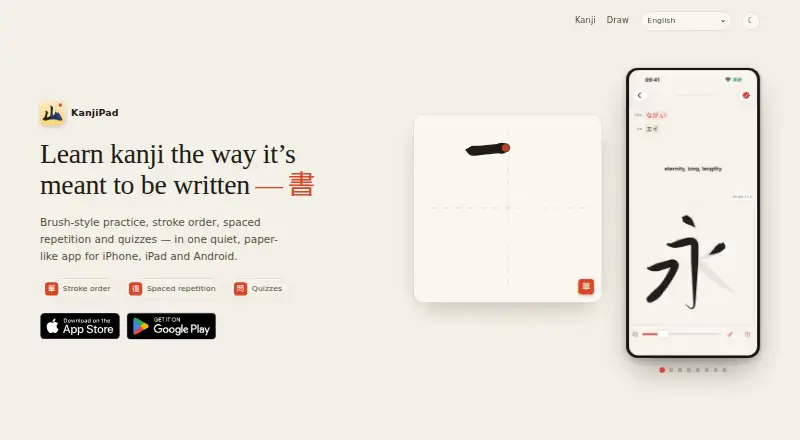
KanjiPad is a Japanese kanji learning and handwriting-practice app for beginners through advanced learners. Its core workflow combines brush-style tracing, real stroke-order guidance, and grading while the learner writes. The free app also includes spaced-repetition review, quizzes, JLPT N5–N1 guided paths, and reference information covering readings, meanings, stroke counts, and example words. It is available on iOS, Android, and macOS, with a browser-based drawing tool for kanji lookup.
Its strongest fit is structured handwriting practice across devices. Learners can follow a JLPT level path, review through spaced repetition, and monitor streaks and activity in the progress dashboard. Search by meaning, reading, or drawn kanji adds a useful reference layer when recognition is uncertain. Because stroke grading happens during writing, KanjiPad is more focused on producing kanji accurately than on passive flashcard review alone. The Free plan includes kanji handwriting practice, stroke-order guidance, spaced repetition, and quizzes, so the main study workflow does not depend on a paid tier.
KanjiPad is a good choice for learners who want a focused, free way to build written kanji recall while moving between iPhone, iPad, Android, and Mac. It should also suit students who prefer JLPT-organized progression and visible activity tracking. The narrower focus is its main trade-off: the feature set centers on kanji writing, review, quizzes, and reference lookup rather than presenting a complete Japanese course covering broader language skills. The browser drawing tool is useful for lookup, while the main practice experience is delivered through the listed apps. Choose KanjiPad for kanji handwriting and recognition; choose a broader learning product if you need a wider curriculum.
Your product? Our editors can test KanjiPad in depth and publish a review, labelled as paid · from $149/mo →
KanjiPad pricing
All 1 KanjiPad plans and prices →
KanjiPad fact sheet
| Free plan | Yes |
|---|---|
| Paid from | Free |
| Writing modes | Not verified |
| Age levels | Not verified |
| Pen-control exercises | Yes |
| Custom word practice | Not verified |
| Progress tracking | Yes |
| Supported platforms | ios, android, macos |
| Deployment | Mobile |
| Platforms | iOS, Android, macOS |
| Support | |
| Built for | Solo, Small business (editorial estimate) |
| Pricing | Free plan (source) |
| Website | kanji-pad.app |
| Facts checked | 21 Sep 2026 |
Alternatives to KanjiPad
- Hanzi WriterAn all-round Chinese handwriting app with structured courses, review tools, and offline practice.9.4
- ZishuA free iOS app with structured practice, grading, and spaced review.9.2
- SkritterA focused handwriting app for serious Chinese and Japanese learners.9.0


See all KanjiPad alternatives →
Used KanjiPad? Be the first to review it
The editor score above is our own research. What this page doesn't have yet is a reader's view — what you used KanjiPad for, what worked and what didn't. No stars are seeded and no review is paid for; an editor reads every one before it appears.
Write a reviewTwo minutes · verified accounts only · read by an editor before it appears
Featured on iTechGuides

KanjiPad is listed in our Handwriting Practice Apps directory. Add the badge to your site — it links back to this page.
<a href="https://www.itechguides.com/products/kanjipad/"><img src="https://www.itechguides.com/best/badge/kanjipad.svg" alt="Featured on iTechGuides" width="230" height="46"></a>
Reviewed by iTechGuides Editors · Editorial team · Updated Oct 2026
Advertiser disclosure: iTechGuides is reader-supported. Vendors can pay for top positions in our rankings and for a place on other products' pages, and we may earn a commission when you click some links. Bought places stand at the number bought; this page and our disclosure say so. Paying vendors may get a fuller, more detailed review from our editors, and that review can change their score. How we rank.
Last updated · How we research and update