
JPixel
JPixel: A free Windows pixel-art editor with useful export and tileset tools. Ranked #64 of 70 in Pixel Art Software by our editors (5.5/10); pricing: Free plan; best for free Windows sprite and tileset editing.
At a glance
- Editor score5.5 / 10
- PricingFree plan
- Best forFree Windows sprite and tileset editing
- Free planYes
- Paid fromFree
- Facts checked22 Sep 2026
Where it wins
- Free one-time editor with optional contributions
- Exports spritesheets, animated GIFs, and PNG tilesets
- Includes animation, palette swapping, filters, and tile tools
Where it doesn't
- Windows-only desktop availability
- No listed support for indexed-color modes or onion skinning
- Focuses on tilesets rather than full tilemap editing
Our verdict on JPixel
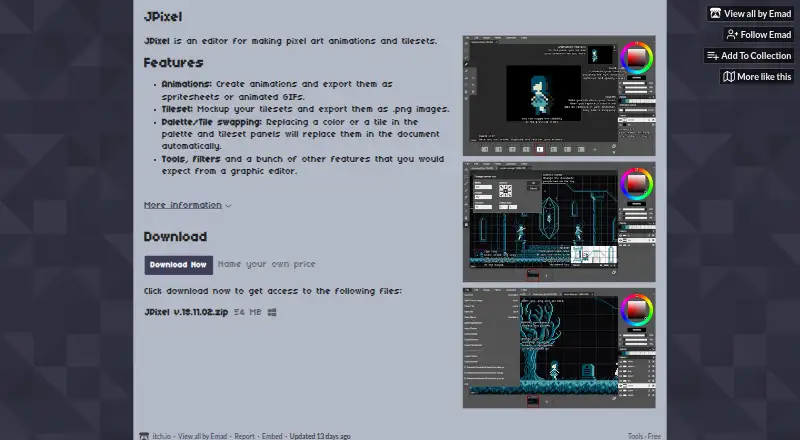
JPixel is a free Windows desktop editor for creating pixel-art animations and tilesets. It is aimed at artists and game developers who need frame-based animation, sprite-sheet output, tileset mockups, and focused pixel-editing tools without a subscription. The editor is distributed as a downloadable ZIP through itch.io by Emad, with version 18.11.02 identified on the product page and a 54 MB Windows download.
Its strongest area is the combination of animation and export workflows. JPixel supports frame-based animation creation, spritesheet export, and animated GIF export, giving users several ways to prepare or preview animated pixel art. Its tileset editor can produce tileset mockups and PNG exports, while palette and tile swapping support common iteration workflows. Graphic-editor tools and filters add broader editing capability, but the product’s stated scope remains centered on sprites, animations, and tilesets rather than a full tilemap-authoring environment.
Pricing is straightforward: the Free plan costs 0 as a one-time purchase and includes the pixel-art animation editor and tileset editor, with optional contributions. There are no paid tiers described. That makes JPixel a practical choice for Windows users seeking a free, focused editor for sprites, animations, and tileset preparation. It is less suitable for teams needing broader platform availability, indexed-color workflows, onion skinning, or tilemap editing. Users who prefer a narrowly scoped desktop tool and export formats including PNG, animated GIF, and spritesheets should find its feature set relevant.
Your product? Our editors can test JPixel in depth and publish a review, labelled as paid · from $149/mo →
JPixel pricing
All 1 JPixel plans and prices →
JPixel fact sheet
| Free plan | Yes |
|---|---|
| Paid from | Free |
| Animation timeline | Not verified |
| Indexed color tools | Not verified |
| Sprite-sheet export | Yes |
| Onion skinning | Not verified |
| Tilemap tools | Not verified |
| Supported platforms | Windows |
| Export formats | PNG, animated GIF, sprite sheets |
| Deployment | Desktop |
| Platforms | Windows |
| Built for | Solo, Small business (editorial estimate) |
| Pricing | Free plan (source) |
| Website | pixelfromhell.itch.io |
| Facts checked | 22 Sep 2026 |
Alternatives to JPixel
- PixeloramaA capable free pixel art editor with broad platform support and automation tools.9.4
- PixelWallA capable free pixel-art editor with broad platform support and $15 Pro exports.9.3
- Pix2DA capable free pixel art editor for artists working across web, desktop, and Android.9.1



Used JPixel? Be the first to review it
The editor score above is our own research. What this page doesn't have yet is a reader's view — what you used JPixel for, what worked and what didn't. No stars are seeded and no review is paid for; an editor reads every one before it appears.
Write a reviewTwo minutes · verified accounts only · read by an editor before it appears
Featured on iTechGuides

JPixel is listed in our Pixel Art Software directory. Add the badge to your site — it links back to this page.
<a href="https://www.itechguides.com/products/jpixel/"><img src="https://www.itechguides.com/best/badge/jpixel.svg" alt="Featured on iTechGuides" width="230" height="46"></a>
Reviewed by iTechGuides Editors · Editorial team · Updated Oct 2026
Advertiser disclosure: iTechGuides is reader-supported. Vendors can pay for top positions in our rankings and for a place on other products' pages, and we may earn a commission when you click some links. Bought places stand at the number bought; this page and our disclosure say so. Paying vendors may get a fuller, more detailed review from our editors, and that review can change their score. How we rank.
Last updated · How we research and update