Jpegli
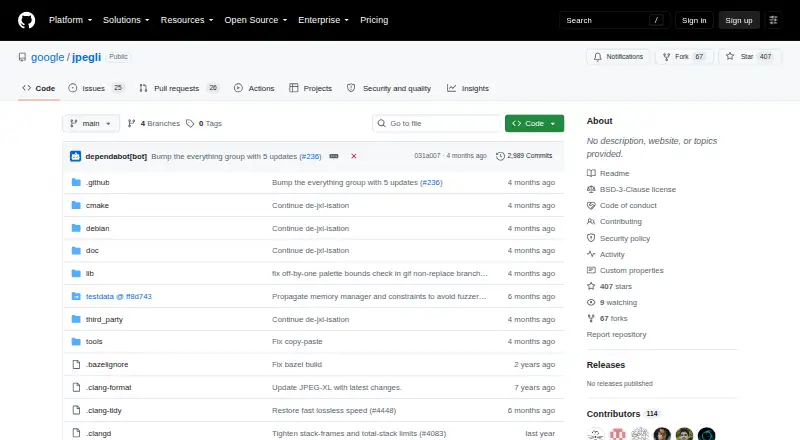
Jpegli: A focused JPEG toolkit for developers building workflows around libjpeg. Ranked #69 of 85 in Image Compression Software by our editors (3.0/10); pricing: Free plan; best for developers building JPEG workflows around libjpeg.
At a glance
- Editor score3.0 / 10
- PricingFree plan
- Best forDevelopers building JPEG workflows around libjpeg
- Free planYes
- Paid fromFree
- Compression modesLossy
- Founded2024
- Facts checked24 Sep 2026
Where it wins
- Encodes and decodes JPEG with adaptive quantization
- Supports 16-bit integer and 32-bit floating-point buffers
- Offers libjpeg62 API/ABI compatibility and command-line tools
Where it doesn't
- Supports JPEG only, not other image formats
- Requires a developer workflow rather than offering hosted compression
- Self-hosted deployment and community support may not suit every team
Our verdict on Jpegli
Jpegli is an open-source JPEG encoder and decoder library from Google, intended for software and developer workflows rather than an end-user compression service. It is aimed at developers building JPEG pipelines who want a library and command-line tools, including those working with libjpeg-compatible software. The project supports JPEG encoding and decoding, with lossy compression, and can produce a shared library as well as the cjpegli and djpegli tools.
Its technical focus is the main reason to consider it. The encoder uses adaptive quantization and includes floating-point color space conversion, chroma subsampling, and DCT. Encoder inputs and decoder outputs can use 16-bit unsigned or 32-bit floating-point buffers, which gives developers options for higher-precision data paths. API and ABI compatibility with libjpeg62 is intended to make it usable as a replacement for the system libjpeg library. These capabilities make Jpegli more relevant to teams integrating JPEG handling into software than to people seeking a graphical tool to compress files manually.
Jpegli is self-hosted and available for Linux and macOS, with community support. Its open-source model and free availability fit teams comfortable building, integrating, and maintaining a library in their own environment. The trade-off is narrow format coverage: it supports JPEG, not a broader set of image formats, and it is not a hosted service. Developers who need a JPEG-focused component and libjpeg compatibility should consider it; buyers seeking a general image optimizer, hosted workflow, or a broader format tool should look elsewhere.
Your product? Our editors can test Jpegli in depth and publish a review, labelled as paid · from $149/mo →
Jpegli pricing
Jpegli fact sheet
| Free plan | Yes |
|---|---|
| Paid from | Free |
| Compression modes | Lossy |
| Batch processing | Not verified |
| API access | Yes |
| Max upload size | Not verified |
| Image resizing | Not verified |
| Supported formats | JPEG |
| Metadata controls | Not verified |
| Deployment | Self-hosted |
| Platforms | Linux, macOS |
| Support | Community |
| Built for | Solo, Small business, Mid-market, Enterprise (editorial estimate) |
| Pricing | Free plan |
| Website | github.com |
| Facts checked | 24 Sep 2026 |
Alternatives to Jpegli
- TinyPNGA flexible compressor for web workflows, batch processing, and automated image pipelines.9.3
- OptimoleA strong WordPress-focused optimizer for responsive images, modern formats, and CDN delivery.9.2
- ThumborA self-hosted image service with URL transformations, smart cropping, and format selection.9.1


Used Jpegli? Be the first to review it
The editor score above is our own research. What this page doesn't have yet is a reader's view — what you used Jpegli for, what worked and what didn't. No stars are seeded and no review is paid for; an editor reads every one before it appears.
Write a reviewTwo minutes · verified accounts only · read by an editor before it appears
Featured on iTechGuides

Jpegli is listed in our Image Compression Software directory. Add the badge to your site — it links back to this page.
<a href="https://www.itechguides.com/products/jpegli/"><img src="https://www.itechguides.com/best/badge/jpegli.svg" alt="Featured on iTechGuides" width="230" height="46"></a>
Reviewed by iTechGuides Editors · Editorial team · Updated Oct 2026
Advertiser disclosure: iTechGuides is reader-supported. Vendors can pay for top positions in our rankings and for a place on other products' pages, and we may earn a commission when you click some links. Bought places stand at the number bought; this page and our disclosure say so. Paying vendors may get a fuller, more detailed review from our editors, and that review can change their score. How we rank.
Last updated · How we research and update