
JPEG-Optimizer
JPEG-Optimizer: A free web tool for adjustable JPEG compression and resizing. Ranked #80 of 85 in Image Compression Software by our editors (3.0/10); pricing: Free plan; best for users compressing and resizing JPEGs online.
At a glance
- Editor score3.0 / 10
- PricingFree plan
- Best forUsers compressing and resizing JPEGs online
- Free planYes
- Paid fromFree
- Compression modesLossy
- Facts checked24 Sep 2026
Where it wins
- Free browser workflow with no desktop installation
- Adjustable lossy JPEG compression quality
- Resize images before downloading optimized files
Where it doesn't
- JPEG-only support limits mixed-format workflows
- Lossy compression offers no lossless mode
- Individual web processing is less suited to bulk jobs
Our verdict on JPEG-Optimizer
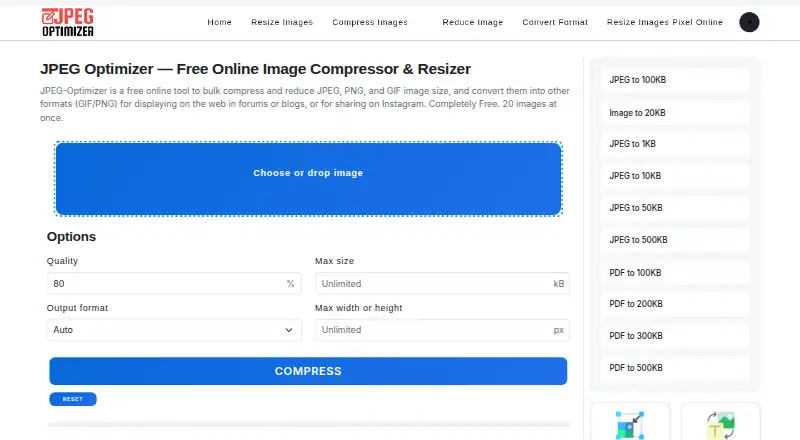
JPEG-Optimizer is a browser-based utility for reducing JPEG file sizes through an individual, on-demand workflow. It is aimed at solo users and small teams that need quick image optimization without installing desktop software. Users upload a JPEG, choose compression settings, optionally resize the image, and download the processed result. The product stays focused on a straightforward web experience rather than a broader image-management system.
The offering is free, and the workflow is simple: upload an image, adjust JPEG compression quality, set a new size if needed, and download the optimized file. Resizing and compression are handled in the same processing step, which suits occasional asset preparation for websites, documents, or sharing. The web platform and cloud deployment make it accessible through a browser, while documentation is provided as the support channel.
JPEG-Optimizer’s narrow scope is its defining trade-off. It supports JPEG input and lossy compression, so it fits users who prioritize smaller JPEG files and adjustable quality over lossless output or multi-format processing. The individual, on-demand model is practical for one-off jobs but less suitable for bulk conversion, automated pipelines, or teams managing varied image formats. Choose it when a free, focused JPEG compressor with optional resizing meets the need; choose a broader image tool when format coverage, batch handling, or lossless processing is central.
Your product? Our editors can test JPEG-Optimizer in depth and publish a review, labelled as paid · from $149/mo →
JPEG-Optimizer pricing
JPEG-Optimizer fact sheet
| Free plan | Yes |
|---|---|
| Paid from | Free |
| Compression modes | Lossy |
| Batch processing | Not verified |
| API access | Not verified |
| Max upload size | Not verified |
| Image resizing | Yes |
| Supported formats | JPEG |
| Metadata controls | Not verified |
| Deployment | Cloud |
| Platforms | Web |
| Support | Docs |
| Built for | Solo, Small business (editorial estimate) |
| Pricing | Free plan |
| Website | jpeg-optimizer.com |
| Facts checked | 24 Sep 2026 |
Alternatives to JPEG-Optimizer
- TinyPNGA flexible compressor for web workflows, batch processing, and automated image pipelines.9.3
- OptimoleA strong WordPress-focused optimizer for responsive images, modern formats, and CDN delivery.9.2
- ThumborA self-hosted image service with URL transformations, smart cropping, and format selection.9.1


See all JPEG-Optimizer alternatives →
Used JPEG-Optimizer? Be the first to review it
The editor score above is our own research. What this page doesn't have yet is a reader's view — what you used JPEG-Optimizer for, what worked and what didn't. No stars are seeded and no review is paid for; an editor reads every one before it appears.
Write a reviewTwo minutes · verified accounts only · read by an editor before it appears
Featured on iTechGuides

JPEG-Optimizer is listed in our Image Compression Software directory. Add the badge to your site — it links back to this page.
<a href="https://www.itechguides.com/products/jpeg-optimizer/"><img src="https://www.itechguides.com/best/badge/jpeg-optimizer.svg" alt="Featured on iTechGuides" width="230" height="46"></a>
Reviewed by iTechGuides Editors · Editorial team · Updated Oct 2026
Advertiser disclosure: iTechGuides is reader-supported. Vendors can pay for top positions in our rankings and for a place on other products' pages, and we may earn a commission when you click some links. Bought places stand at the number bought; this page and our disclosure say so. Paying vendors may get a fuller, more detailed review from our editors, and that review can change their score. How we rank.
Last updated · How we research and update