
Inochi Creator
Inochi Creator: A focused desktop editor for building and animating Inochi2D puppet models. Ranked #19 of 48 in 2D Character Animation Software by our editors (7.2/10); pricing: Paid; best for open-source 2D puppet creators.
At a glance
- Editor score7.2 / 10
- PricingPaid
- Best forOpen-source 2D puppet creators
- Free planNo
- Animation workflowPuppet
- Facts checked20 Sep 2026
Where it wins
- Mesh deformation and real-time texture transformation
- Imports layered Photoshop documents
- Runs on Windows, macOS, and Linux
Where it doesn't
- Paid product rather than a free-plan offering
- Video export format is listed as MP4
- Focused on puppet-based animation workflows
Our verdict on Inochi Creator
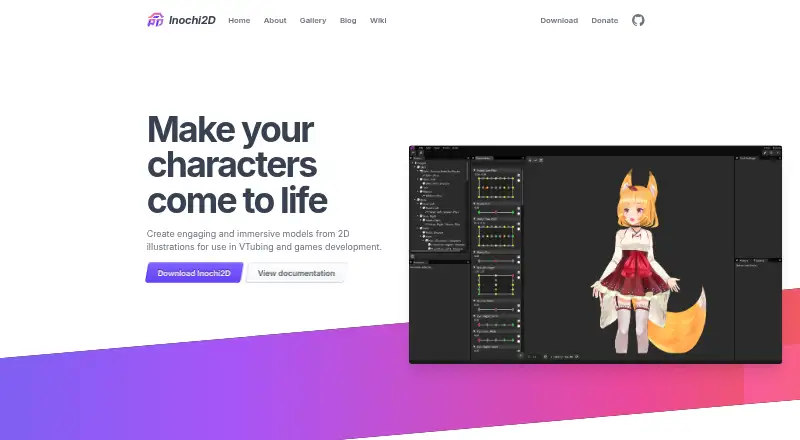
Inochi Creator is an open-source desktop editor for turning layered 2D artwork into Inochi2D puppet models. It is aimed at VTubers, game developers, and digital-animation users who want a parameter-driven puppet workflow rather than a traditional frame-by-frame tool. Official builds support Windows, macOS, and Linux, while the wider Inochi2D project supplies runtime tools and specifications for using models in real-time applications such as games and VTubing.
Its strongest area is character rigging and deformation. The editor supports bone rigging, mesh-based character deformation, real-time morphing, transformations, and texture deformation. Flip pairings can transfer deformation data between paired parts, and advanced blending modes provide additional control over layered artwork. Photoshop document import can also reduce the work required to bring existing layered assets into the editor. For creators building reusable puppet models, this combination gives the workflow a clear focus from source artwork through animation-ready structure.
Animation and output features extend beyond model construction. An animation editor supports lead-in and lead-out animations, and video export includes transparency options and codec selection. The published export information lists MP4, so creators whose delivery requirements depend on other formats should assess their workflow accordingly. Inochi Creator fits users who want open-source 2D puppet creation across three desktop platforms, especially when the Inochi2D runtime ecosystem is relevant. It is less suitable for artists seeking a free-plan product or a broader, general-purpose animation environment outside puppet-based production.
Your product? Our editors can test Inochi Creator in depth and publish a review, labelled as paid · from $149/mo →
Inochi Creator pricing
Inochi Creator fact sheet
| Free plan | No |
|---|---|
| Paid from | Not verified |
| Animation workflow | Puppet |
| Bone rigging | Yes |
| Mesh deformation | Yes |
| Lip sync | Not verified |
| Supported platforms | windows, macos, linux |
| Export formats | MP4 |
| Deployment | Desktop |
| Platforms | Windows, macOS, Linux |
| Support | Community, Docs |
| Built for | Solo, Small business, Mid-market (editorial estimate) |
| Pricing | Paid |
| Website | inochi2d.com |
| Facts checked | 20 Sep 2026 |
Alternatives to Inochi Creator
- Toon Boom HarmonyA broad desktop suite for teams that need both drawn and rigged 2D production.9.4
- OpenToonzA free, full-featured 2D animation suite for artists who can manage a technical workflow.9.2
- Adobe AnimateA capable desktop animator for vector workflows, web publishing, and Adobe users.9.0



See all Inochi Creator alternatives →
Also Ranked In
Inochi Creator is ranked in 2 of our directories.
Used Inochi Creator? Be the first to review it
The editor score above is our own research. What this page doesn't have yet is a reader's view — what you used Inochi Creator for, what worked and what didn't. No stars are seeded and no review is paid for; an editor reads every one before it appears.
Write a reviewTwo minutes · verified accounts only · read by an editor before it appears
Featured on iTechGuides

Inochi Creator is listed in our 2D Character Animation Software directory. Add the badge to your site — it links back to this page.
<a href="https://www.itechguides.com/products/inochi-creator/"><img src="https://www.itechguides.com/best/badge/inochi-creator.svg" alt="Featured on iTechGuides" width="230" height="46"></a>
Reviewed by iTechGuides Editors · Editorial team · Updated Oct 2026
Advertiser disclosure: iTechGuides is reader-supported. Vendors can pay for top positions in our rankings and for a place on other products' pages, and we may earn a commission when you click some links. Bought places stand at the number bought; this page and our disclosure say so. Paying vendors may get a fuller, more detailed review from our editors, and that review can change their score. How we rank.
Last updated · How we research and update