Inkplainer
Inkplainer: A local-first, open-source editor for hand-drawn image and text animations. Ranked #24 of 26 in Whiteboard Animation Software by our editors (6.7/10); pricing: Free plan; best for open-source image and text animation.
At a glance
- Editor score6.7 / 10
- PricingFree plan
- Best forOpen-source image and text animation
- Free planYes
- Paid fromFree
- Drawing animationYes
- Facts checked20 Sep 2026
Where it wins
- Free, open source, and usable without an account
- Layered hand-drawn animation with multiple visual styles
- Exports MP4, WebM, and PNG files without a watermark
Where it doesn't
- No verified narration or character tools
- No templates or integrations
- Platform coverage is limited to web and self-hosted use
Our verdict on Inkplainer
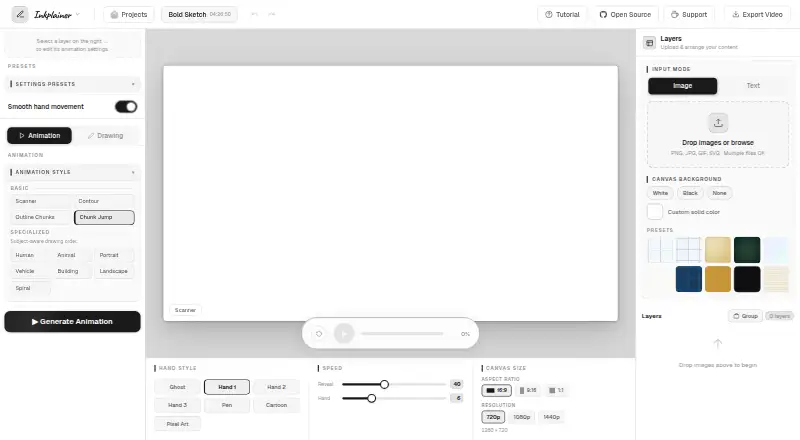
Inkplainer is a free, open-source whiteboard animation tool for students, teachers, creators, small businesses, and independent users. It runs in a browser and turns uploaded images and text into hand-drawn animations. The editor supports layered projects with animation ordering, image slicing, drawing controls, and multiple styles, including Scanner, Contour, and subject-aware options. It also supports commercial use, does not require an account, and exports without a watermark.
The Free plan includes the browser-based editor, local project storage, and MP4 and WebM export. Inkplainer also supports PNG export for final frames. Projects are saved automatically in browser storage, while animation and export work is handled locally on the user's device. That local-first approach suits people who want to keep projects on their own computer and avoid subscription-based editing workflows. Web and self-hosted availability provide two ways to access the product, although its platform scope is narrower than tools with broader app ecosystems.
Inkplainer's main depth is in turning still images and text into drawn animation. Stroke, outline detection, coloring, image reveal controls, and a grid, rectangle, and freehand image slicer give users control over how visual elements are introduced. It is a focused choice for open-source image and text animation, particularly when layered editing and local saving matter. Choose another product if narration, character creation, templates, integrations, or broader platform coverage are central to the project.
Your product? Our editors can test Inkplainer in depth and publish a review, labelled as paid · from $149/mo →
Inkplainer pricing
All 1 Inkplainer plans and prices →
Inkplainer fact sheet
| Free plan | Yes |
|---|---|
| Paid from | Free |
| Drawing animation | Yes |
| Character library | Not verified |
| Voiceover tools | Not verified |
| Scene templates | Not verified |
| Export resolution | Not verified |
| Commercial use | Yes |
| Deployment | Cloud, Self-hosted |
| Platforms | Web |
| Support | Docs |
| Built for | Solo, Small business (editorial estimate) |
| Pricing | Free plan (source) |
| Website | inkplainer.pages.dev |
| Facts checked | 20 Sep 2026 |
Alternatives to Inkplainer
- AnimakerA broad whiteboard and animation suite with AI tools, collaboration, and 4K export.9.4
- VideoScribeA focused whiteboard animation tool with broad assets, AI tools, and 1080p exports.9.2
- simpleshow video makerA browser-based explainer-video maker with AI scripting, storyboards, voices, and integrations.9.0


See all Inkplainer alternatives →
Also Ranked In
Inkplainer is ranked in 2 of our directories.
Used Inkplainer? Be the first to review it
The editor score above is our own research. What this page doesn't have yet is a reader's view — what you used Inkplainer for, what worked and what didn't. No stars are seeded and no review is paid for; an editor reads every one before it appears.
Write a reviewTwo minutes · verified accounts only · read by an editor before it appears
Featured on iTechGuides

Inkplainer is listed in our Whiteboard Animation Software directory. Add the badge to your site — it links back to this page.
<a href="https://www.itechguides.com/products/inkplainer/"><img src="https://www.itechguides.com/best/badge/inkplainer.svg" alt="Featured on iTechGuides" width="230" height="46"></a>
Reviewed by iTechGuides Editors · Editorial team · Updated Oct 2026
Advertiser disclosure: iTechGuides is reader-supported. Vendors can pay for top positions in our rankings and for a place on other products' pages, and we may earn a commission when you click some links. Bought places stand at the number bought; this page and our disclosure say so. Paying vendors may get a fuller, more detailed review from our editors, and that review can change their score. How we rank.
Last updated · How we research and update