
ImageOptim
ImageOptim: A capable free macOS optimizer with a separately priced automation API. Ranked #14 of 85 in Image Compression Software by our editors (8.0/10); pricing: Free plan; best for mac users needing automation.
At a glance
- Editor score8.0 / 10
- PricingFree plan
- Best forMac users needing automation
- Free planYes
- Paid from$12/mo
- Compression modesBoth
- Facts checked20 Sep 2026
Where it wins
- Free, open-source macOS app with batch folder processing
- Lossless and optional lossy compression with metadata controls
- CLI, HTTP API, resizing, cropping, and format conversion
Where it doesn't
- Desktop app is limited to macOS
- API plans are separate from the free desktop app
- API documentation sets a 50 MB maximum file size
Our verdict on ImageOptim
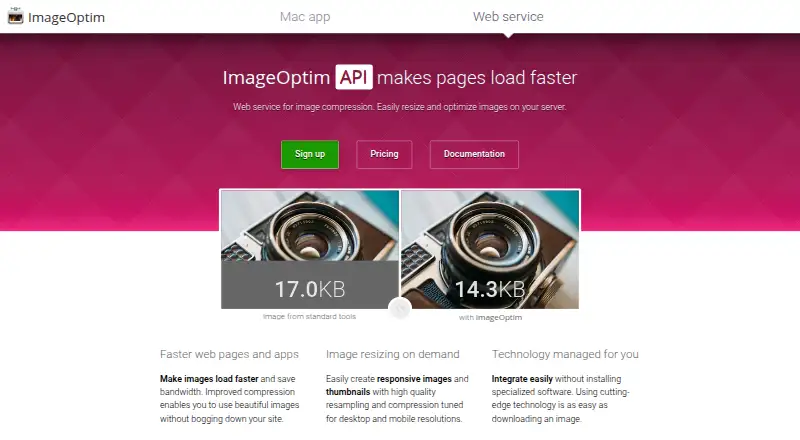
ImageOptim is free, open-source image compression software for macOS, with a separate paid API for web applications and automated workflows. It suits Mac users who want drag-and-drop optimization, batch processing, or command-line operation, as well as development teams that need image processing in websites and application backends. The desktop app uses lossless optimization by default, with optional lossy minification and controls for removing or preserving metadata.
The desktop app is free, while API access starts at $12 per month for 2,000 optimizations. The $49 monthly plan raises the allowance to 16,000 optimizations, and the $245 monthly plan provides 100,000 optimizations. Dedicated servers and custom plans are available at $850. The API is therefore suited to automated workloads with defined monthly volumes, while the free desktop app covers local optimization without a recurring plan. API documentation sets a 50 MB maximum file size.
ImageOptim’s ecosystem includes macOS Finder Services, Apple Mail Markup, and Sketch, plus development options for PHP, WordPress, Node.js, Python, C#, and Java. Its feature range extends beyond compression to resizing, cropping, image format conversion, caching, and server-side processing through the API. The main tradeoff is platform scope: the desktop experience is for macOS, while other environments connect through the API or listed development integrations. Choose ImageOptim for open-source Mac workflows and programmable optimization; consider another option if you need a desktop application for a different operating system or a single product that combines local and API pricing.
Questions about ImageOptim
Does ImageOptim have a free plan? No free plan is listed; paid plans start at $12/mo (API 2,000 optimizations).
How much does ImageOptim cost? ImageOptim lists 4 paid plans; the lowest is API 2,000 optimizations at $12/mo.
What does ImageOptim run on? macOS. It runs in the cloud and as a desktop app.
What does ImageOptim integrate with? 9 integrations, including macOS Finder Services, Apple Mail Markup, Sketch, PHP and WordPress.
Who is ImageOptim built for? Solo users, small businesses, mid-market companies and enterprises (our editorial estimate).
Your product? Our editors can test ImageOptim in depth and publish a review, labelled as paid · from $149/mo →
ImageOptim pricing
All 4 ImageOptim plans and prices →
ImageOptim fact sheet
| Free plan | Yes |
|---|---|
| Paid from | $12/mo |
| Compression modes | Both |
| Batch processing | Yes |
| API access | Yes |
| Max upload size | 50 MB |
| Image resizing | Yes |
| Supported formats | JPEG, PNG, SVG, GIF |
| Metadata controls | Yes |
| Deployment | Cloud, Desktop |
| Platforms | macOS |
| Support | Email, Docs |
| Built for | Solo, Small business, Mid-market, Enterprise (editorial estimate) |
| Integrations | 9 integrations: macOS Finder Services, Apple Mail Markup, Sketch, PHP, WordPress, Node.js … |
| Pricing | Free plan (source) |
| Website | imageoptim.com |
| Facts checked | 20 Sep 2026 |
ImageOptim integrations
ImageOptim lists 9 integrations on its own site.
- macOS Finder Services
- Apple Mail Markup
- Sketch
- PHP
- WordPress
- Node.js
- Python
- C#
- Java
Alternatives to ImageOptim
- TinyPNGA flexible compressor for web workflows, batch processing, and automated image pipelines.9.3
- OptimoleA strong WordPress-focused optimizer for responsive images, modern formats, and CDN delivery.9.2
- ThumborA self-hosted image service with URL transformations, smart cropping, and format selection.9.1


See all ImageOptim alternatives →
Also Ranked In
ImageOptim is ranked in 2 of our directories.
Used ImageOptim? Be the first to review it
The editor score above is our own research. What this page doesn't have yet is a reader's view — what you used ImageOptim for, what worked and what didn't. No stars are seeded and no review is paid for; an editor reads every one before it appears.
Write a reviewTwo minutes · verified accounts only · read by an editor before it appears
Featured on iTechGuides

ImageOptim is listed in our Image Compression Software directory. Add the badge to your site — it links back to this page.
<a href="https://www.itechguides.com/products/imageoptim/"><img src="https://www.itechguides.com/best/badge/imageoptim.svg" alt="Featured on iTechGuides" width="230" height="46"></a>
Reviewed by iTechGuides Editors · Editorial team · Updated Nov 2026
Advertiser disclosure: iTechGuides is reader-supported. Vendors can pay for top positions in our rankings and for a place on other products' pages, and we may earn a commission when you click some links. Bought places stand at the number bought; this page and our disclosure say so. Paying vendors may get a fuller, more detailed review from our editors, and that review can change their score. How we rank.
Last updated · How we research and update