
IconJar
IconJar: A focused macOS library manager for organizing icons and exporting them in batches. Ranked #26 of 46 in Icon Libraries by our editors (6.7/10); pricing: 14-day trial; best for mac users organizing and exporting icon sets.
At a glance
- Editor score6.7 / 10
- Pricing14-day trial
- Best forMac users organizing and exporting icon sets
- Free planNo
- Paid from$25/yr
- Facts checked23 Sep 2026
Where it wins
- Smart Sets group icons by rules, alongside favorites and recently used sets.
- Bulk presets export icons for Android, iOS, and macOS.
- SVG cleanup and license associations support a more orderly library.
Where it doesn't
- Available only as a macOS desktop app.
- There is no free plan; the trial lasts 14 days.
- Icon-set commercial rights vary, so the app does not grant blanket usage rights.
Our verdict on IconJar
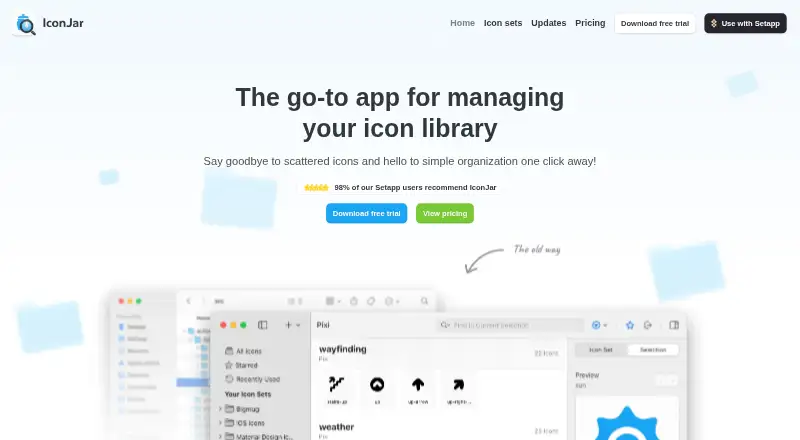
IconJar is a macOS desktop app for designers, engineers, and marketers who want to organize personal icon libraries and move icons into other applications. Search, grouping, tags, favorites, recently used sets, and rule-based Smart Sets help structure a collection. The app also handles icon fonts, including rich-text character copying, and includes Google Material Icons. Its focus is managing and exporting libraries rather than creating icons, so it suits people with icon sets to curate more than buyers seeking a general-purpose design suite.
Export tools are a central strength: presets support bulk exports for Android, iOS, and macOS, while QuickDrag sends icons in different file formats. Supported formats include SVG, PDF, EPS, ICO, WebP, bitmap images, and .IconJar. SVG optimization and cleaning add a cleanup step, and integrations include Figma, Sketch, Google Apps, and Visual Studio Code. That combination makes IconJar a practical companion for workflows moving assets among design and development tools, though it remains a Mac-only desktop product.
According to the published plans, the Annual license costs $25 per year and the Lifetime license costs $75 once. A 14-day trial is available, with no card required, and purchases have a 14-day refund period. The paid plans are license options rather than separate feature tiers: the listed highlights are an IconJar license and a Lifetime license. License associations can attach information to icons, sets, and groups, but commercial-use rights depend on each icon set. Choose IconJar if library organization and repeat exports justify a paid Mac app; look elsewhere if you need a free plan, another platform, or icon rights bundled universally.
Your product? Our editors can test IconJar in depth and publish a review, labelled as paid · from $149/mo →
IconJar pricing
All 2 IconJar plans and prices →
IconJar fact sheet
| Free plan | No |
|---|---|
| Paid from | $25/yr |
| Icons included | Not verified |
| Icon formats | SVG, PDF, EPS, ICO, WebP, bitmap images, and .IconJar |
| Style coverage | Not verified |
| Commercial use | Not verified |
| Figma plugin | Not verified |
| API access | Not verified |
| Icon font | Yes |
| Free trial | 14 days · no card needed |
| Money-back guarantee | 14 days |
| Deployment | Desktop |
| Platforms | macOS |
| Compliance & security | GDPR |
| Support | Email, Docs |
| Built for | Solo, Small business, Mid-market (editorial estimate) |
| Integrations | 4 integrations: Google Apps, Figma, Sketch, Visual Studio Code |
| Pricing | 14-day trial (source) |
| Website | geticonjar.com |
| Facts checked | 23 Sep 2026 |
IconJar integrations
IconJar lists 4 integrations on its own site.
- Google Apps
- Figma
- Sketch
- Visual Studio Code
Alternatives to IconJar
- The Noun ProjectA broad icon library with strong editing, integration, and API options at a low entry price.9.4
- FlaticonA broad icon library with strong format support, editing tools, and workflow integrations.9.2
- IconifyA broad, open-source icon ecosystem with APIs, generation tools, and Figma support.9.0



See all IconJar alternatives →
Used IconJar? Be the first to review it
The editor score above is our own research. What this page doesn't have yet is a reader's view — what you used IconJar for, what worked and what didn't. No stars are seeded and no review is paid for; an editor reads every one before it appears.
Write a reviewTwo minutes · verified accounts only · read by an editor before it appears
Featured on iTechGuides

IconJar is listed in our Icon Libraries directory. Add the badge to your site — it links back to this page.
<a href="https://www.itechguides.com/products/iconjar/"><img src="https://www.itechguides.com/best/badge/iconjar.svg" alt="Featured on iTechGuides" width="230" height="46"></a>
Reviewed by iTechGuides Editors · Editorial team · Updated Oct 2026
Advertiser disclosure: iTechGuides is reader-supported. Vendors can pay for top positions in our rankings and for a place on other products' pages, and we may earn a commission when you click some links. Bought places stand at the number bought; this page and our disclosure say so. Paying vendors may get a fuller, more detailed review from our editors, and that review can change their score. How we rank.
Last updated · How we research and update