HarborFM
HarborFM: A flexible open-source host for creators who want control over audio, storage, and access. Ranked #32 of 71 in Podcast Hosting Platforms by our editors (6.3/10); pricing: Free plan; best for self-hosters wanting recording and storage control.
At a glance
- Editor score6.3 / 10
- PricingFree plan
- Best forSelf-hosters wanting recording and storage control
- Free planYes
- Paid fromFree
- RSS feedYes
- Facts checked21 Sep 2026
Where it wins
- Remote WebRTC recording, editing, transcripts, and summaries
- Storage and delivery options include S3, R2, FTP, SFTP, and IPFS
- Private feeds, Stripe access, analytics, and customizable public pages
Where it doesn't
- Directory distribution is limited to selected platforms
- Deployment requires Docker, Terraform, or manual installation
- Its documented workflow focuses on audio rather than video publishing
Our verdict on HarborFM
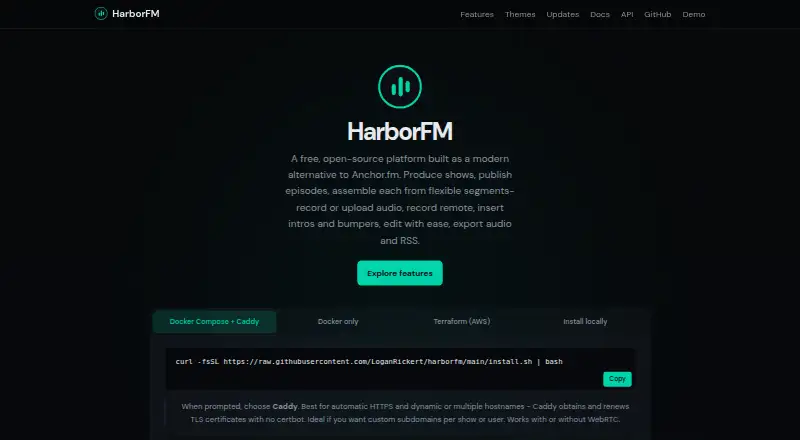
HarborFM is an open-source podcast creation and hosting platform for independent creators and production teams. It combines remote recording, audio uploads, segment-based editing, RSS publishing, public podcast pages, embeddable players, analytics, private feeds, and subscriber-only episodes. Creators can also add transcripts, summaries, Podcast 2.0 metadata, and Stripe-based paid access. The broad feature set suits teams that want production and hosting in one self-managed system, especially when control over delivery and storage matters.
The pricing model is open source with a free plan, and the platform can be deployed through Docker, Terraform, or manual installation. That structure favors creators comfortable managing their own environment rather than buyers seeking a conventional hosted plan with a simple account-based setup. HarborFM's storage and delivery options are unusually broad: audio can be sent to Amazon S3, Cloudflare R2, Backblaze B2, FTP, SFTP, WebDAV, IPFS, or SMB. This lets teams align delivery with an existing infrastructure choice, while also making deployment decisions part of the product experience.
For publishing and monetization, HarborFM provides per-show RSS feeds with iTunes and Podcast 2.0 tags, plus connections with Apple Podcasts, Spotify, and Amazon Music. Its private RSS feeds and Stripe-based access support subscriber-only shows, while analytics cover downloads, unique listeners, apps, and locations. Liquid themes extend public feed pages, and Whisper with optional Ollama or OpenAI support adds transcript and AI-assisted content workflows. The trade-off is a focused audio ecosystem with distribution to selected directories, so creators wanting broad directory coverage or a primarily video-led workflow should consider another platform. HarborFM is a strong fit for self-hosters who value control; it is less suitable for teams that want managed onboarding and minimal infrastructure work.
Your product? Our editors can test HarborFM in depth and publish a review, labelled as paid · from $149/mo →
HarborFM pricing
HarborFM fact sheet
| Free plan | Yes |
|---|---|
| Paid from | Free |
| RSS feed | Yes |
| Directory distribution | Selected directories |
| Monthly upload hours | Not verified |
| Analytics level | Not verified |
| Monetization tools | Yes |
| Private podcasts | Yes |
| Video podcast support | Not verified |
| Deployment | Self-hosted |
| Platforms | Web |
| Compliance & security | SSO/SAML, 2FA |
| Support | Docs |
| Built for | Solo, Small business, Mid-market (editorial estimate) |
| Integrations | 15 integrations: Stripe, Amazon S3, Cloudflare R2, Backblaze B2, FTP, SFTP … |
| Pricing | Free plan |
| Website | harborfm.com |
| Facts checked | 21 Sep 2026 |
HarborFM integrations
HarborFM lists 15 integrations on its own site.
- Stripe
- Amazon S3
- Cloudflare R2
- Backblaze B2
- FTP
- SFTP
- WebDAV
- IPFS
- SMB
- Cloudflare
- Ollama
- OpenAI
- Apple Podcasts
- Spotify
- Amazon Music
Alternatives to HarborFM
- PodbeanBroad podcast hosting with publishing, analytics, monetization, private, and video tools.9.4
- BuzzsproutA mature podcast host for creators who value analytics, reach, and multiple publishing options.9.3
- AcastAcast suits publishers that need podcast distribution, audience insight, and revenue tools.9.2



See all HarborFM alternatives →
Used HarborFM? Be the first to review it
The editor score above is our own research. What this page doesn't have yet is a reader's view — what you used HarborFM for, what worked and what didn't. No stars are seeded and no review is paid for; an editor reads every one before it appears.
Write a reviewTwo minutes · verified accounts only · read by an editor before it appears
Featured on iTechGuides

HarborFM is listed in our Podcast Hosting Platforms directory. Add the badge to your site — it links back to this page.
<a href="https://www.itechguides.com/products/harborfm/"><img src="https://www.itechguides.com/best/badge/harborfm.svg" alt="Featured on iTechGuides" width="230" height="46"></a>
Reviewed by iTechGuides Editors · Editorial team · Updated Oct 2026
Advertiser disclosure: iTechGuides is reader-supported. Vendors can pay for top positions in our rankings and for a place on other products' pages, and we may earn a commission when you click some links. Bought places stand at the number bought; this page and our disclosure say so. Paying vendors may get a fuller, more detailed review from our editors, and that review can change their score. How we rank.
Last updated · How we research and update