
Harbor
Harbor: A cross-platform workspace for custody coordination, expenses, communication, and records. Ranked #23 of 33 in Co-Parenting Apps by our editors (7.2/10); pricing: 7-day trial; best for cross-platform custody and expense tracking.
At a glance
- Editor score7.2 / 10
- Pricing7-day trial
- Best forCross-platform custody and expense tracking
- Free planNo
- Court reportsBasic
- Facts checked22 Sep 2026
Where it wins
- Splits child-related expenses and extracts data from receipt photos
- Detailed custody calendars support holidays, exceptions, and swaps
- Timestamped messages and exportable records support documentation
Where it doesn't
- No free plan; access is provided through paid monthly or annual plans
- Court reports are basic
- Payment processing is not included
Our verdict on Harbor
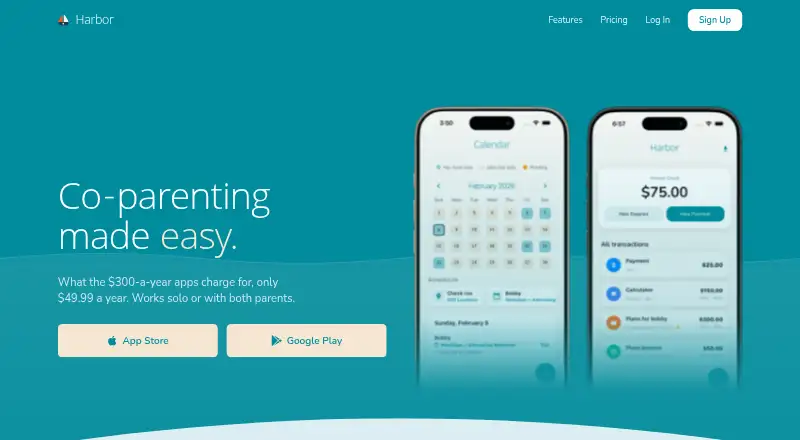
Harbor brings child-related expenses, custody schedules, communication, and documentation into one co-parenting workspace. It is designed for separated parents coordinating across households, whether one parent uses it or both do. The service is available on the web, iOS, and Android, and is positioned for families in the United States and Canada. A 7-day trial is available before the paid plans begin.
The strongest fit is its breadth of coordination tools. Parents can record shared expenses, calculate splits, capture receipt photos, and extract receipt data. Its custody calendar supports schedules, holidays, exceptions, and swaps, while Google Calendar, Apple Calendar, and Outlook integrations help connect scheduling with existing calendars. Secure timestamped messaging, Temperature Check for message tone, GPS exchange check-ins, and a private journal extend the app beyond basic calendar sharing.
Harbor also emphasizes organized documentation. Exportable court-ready records and a per-child file vault provide places for records and documents, while the messaging history adds timestamps to communication. The paid offering has Harbor Monthly and Harbor Annual plans, both listing the same core features: expense tracking and splitting, a custody calendar, secure messaging, Temperature Check, and court-ready records and exports. Harbor should suit parents who want one cross-platform system covering schedules, expenses, messages, and files. Parents who need payment processing or more advanced court reporting should consider a narrower alternative that prioritizes those functions.
Your product? Our editors can test Harbor in depth and publish a review, labelled as paid · from $149/mo →
Harbor pricing
All 2 Harbor plans and prices →
Harbor fact sheet
| Free plan | No |
|---|---|
| Paid from | Not verified |
| Expense tracking | Yes |
| Document storage | Yes |
| Court reports | Basic |
| Payment processing | No |
| Video calling | Not verified |
| Calendar sync | Yes |
| Free trial | 7 days |
| Deployment | Cloud, Mobile |
| Platforms | Web, iOS, Android |
| Support | |
| Built for | Solo, Small business (editorial estimate) |
| Integrations | 3 integrations: Google Calendar, Apple Calendar, Outlook |
| Pricing | 7-day trial (source) |
| Website | harborcoparent.com |
| Facts checked | 22 Sep 2026 |
Harbor integrations
Harbor lists 3 integrations on its own site.
- Google Calendar
- Apple Calendar
- Outlook
Alternatives to Harbor
- OurFamilyWizardA documentation-focused co-parenting platform with broad records, payment, and calendar tools.9.4
- AppCloseA broad co-parenting toolkit with structured records and a 60-day trial.9.3
- TalkingParentsA mature co-parenting service for documented communication, scheduling, expenses, and records.9.2



Used Harbor? Be the first to review it
The editor score above is our own research. What this page doesn't have yet is a reader's view — what you used Harbor for, what worked and what didn't. No stars are seeded and no review is paid for; an editor reads every one before it appears.
Write a reviewTwo minutes · verified accounts only · read by an editor before it appears
Featured on iTechGuides

Harbor is listed in our Co-Parenting Apps directory. Add the badge to your site — it links back to this page.
<a href="https://www.itechguides.com/products/harbor-co-parenting-app/"><img src="https://www.itechguides.com/best/badge/harbor-co-parenting-app.svg" alt="Featured on iTechGuides" width="230" height="46"></a>
Reviewed by iTechGuides Editors · Editorial team · Updated Oct 2026
Advertiser disclosure: iTechGuides is reader-supported. Vendors can pay for top positions in our rankings and for a place on other products' pages, and we may earn a commission when you click some links. Bought places stand at the number bought; this page and our disclosure say so. Paying vendors may get a fuller, more detailed review from our editors, and that review can change their score. How we rank.
Last updated · How we research and update