
Gusta Draw
Gusta Draw: A capable free browser editor for core vector work, without desktop or collaboration features. Ranked #34 of 51 in Vector Graphics Software by our editors (5.3/10); pricing: Free plan; best for simple free browser vector editing.
At a glance
- Editor score5.3 / 10
- PricingFree plan
- Best forSimple free browser vector editing
- Free planYes
- Paid fromFree
- SVG exportYes
- Facts checked20 Sep 2026
Where it wins
- Node editing, Bézier handles, and Boolean geometry support precise shape work
- Exports editable SVG, PNG, and vector PDF files
- Local autosave and AI-assisted editing work without an account
Where it doesn't
- Available through the web rather than a desktop application
- No listed integrations or collaboration features
- Open beta status may not suit teams seeking established product signals
Our verdict on Gusta Draw
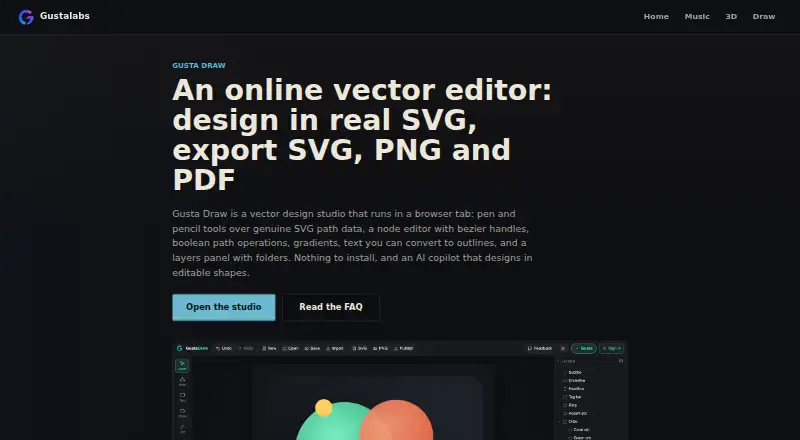
Gusta Draw is a free browser-based vector design studio from Gustalabs, designed for creating album art, stickers, logos, posters, app icons, and cut-ready graphics. Its toolset covers pen, pencil, polyline, rectangle, ellipse, line, text, and eyedropper work, with editable SVG paths at the center. Node editing includes anchors and Bézier handles, while Boolean unite, subtract, intersect, and exclude operations support more involved shape construction. Designs can be exported as SVG, PNG, or vector PDF files, and drawing and exporting work without an account.
For everyday vector editing, Gusta Draw offers a useful range beyond basic shape drawing. Layer folders support visibility, locking, renaming, and reordering; gradients, blur, drop shadows, palettes, and roughen effects add visual control; and text can be converted to outlines. Custom TTF and OTF font uploads are supported. Local browser autosave and editable project-file export help preserve work, while the AI copilot can create and modify layered vector shapes. These capabilities make it a practical choice for individual designers who want a focused browser workflow and common export formats without a paid plan.
The main trade-off is platform and ecosystem scope. Gusta Draw is web-only, with no desktop application, listed integrations, or collaboration features. Gustalabs describes it as being in open beta, and AI tokens are granted free while testing. That positioning fits exploratory personal work, quick graphics, and users who prefer not to install software. Teams needing shared workflows, broader integrations, or a desktop-first environment should choose an alternative. For a solo user seeking accessible vector editing with node tools, layers, effects, autosave, and SVG/PDF output, Gusta Draw keeps the focus on core creation and export.
Your product? Our editors can test Gusta Draw in depth and publish a review, labelled as paid · from $149/mo →
Gusta Draw pricing
Gusta Draw fact sheet
| Free plan | Yes |
|---|---|
| Paid from | Free |
| SVG export | Yes |
| Browser app | Yes |
| Desktop app | No |
| Real-time collaboration | Not verified |
| PDF export | Yes |
| Animation tools | Not verified |
| Maximum artboards | Not verified |
| Deployment | Cloud |
| Platforms | Web |
| Pricing | Free plan |
| Website | gustalabs.com |
| Facts checked | 20 Sep 2026 |
Alternatives to Gusta Draw
- Adobe IllustratorA deep vector design suite for teams that need advanced artwork and typography tools.9.4
- AffinityA broad free desktop suite for designers who need vector, pixel and layout tools together.9.2
- InkscapeA capable no-cost SVG editor for designers who want desktop flexibility.9.0



See all Gusta Draw alternatives →
Also Ranked In
Gusta Draw is ranked in 2 of our directories.
Used Gusta Draw? Be the first to review it
The editor score above is our own research. What this page doesn't have yet is a reader's view — what you used Gusta Draw for, what worked and what didn't. No stars are seeded and no review is paid for; an editor reads every one before it appears.
Write a reviewTwo minutes · verified accounts only · read by an editor before it appears
Featured on iTechGuides

Gusta Draw is listed in our Vector Graphics Software directory. Add the badge to your site — it links back to this page.
<a href="https://www.itechguides.com/products/gusta-draw/"><img src="https://www.itechguides.com/best/badge/gusta-draw.svg" alt="Featured on iTechGuides" width="230" height="46"></a>
Reviewed by iTechGuides Editors · Editorial team · Updated Oct 2026
Advertiser disclosure: iTechGuides is reader-supported. Vendors can pay for top positions in our rankings and for a place on other products' pages, and we may earn a commission when you click some links. Bought places stand at the number bought; this page and our disclosure say so. Paying vendors may get a fuller, more detailed review from our editors, and that review can change their score. How we rank.
Last updated · How we research and update