
GraphicConverter
GraphicConverter: A format-rich Mac converter with editing and batch tools for a one-time fee. Ranked #11 of 36 in Image Converter Software by our editors (7.7/10); pricing: Paid; best for mac users wanting a broad conversion and editing suite.
At a glance
- Editor score7.7 / 10
- PricingPaid
- Best forMac users wanting a broad conversion and editing suite
- Free planNo
- Paid from$39.95 one-time
- Batch conversionYes
- Facts checked23 Sep 2026
Where it wins
- Imports around 200 and exports around 80 graphic formats
- Batch conversion plus image editing, effects, and filters
- ColorSync and ICC-profile color management with AppleScript support
Where it doesn't
- Available only for macOS
- No free plan; shareware restrictions include unavailable batch processing
- Family license is limited to non-commercial use in one household
Our verdict on GraphicConverter
GraphicConverter is a macOS desktop application for converting and editing images, aimed at Mac users who need more than a basic format switcher. It imports around 200 and exports around 80 graphic formats, and combines conversion with browsing, slideshows, editing tools, advanced effects, and filters. Camera imports include RAW images. That breadth makes it relevant to individual users and small teams managing varied image files, while its Mac-only availability rules out Windows and web-based workflows.
Conversion is the central strength: batch conversion and processing can handle repetitive file work, and color management includes ColorSync and ICC profiles. The application also supports AppleScript, Apple Digital Images, and TWAIN, which can matter when fitting image handling into a Mac-oriented workflow. Its image and document browser and slideshow features extend it beyond a narrowly focused converter. Buyers seeking only occasional, single-file conversions may not need this broader set of tools.
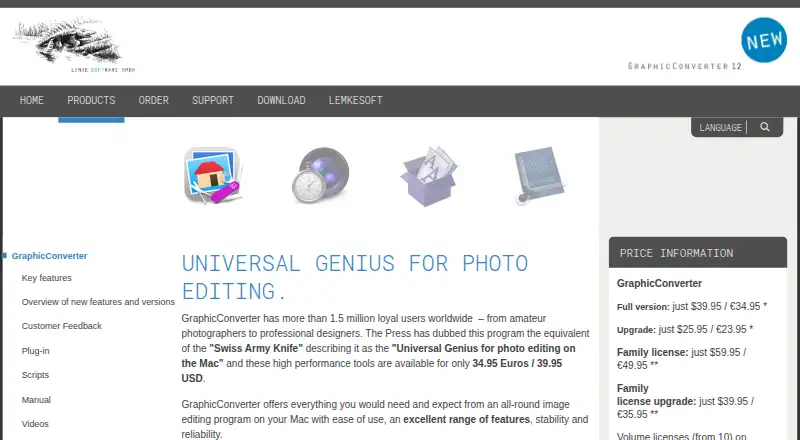
According to the vendor's pricing page, the Full version costs $39.95 as a one-time purchase. The Family license costs $59.95 once and allows use on up to five computers in one household for non-commercial purposes. The downloadable shareware can be tried before purchase, but unregistered software has restrictions, including unavailable batch-processing functions. Those who need batch work therefore have a clear reason to buy rather than rely on the unregistered version. GraphicConverter suits Mac users who value broad format coverage, batch tools, and editing in one desktop application; users needing a free plan, a web app, or another operating system should look elsewhere.
Questions about GraphicConverter
What does GraphicConverter run on? macOS. It runs as a desktop app.
What does GraphicConverter integrate with? 3 integrations: AppleScript, Apple Digital Images and TWAIN.
Who is GraphicConverter built for? Solo users and small businesses (our editorial estimate).
Your product? Our editors can test GraphicConverter in depth and publish a review, labelled as paid · from $149/mo →
GraphicConverter pricing
All 2 GraphicConverter plans and prices →
GraphicConverter fact sheet
| Free plan | No |
|---|---|
| Paid from | $39.95 one-time |
| Batch conversion | Yes |
| Image resizing | Not verified |
| Color mode conversion | Not verified |
| API access | No |
| Desktop application | Yes |
| Web application | No |
| Supported formats | 80 formats |
| Deployment | Desktop |
| Platforms | macOS |
| Support | Email, Community |
| Built for | Solo, Small business (editorial estimate) |
| Integrations | 3 integrations: AppleScript, Apple Digital Images, TWAIN |
| Pricing | Paid (source) |
| Website | lemkesoft.de |
| Facts checked | 23 Sep 2026 |
GraphicConverter integrations
GraphicConverter lists 3 integrations on its own site.
- AppleScript
- Apple Digital Images
- TWAIN
Alternatives to GraphicConverter
- XnConvertA broad local converter for automated batch workflows, with free noncommercial use.9.4
- ImageMagickA highly capable command-line converter for developers building automated image pipelines.9.2
- GraphicsMagickA capable free converter for scripted, multi-file image workflows.8.9


See all GraphicConverter alternatives →
Also Ranked In
GraphicConverter is ranked in 2 of our directories.
Used GraphicConverter? Be the first to review it
The editor score above is our own research. What this page doesn't have yet is a reader's view — what you used GraphicConverter for, what worked and what didn't. No stars are seeded and no review is paid for; an editor reads every one before it appears.
Write a reviewTwo minutes · verified accounts only · read by an editor before it appears
Featured on iTechGuides

GraphicConverter is listed in our Image Converter Software directory. Add the badge to your site — it links back to this page.
<a href="https://www.itechguides.com/products/graphicconverter/"><img src="https://www.itechguides.com/best/badge/graphicconverter.svg" alt="Featured on iTechGuides" width="230" height="46"></a>
Reviewed by iTechGuides Editors · Editorial team · Updated Nov 2026
Advertiser disclosure: iTechGuides is reader-supported. Vendors can pay for top positions in our rankings and for a place on other products' pages, and we may earn a commission when you click some links. Bought places stand at the number bought; this page and our disclosure say so. Paying vendors may get a fuller, more detailed review from our editors, and that review can change their score. How we rank.
Last updated · How we research and update