Google Web Designer
Google Web Designer: A free desktop tool for animated HTML5 content with visual and code-based control. Ranked #6 of 40 in Web Design Software by our editors (8.4/10); pricing: Free plan; best for free HTML5 animation and interactive content.
At a glance
- Editor score8.4 / 10
- PricingFree plan
- Best forFree HTML5 animation and interactive content
- Free planYes
- Paid fromFree
- Responsive designYes
- Founded1998 · Mountain View, California, United States
- Facts checked20 Sep 2026
Where it wins
- Free plan includes visual and code editing
- Timeline animation supports Quick and Advanced modes
- Runs on Windows, macOS, and Linux
Where it doesn't
- Desktop application rather than a browser-based builder
- Business use only
- Publishing integrations center on Google and supported platforms
Our verdict on Google Web Designer
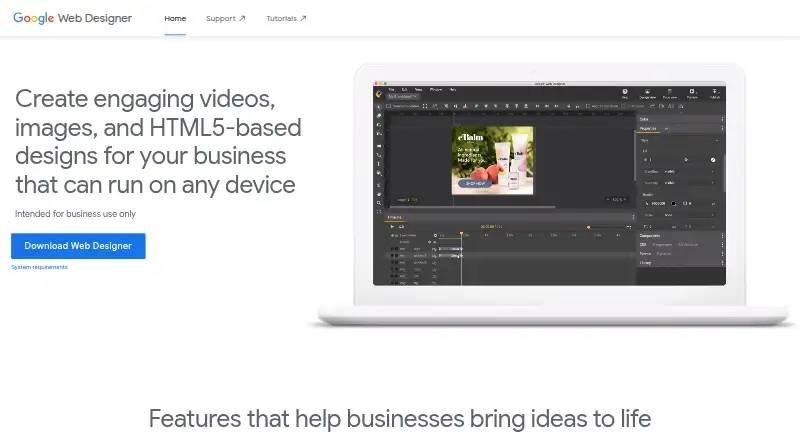
Google Web Designer is a free desktop application for businesses creating HTML5 ads, images, videos, and other web content. It combines visual design and code views, allowing teams to work with HTML, CSS, JavaScript, and XML in the same project. Responsive layouts, browser previews, animation tools, and interactive components make it suited to designers and developers who need more control than a visual-only editor provides.
Its strongest area is animated and interactive HTML5 content. Timeline animation is available in Quick and Advanced modes, while components support galleries, maps, and media players. Custom events can respond to user actions or timeline points, and responsive layouts can use viewport sizes and media rules. This gives teams a broad toolkit for ads and interactive web assets without requiring separate visual and code workflows. The Free plan includes HTML5 ad and web-content creation, visual and code editing, responsive layouts, animation, and interactive components.
Google Web Designer also offers practical publishing choices. Projects can be published locally or exported to ZIP files and folders, then published to Google Drive, Google Ads, Studio, or other supported advertising platforms. It runs on Windows, macOS, and Linux, making it accessible across common desktop environments. The trade-off is focus: it is a desktop application for business content rather than a browser-first site builder with a broad ecosystem of verified integrations. Choose it for free HTML5 animation, responsive interactive content, and direct code access; choose an alternative if you need a hosted, browser-based workflow or a wider builder ecosystem.
Your product? Our editors can test Google Web Designer in depth and publish a review, labelled as paid · from $149/mo →
Google Web Designer pricing
All 1 Google Web Designer plans and prices →
Google Web Designer fact sheet
| Free plan | Yes |
|---|---|
| Paid from | Free |
| Responsive design | Yes |
| Prototype interactions | Yes |
| Code export | Yes |
| Design systems | Yes |
| Team collaboration | Not verified |
| Included team seats | Not verified |
| Primary platform | Desktop |
| Deployment | Desktop |
| Platforms | Windows, macOS, Linux |
| Support | Community, Docs |
| Built for | Small business, Mid-market, Enterprise (editorial estimate) |
| Integrations | 3 integrations: Google Drive, Google Ads, Studio |
| Pricing | Free plan (source) |
| Website | webdesigner.withgoogle.com |
| Facts checked | 20 Sep 2026 |
Google Web Designer integrations
Google Web Designer lists 3 integrations on its own site.
- Google Drive
- Google Ads
- Studio
Alternatives to Google Web Designer
- PlasmicA flexible visual builder for teams that need responsive, code-connected web experiences.9.4
- WYSIWYG Web BuilderA complete Windows visual builder with a low one-time price and broad publishing tools.9.2
- Xara Web DesignerA capable Windows website builder with responsive design, export, and marketing tools.9.0



See all Google Web Designer alternatives →
Google Web Designer vs the competition
- Google Web Designer vs Plasmic
- Google Web Designer vs WYSIWYG Web Builder
- Google Web Designer vs Xara Web Designer
- Google Web Designer vs Bootstrap Studio
- Google Web Designer vs Adobe Dreamweaver
- Google Web Designer vs TemplateToaster


Compare Google Web Designer with any tool side by side →
Also Ranked In
Google Web Designer is ranked in 5 of our directories.
Used Google Web Designer? Be the first to review it
The editor score above is our own research. What this page doesn't have yet is a reader's view — what you used Google Web Designer for, what worked and what didn't. No stars are seeded and no review is paid for; an editor reads every one before it appears.
Write a reviewTwo minutes · verified accounts only · read by an editor before it appears
Featured on iTechGuides

Google Web Designer is listed in our Web Design Software directory. Add the badge to your site — it links back to this page.
<a href="https://www.itechguides.com/products/google-web-designer/"><img src="https://www.itechguides.com/best/badge/google-web-designer.svg" alt="Featured on iTechGuides" width="230" height="46"></a>
Reviewed by iTechGuides Editors · Editorial team · Updated Oct 2026
Advertiser disclosure: iTechGuides is reader-supported. Vendors can pay for top positions in our rankings and for a place on other products' pages, and we may earn a commission when you click some links. Bought places stand at the number bought; this page and our disclosure say so. Paying vendors may get a fuller, more detailed review from our editors, and that review can change their score. How we rank.
Last updated · How we research and update