
Google Vids
Google Vids: A strong Google Workspace option for recording, editing, and sharing presentations. Ranked #3 of 26 in Presentation Recording Software by our editors (9.1/10); pricing: Free plan · 14-day trial; best for google Workspace presentation recording.
At a glance
- Editor score9.1 / 10
- PricingFree plan · 14-day trial
- Best forGoogle Workspace presentation recording
- Free planYes
- Paid from$7/user/mo
- Recording modesSlides_screen_and_webcam
- Facts checked20 Sep 2026
Where it wins
- Records screens, webcams, voice, or combined presentations
- Edits video through transcripts and adds automatic captions
- Exports to MP4, Google Drive, GIF, and YouTube
Where it doesn't
- Creation and editing are available only on the web
- Advanced features and limits depend on eligible plans
- The broad feature set may exceed simple recording needs
Our verdict on Google Vids
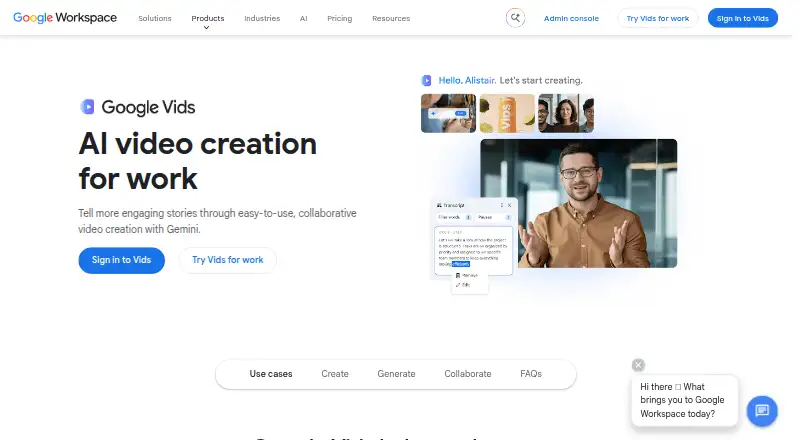
Google Vids is a collaborative video creation app for work, designed for teams that need to turn presentations, screen recordings, webcam footage, narration, templates, and uploaded media into edited videos. It supports Google Slides-to-video conversion, 1080p video, screen and webcam recording, automatic transcription, captions, and transcript-based editing. Its strongest fit is for organizations already working in Google Workspace, particularly teams creating presentations, training materials, internal updates, or narrated demonstrations.
Pricing is tied to Google Workspace plans. Business Starter includes Google Vids, 30 GB of pooled storage per user, and 100-participant Google Meet for $8.40 per user per month on the Flexible Plan or $7 per user per month with annual billing. Business Standard costs $16.80 monthly or $14 with annual billing and adds 2 TB of pooled storage per user plus 150-participant Google Meet with recording. Business Plus costs $26.40 monthly or $22 with annual billing and includes 5 TB of pooled storage per user, 500-participant Google Meet, and Google Vault. Enterprise includes Google Vids with contact-sales pricing and enterprise security and management controls. Google Vids also offers free access with a Google Account, while a 14-day free trial is listed.
The product’s main advantage is its connection to Google Slides, Drive, Photos, and YouTube. Teams can collaborate through viewer, commenter, and editor permissions, then export to MP4, GIF, Google Drive, or YouTube. AI features include generated scripts, voiceovers, avatars, and video clips, alongside royalty-free stock media and templates. Creation and editing are available on desktop, while processed videos can be viewed on mobile devices. Choose Google Vids for collaborative, presentation-led video work within Google’s ecosystem. A narrower recording tool may suit teams that do not need Slides conversion, AI-assisted creation, or broader editing features.
Your product? Our editors can test Google Vids in depth and publish a review, labelled as paid · from $149/mo →
Google Vids pricing
All 7 Google Vids plans and prices →
Google Vids fact sheet
| Free plan | Yes |
|---|---|
| Paid from | $7/user/mo |
| Recording modes | Slides_screen_and_webcam |
| Maximum video quality | 1080p |
| Webcam recording | Yes |
| Transcript generation | Yes |
| Viewer analytics | Not verified |
| Export formats | MP4, GIF, Google Vids, YouTube |
| Maximum recording length | 30 minutes |
| Free trial | 14 days |
| Deployment | Cloud |
| Platforms | Web |
| Support | Community, Docs · 24/7 |
| Built for | Small business, Mid-market, Enterprise (editorial estimate) |
| Integrations | 4 integrations: Google Slides, Google Drive, Google Photos, YouTube |
| Pricing | Free plan · 14-day trial (source) |
| Website | workspace.google.com |
| Facts checked | 20 Sep 2026 |
Google Vids integrations
Google Vids lists 4 integrations on its own site.
- Google Slides
- Google Drive
- Google Photos
- YouTube
Alternatives to Google Vids
- SlideatorA flexible presentation recorder with 4K video, AI tools, and a free starting point.9.4
- Flonnect Presentation RecorderA flexible presentation recorder with synchronized capture, annotations, and team workspaces.9.2
- 30handsA focused tool for narrated slide videos, captions, sharing, and viewer analytics.8.9



See all Google Vids alternatives →
Google Vids vs the competition
- Google Vids vs Slideator
- Google Vids vs Flonnect Presentation Recorder
- Google Vids vs 30hands
- Google Vids vs VIDAREO
- Google Vids vs Knovio
- Google Vids vs Panopto



Compare Google Vids with any tool side by side →
Also Ranked In
Google Vids is ranked in 2 of our directories.
Used Google Vids? Be the first to review it
The editor score above is our own research. What this page doesn't have yet is a reader's view — what you used Google Vids for, what worked and what didn't. No stars are seeded and no review is paid for; an editor reads every one before it appears.
Write a reviewTwo minutes · verified accounts only · read by an editor before it appears
Featured on iTechGuides

Google Vids is listed in our Presentation Recording Software directory. Add the badge to your site — it links back to this page.
<a href="https://www.itechguides.com/products/google-vids/"><img src="https://www.itechguides.com/best/badge/google-vids.svg" alt="Featured on iTechGuides" width="230" height="46"></a>
Reviewed by iTechGuides Editors · Editorial team · Updated Oct 2026
Advertiser disclosure: iTechGuides is reader-supported. Vendors can pay for top positions in our rankings and for a place on other products' pages, and we may earn a commission when you click some links. Bought places stand at the number bought; this page and our disclosure say so. Paying vendors may get a fuller, more detailed review from our editors, and that review can change their score. How we rank.
Last updated · How we research and update