FretTab
FretTab: A focused $10 ukulele tab editor for simple melodies, chords, and teaching materials. Ranked #30 of 32 in Guitar Tab Software by our editors (5.2/10); pricing: Paid; best for simple ukulele tablature.
At a glance
- Editor score5.2 / 10
- PricingPaid
- Best forSimple ukulele tablature
- Free planNo
- Paid from$10 one-time
- Facts checked20 Sep 2026
Where it wins
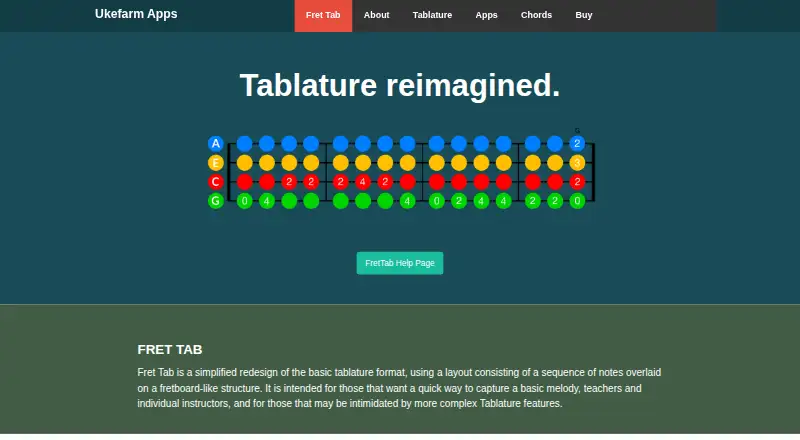
- Supports GCEA ukulele tuning and fretboard-style note entry
- Includes standard and advanced chord sets
- Offers measures, repeats, pull-offs, hammer-ons, and slides
Where it doesn't
- Designed for ukulele rather than conventional guitar tablature
- Provides tablature only, without conventional notation
- Does not include playback, MIDI, or sharing features
Our verdict on FretTab
FretTab is a desktop editor for creating simple ukulele tablature, including melodies, riffs, chord progressions, and teaching materials. Its fretboard-like layout is designed around ukulele notation and supports GCEA tuning, making it a focused choice for players, teachers, and arrangers who want to write straightforward ukulele parts on Windows or macOS. The software is not aimed at broad guitar-tab workflows or conventional notation.
The published plan is simple: FretTab Software costs $10 as a one-time purchase, with no free plan listed. That plan includes the ukulele tablature editor, Mac and Windows versions, and standard and advanced chord sets. Entry can be handled through copy and paste, while character and keystroke information helps with keyboard-based input. macOS supports both black-and-white and color display, including compatibility with Aquila Kids colored strings; Windows provides black-and-white output.
FretTab’s main strength is its narrow, practical feature set. It supports measures, repeats, bar lines, pull-offs, hammer-ons, and slides, covering common elements for simple ukulele arrangements. The trade-off is equally clear: it is designed for tablature rather than conventional guitar tablature, and the category specifications identify tablature as its only notation mode. Playback, MIDI, sharing, and broader guitar-oriented functionality are not part of the published feature set. Pick FretTab if you need an inexpensive desktop tool for basic ukulele tabs and chord-led teaching materials; choose an alternative if you need audio playback, MIDI, collaboration, sharing, or conventional guitar notation.
Your product? Our editors can test FretTab in depth and publish a review, labelled as paid · from $149/mo →
FretTab pricing
All 1 FretTab plans and prices →
FretTab fact sheet
| Free plan | No |
|---|---|
| Paid from | $10 one-time |
| Supported platforms | windows, macos |
| Notation modes | Tablature only |
| Tab playback | Not verified |
| MIDI support | Not verified |
| Audio recording | Not verified |
| Sharing or publishing | Not verified |
| Deployment | Desktop |
| Platforms | Windows, macOS |
| Built for | Solo, Small business (editorial estimate) |
| Pricing | Paid (source) |
| Website | ukefarm.com |
| Facts checked | 20 Sep 2026 |
Alternatives to FretTab
- Guitar ProA mature, deep tab editor for musicians who need notation, playback, and broad exports.9.3
- TuxGuitarA broad free tab editor with strong format support, playback, and four-platform coverage.9.0
- Guitar2TabsA flexible audio-to-tab tool with editing, playback, sharing, and broad export support.8.5


See all FretTab alternatives →
Used FretTab? Be the first to review it
The editor score above is our own research. What this page doesn't have yet is a reader's view — what you used FretTab for, what worked and what didn't. No stars are seeded and no review is paid for; an editor reads every one before it appears.
Write a reviewTwo minutes · verified accounts only · read by an editor before it appears
Featured on iTechGuides

FretTab is listed in our Guitar Tab Software directory. Add the badge to your site — it links back to this page.
<a href="https://www.itechguides.com/products/frettab/"><img src="https://www.itechguides.com/best/badge/frettab.svg" alt="Featured on iTechGuides" width="230" height="46"></a>
Reviewed by iTechGuides Editors · Editorial team · Updated Oct 2026
Advertiser disclosure: iTechGuides is reader-supported. Vendors can pay for top positions in our rankings and for a place on other products' pages, and we may earn a commission when you click some links. Bought places stand at the number bought; this page and our disclosure say so. Paying vendors may get a fuller, more detailed review from our editors, and that review can change their score. How we rank.
Last updated · How we research and update