
Folio Studio
Folio Studio: A low-cost book production tool with broad export, cover, and retailer support. Ranked #6 of 28 in Book Layout Software by our editors (7.8/10); pricing: Free plan; best for budget-conscious authors needing broad publishing output.
At a glance
- Editor score7.8 / 10
- PricingFree plan
- Best forBudget-conscious authors needing broad publishing output
- Free planYes
- Paid from€4.99/mo
- Ebook exportYes
- Facts checked20 Sep 2026
Where it wins
- Free plan plus paid tiers from €4.99 per month
- Exports EPUB, print-ready PDF, and DOCX
- Supports five major book retailer integrations
Where it doesn't
- Free plan limits users to one active project
- Free EPUB and PDF exports include a watermark
- Advanced cover tools require the Pro plan
Our verdict on Folio Studio
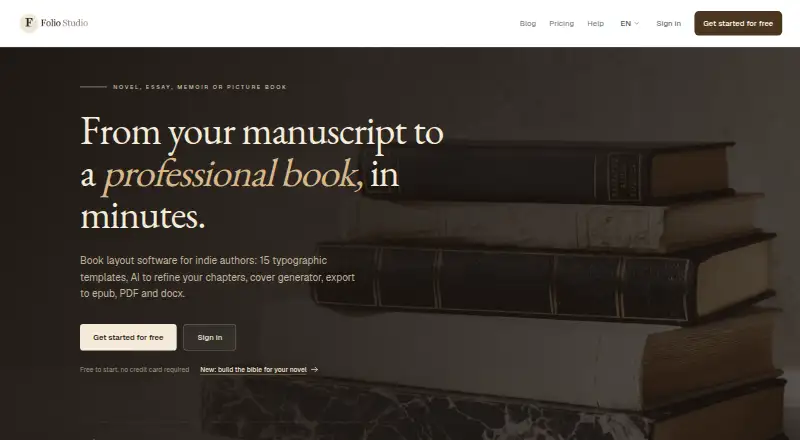
Folio Studio helps independent authors turn manuscripts into formatted books for digital and print publishing. It imports Markdown, DOCX, ODT, and PDF files, detects chapters and sections, applies typographic templates, and provides a live page-by-page preview. The product supports novels, essays, memoirs, and illustrated books, with cover layouts, full-page illustrations, and optional AI assistance for chapter refinement and manuscript analysis. It runs on the web, Windows, macOS, and Linux.
The pricing structure suits authors who want to start small. The Free plan is free forever and includes one active project, two layout templates, EPUB and watermarked PDF export, one introductory AI action, and one full-page illustration. Starter costs €4.99 per month and adds 10 projects, five templates, EPUB, PDF, and DOCX export, print-ready export, a full wraparound cover, and 100 AI credits per month. Pro costs €9 per month and adds unlimited projects, 15 templates, an advanced cover studio, a manuscript bible for fiction, and 200 AI credits per month. The paid tiers provide a clear path from basic formatting to higher-volume production.
Folio Studio’s strongest fit is authors who need more than ebook layout alone. Its print-ready PDF workflow includes bleed, barcode-zone, and spine-width handling for KDP covers, while integrations with Amazon KDP, Apple Books, Kobo, Google Play Books, and IngramSpark support a broad publishing workflow. The trade-off is that the Free plan is constrained, and the most advanced cover capabilities sit in Pro. Authors seeking a focused, low-cost route across ebook, print, cover creation, and multiple retailers should consider Folio Studio; those needing unlimited projects or advanced cover work at no cost should look elsewhere.
Your product? Our editors can test Folio Studio in depth and publish a review, labelled as paid · from $149/mo →
Folio Studio pricing
All 3 Folio Studio plans and prices →
Folio Studio fact sheet
| Free plan | Yes |
|---|---|
| Paid from | €4.99/mo |
| Ebook export | Yes |
| Print PDF export | Yes |
| Cover layout | Yes |
| Bleed settings | Yes |
| Master pages | Not verified |
| Layout model | Both |
| Deployment | Cloud, Browser extension |
| Platforms | Web, Windows, macOS, Linux |
| Support | |
| Built for | Solo, Small business (editorial estimate) |
| Integrations | 5 integrations: Amazon KDP, Apple Books, Kobo, Google Play Books, IngramSpark |
| Pricing | Free plan (source) |
| Website | foliostudio.app |
| Facts checked | 20 Sep 2026 |
Folio Studio integrations
Folio Studio lists 5 integrations on its own site.
- Amazon KDP
- Apple Books
- Kobo
- Google Play Books
- IngramSpark
Alternatives to Folio Studio
- Reedsy StudioA free, collaborative book workspace with version history and publishing-ready exports.9.2
- PressbooksA web-based book production workspace with strong export, collaboration, and education features.8.8
- Kindle CreateA free Kindle-focused formatter with flexible imports, previews, and KPF or EPUB export.8.4


See all Folio Studio alternatives →
Folio Studio vs the competition
- Folio Studio vs Reedsy Studio
- Folio Studio vs Pressbooks
- Folio Studio vs Kindle Create
- Folio Studio vs Blurb BookWright
- Folio Studio vs Bookmint
- Folio Studio vs Koberger



Compare Folio Studio with any tool side by side →
Used Folio Studio? Be the first to review it
The editor score above is our own research. What this page doesn't have yet is a reader's view — what you used Folio Studio for, what worked and what didn't. No stars are seeded and no review is paid for; an editor reads every one before it appears.
Write a reviewTwo minutes · verified accounts only · read by an editor before it appears
Featured on iTechGuides

Folio Studio is listed in our Book Layout Software directory. Add the badge to your site — it links back to this page.
<a href="https://www.itechguides.com/products/folio-studio/"><img src="https://www.itechguides.com/best/badge/folio-studio.svg" alt="Featured on iTechGuides" width="230" height="46"></a>
Reviewed by iTechGuides Editors · Editorial team · Updated Oct 2026
Advertiser disclosure: iTechGuides is reader-supported. Vendors can pay for top positions in our rankings and for a place on other products' pages, and we may earn a commission when you click some links. Bought places stand at the number bought; this page and our disclosure say so. Paying vendors may get a fuller, more detailed review from our editors, and that review can change their score. How we rank.
Last updated · How we research and update