
Flock
Flock: A broad team chat workspace with a capable free Starter plan and useful work tools. Ranked #8 of 63 in Team Chat Apps by our editors (8.5/10); pricing: Free plan · 30-day trial; best for teams wanting free chat plus work tools.
At a glance
- Editor score8.5 / 10
- PricingFree plan · 30-day trial
- Best forTeams wanting free chat plus work tools
- Free planYes
- Guest accessYes
- Facts checked20 Sep 2026
Where it wins
- Free Starter plan includes channels, calls, search, files, and task tools
- Works across web, desktop, mobile, and Chrome extension
- Integrates with Trello, Asana, GitHub, Drive, Jira, and more
Where it doesn't
- Starter limits searchable history to 10,000 messages
- Starter includes 10 public channels and 5 GB per team
- Guests are charged at the member rate after 90 days
Our verdict on Flock
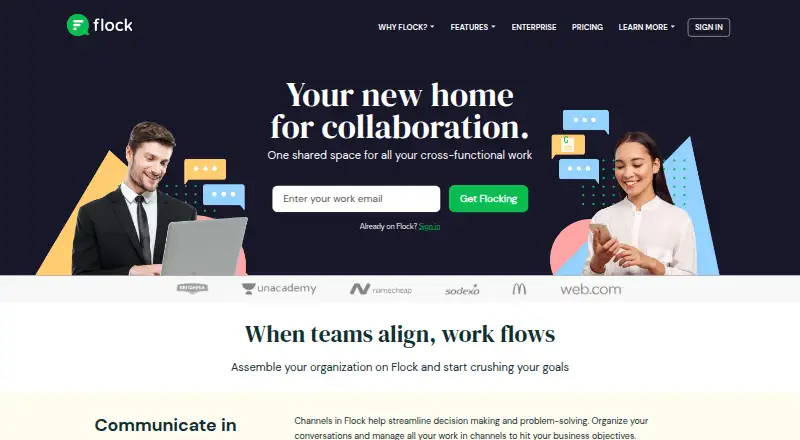
Flock combines direct messaging, group conversations, public and private channels, guest access, calling, file sharing, and searchable workspace content in one team communication application. It is aimed at organizations that want chat alongside practical work tools, including shared to-dos, reminders, notes, polls, announcement channels, and Smart Channels. Flock is available on the web, Windows, macOS, Linux, iOS, Android, and as a Chrome extension, making it suitable for teams working across different devices.
The plan structure gives smaller teams a defined starting point. The free Starter plan includes unlimited 1-to-1 and group messages, 10,000 searchable messages, 10 public channels, 5 GB of total team storage, and 1-to-1 video calls. A 30-day free trial is also available. PRO adds unlimited searchable messages, unlimited private and public channels, 10 GB per team member, group video calls, and screen sharing. Enterprise is designed for organizations with 100 or more members and adds Active Directory sync and single sign-on alongside unlimited history and channels. Guests can access selected chats and channels for free for 90 days, after which they are charged at the regular member rate.
Flock’s breadth is its main distinction: teams can search messages, files, links, and notes, share files, manage lightweight tasks, and connect services such as Trello, Asana, GitHub, Google Calendar, Google Drive, Dropbox, Todoist, Jira, and Microsoft OneDrive. Custom apps and integrations are also supported through the Flock API. Teams seeking chat with adjacent collaboration features should find the feature mix relevant. Organizations needing more than Starter’s history, channel, or storage limits should consider PRO, while larger organizations with directory synchronization and single sign-on requirements fit Enterprise.
Your product? Our editors can test Flock in depth and publish a review, labelled as paid · from $149/mo →
Flock pricing
All 3 Flock plans and prices →
Flock fact sheet
| Free plan | Yes |
|---|---|
| Paid from | Not verified |
| Channels | Yes |
| Guest access | Yes |
| Message history | Limited |
| Integrations | Google Drive, Google Calendar, GitHub, Trello, Dropbox, Twitter, Bitbucket, Asana, Jira, Zapier, Zoom, Microsoft Dynamics 365, Todoist, GitLab, Zendesk, Freshdesk, OneDrive, Mailchimp |
| Supported platforms | web, Windows, macOS, Linux, iOS, Android, Chrome extension, API |
| Maximum members | Not verified |
| Free trial | 30 days · no card needed |
| Deployment | Cloud, Mobile, Browser extension |
| Platforms | Web, Windows, macOS, Linux, iOS, Android, Chrome extension |
| Compliance & security | SOC 2, SSO/SAML, 2FA |
| Support | Email, Live chat, Docs · 24/7 |
| Built for | Small business, Mid-market, Enterprise (editorial estimate) |
| Integrations | 60+ integrations: Google Drive, Google Calendar, GitHub, Trello, Dropbox, Twitter … See all → |
| Pricing | Free plan · 30-day trial (source) |
| Website | flock.com |
| Facts checked | 20 Sep 2026 |
Flock integrations
Flock lists 60+ integrations on its own site — the 18 named here are the ones its pages call out.
- Google Drive
- Google Calendar
- GitHub
- Trello
- Dropbox
- Bitbucket
- Asana
- Jira
- Zapier
- Zoom
- Microsoft Dynamics 365
- Todoist
- GitLab
- Zendesk
- Freshdesk
- OneDrive
- Mailchimp
Alternatives to Flock
- Microsoft TeamsA broad team chat workspace with a free plan and deep Microsoft 365 integration.9.4
- SlackA capable team-chat hub for integration-heavy teams, with limited free history.9.3
- Zoho CliqA broad team chat suite with strong Zoho ecosystem fit and a capable free plan.9.1


Flock vs the competition
- Flock vs Microsoft Teams
- Flock vs Slack
- Flock vs Zoho Cliq
- Flock vs Mattermost
- Flock vs Rocket.Chat
- Flock vs Zulip



Compare Flock with any tool side by side →
Also Ranked In
Flock is ranked in 8 of our directories; the 6 strongest besides Team Chat Apps.
- #5Team Collaboration Software25 tools ranked
- #5Business Instant Messaging - Midmarket Software24 tools ranked
- #7Business Instant Messaging - Enterprise Software22 tools ranked
- #9Remote Working software23 tools ranked
- #10Team Communication Software25 tools ranked
- #12Google Workspace Communication Tools28 tools ranked
Used Flock? Be the first to review it
The editor score above is our own research. What this page doesn't have yet is a reader's view — what you used Flock for, what worked and what didn't. No stars are seeded and no review is paid for; an editor reads every one before it appears.
Write a reviewTwo minutes · verified accounts only · read by an editor before it appears
Featured on iTechGuides

Flock is listed in our Team Chat Apps directory. Add the badge to your site — it links back to this page.
<a href="https://www.itechguides.com/products/flock/"><img src="https://www.itechguides.com/best/badge/flock.svg" alt="Featured on iTechGuides" width="230" height="46"></a>
Reviewed by iTechGuides Editors · Editorial team · Updated Oct 2026
Advertiser disclosure: iTechGuides is reader-supported. Vendors can pay for top positions in our rankings and for a place on other products' pages, and we may earn a commission when you click some links. Bought places stand at the number bought; this page and our disclosure say so. Paying vendors may get a fuller, more detailed review from our editors, and that review can change their score. How we rank.
Last updated · How we research and update