FilmSchedule
FilmSchedule: A focused offline scheduling tool with broad production-planning exports. Ranked #18 of 29 in Video Production Management Software by our editors (7.7/10); pricing: Paid; best for offline desktop scheduling specialists.
At a glance
- Editor score7.7 / 10
- PricingPaid
- Best forOffline desktop scheduling specialists
- Free planNo
- Paid from$99 one-time
- Script breakdownsYes
- Facts checked20 Sep 2026
Where it wins
- Imports PDF, Final Draft, scheduling-export, and Scriptation files
- Combines breakdowns, stripboards, call sheets, and production calendars
- Smart Schedule uses cast and location availability for proposals
Where it doesn't
- Mac and Windows licenses are purchased separately
- The trial is limited to 25 scenes and cannot export PDFs
- Teams needing budgeting or mobile support should consider alternatives
Our verdict on FilmSchedule
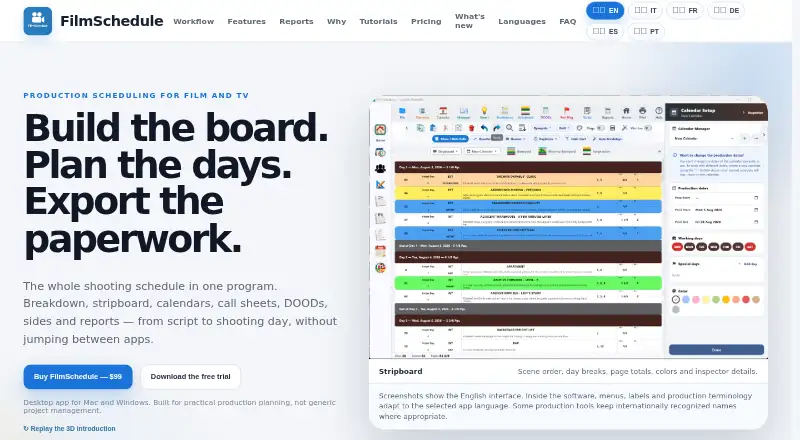
FilmSchedule is a desktop application for film and television production planning. It is aimed at assistant directors, production coordinators, and productions managing practical scheduling workflows. The software imports PDF, Final Draft, scheduling-export, and Scriptation files, then supports script breakdowns, automatic tagging, stripboard scheduling, production calendars, and shooting-day planning. It also generates call sheets, DOODs, sides, shooting schedules, reports, PDFs, and Excel files, giving teams a focused workspace for turning scripts into production schedules.
The published pricing shows one FilmSchedule lifetime license at $99 USD, with all features included. One computer can be active at a time, and Mac and Windows versions are sold separately. A limited trial covers 25 scenes and cannot export PDFs, so it is useful for reviewing the workflow but not equivalent to a time-based free plan. The core value is concentrated in scheduling rather than tiered packaging: one purchase includes script import, breakdown, stripboard planning, reports, and call-sheet generation.
FilmSchedule’s strongest fit is an offline, local workflow on macOS or Windows. Projects can be shared through Dropbox or other file-sync services, while Scriptation is supported in the import workflow. Smart Schedule proposals use cast and location availability, and the application includes DOOD, sides, shooting schedule, and report exports for production coordination. Productions that want desktop scheduling with local project access should consider it; teams requiring budgeting, mobile support, or a broader production-management environment should choose an alternative built around those needs.
Your product? Our editors can test FilmSchedule in depth and publish a review, labelled as paid · from $149/mo →
FilmSchedule pricing
All 1 FilmSchedule plans and prices →
FilmSchedule fact sheet
| Free plan | No |
|---|---|
| Paid from | $99 one-time |
| Script breakdowns | Yes |
| Production scheduling | Yes |
| Call sheets | Yes |
| Budget tracking | Not verified |
| Crew and cast management | Yes |
| Location management | Yes |
| Mobile app platforms | Not verified |
| Money-back guarantee | 14 days |
| Deployment | Desktop |
| Platforms | Windows, macOS |
| Support | |
| Built for | Small business, Mid-market (editorial estimate) |
| Integrations | 2 integrations: Dropbox, Scriptation |
| Pricing | Paid (source) |
| Website | filmschedule.app |
| Facts checked | 20 Sep 2026 |
FilmSchedule integrations
FilmSchedule lists 2 integrations on its own site.
- Dropbox
- Scriptation
Alternatives to FilmSchedule
- YamduA broad production workspace covering planning, scheduling, budgeting, collaboration, and delivery.9.4
- InteSceneA broad, budget-friendly toolkit covering production from script to reports.9.3
- ScenePaperA free production workspace spanning scripts, schedules, budgets, crews, and department workflows.9.2



See all FilmSchedule alternatives →
Also Ranked In
FilmSchedule is ranked in 2 of our directories.
Used FilmSchedule? Be the first to review it
The editor score above is our own research. What this page doesn't have yet is a reader's view — what you used FilmSchedule for, what worked and what didn't. No stars are seeded and no review is paid for; an editor reads every one before it appears.
Write a reviewTwo minutes · verified accounts only · read by an editor before it appears
Featured on iTechGuides

FilmSchedule is listed in our Video Production Management Software directory. Add the badge to your site — it links back to this page.
<a href="https://www.itechguides.com/products/filmschedule/"><img src="https://www.itechguides.com/best/badge/filmschedule.svg" alt="Featured on iTechGuides" width="230" height="46"></a>
Reviewed by iTechGuides Editors · Editorial team · Updated Oct 2026
Advertiser disclosure: iTechGuides is reader-supported. Vendors can pay for top positions in our rankings and for a place on other products' pages, and we may earn a commission when you click some links. Bought places stand at the number bought; this page and our disclosure say so. Paying vendors may get a fuller, more detailed review from our editors, and that review can change their score. How we rank.
Last updated · How we research and update