Ferry Email
Ferry Email: A capable free desktop client for unified inboxes, calendars, cleanup, and exports. Ranked #46 of 142 in Email Clients by our editors (5.0/10); pricing: Free plan; best for free desktop email with export workflows.
At a glance
- Editor score5.0 / 10
- PricingFree plan
- Best forFree desktop email with export workflows
- Free planYes
- Paid fromFree
- App coverageDesktop
- Facts checked20 Sep 2026
Where it wins
- Supports Microsoft 365, Gmail, iCloud, Fastmail, IMAP, and POP3
- Combines inboxes, calendars, contacts, cleanup, and automatic replies
- Exports archives to ZIP with .eml files and JSON, or to PDF
Where it doesn't
- Desktop-only access limits use to Windows and macOS apps
- No paid tier is available for organizations seeking tiered plans
- Export options center on ZIP, .eml, JSON, and PDF formats
Our verdict on Ferry Email
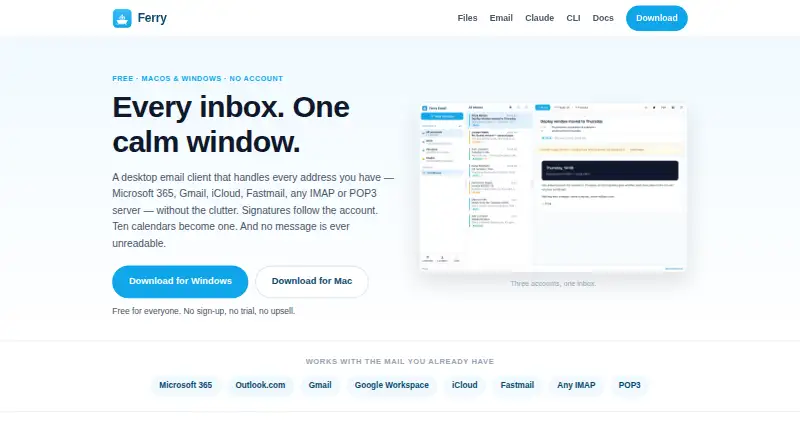
Ferry Email is a free desktop email client for Windows and macOS that brings multiple accounts into one application. It is designed for people managing Microsoft 365, Outlook.com, Gmail, Google Workspace, iCloud, Fastmail, IMAP, or POP3 accounts who want a unified inbox rather than separate provider apps. Alongside email, it includes a unified calendar, shared address book, account-specific signatures, automatic replies with loop-prevention safeguards, mailbox cleanup, and server-side search. No Ferry account is required, and the app works directly between the computer and mail providers without a Ferry relay.
The Free plan includes the complete listed product scope: there is no trial and no paid tier. That makes Ferry Email straightforward for individuals and teams that want desktop email without subscription planning. Its provider coverage is broad for a desktop client, spanning major hosted services as well as IMAP, POP3, and SMTP. The platform fit is narrower than a browser-based service because the listed apps are limited to Windows and macOS, but the account range supports mixed-provider setups within those environments.
Ferry Email stands out for treating message handling as an exportable workflow. It can archive messages to ZIP files containing .eml files and a JSON index, export messages as PDF, and support command-line and Claude-assisted inbox workflows. Encrypted local account configuration adds protection for stored setup information. Choose Ferry Email if free desktop access, multi-account consolidation, and portable email records matter most. Choose another option if browser or mobile access, a paid administrative tier, or different export formats are central requirements.
Your product? Our editors can test Ferry Email in depth and publish a review, labelled as paid · from $149/mo →
Ferry Email pricing
All 1 Ferry Email plans and prices →
Ferry Email fact sheet
| Free plan | Yes |
|---|---|
| Paid from | Free |
| App coverage | Desktop |
| Account limit | Not verified |
| Unified inbox | Yes |
| Offline access | Not verified |
| Scheduled sending | Not verified |
| Calendar tools | Yes |
| Deployment | Desktop |
| Platforms | Windows, macOS |
| Support | Docs |
| Built for | Solo, Small business (editorial estimate) |
| Integrations | 9 integrations: Microsoft 365, Outlook.com, Gmail, Google Workspace, iCloud, Fastmail … |
| Pricing | Free plan (source) |
| Website | theferryapp.com |
| Facts checked | 20 Sep 2026 |
Ferry Email integrations
Ferry Email lists 9 integrations on its own site.
- Microsoft 365
- Outlook.com
- Gmail
- Google Workspace
- iCloud
- Fastmail
- IMAP
- POP3
- SMTP
Alternatives to Ferry Email
- Mozilla ThunderbirdA capable free client for multi-account email, offline access, and desktop productivity tools.9.4
- Zoho MailA flexible hosted email service with free access, migration tools, and Zoho collaboration options.9.2
- Apple MailA capable Apple-focused email client with unified inboxes, scheduling, privacy controls, and AI assistance.9.1



See all Ferry Email alternatives →
Also Ranked In
Ferry Email is ranked in 2 of our directories.
Used Ferry Email? Be the first to review it
The editor score above is our own research. What this page doesn't have yet is a reader's view — what you used Ferry Email for, what worked and what didn't. No stars are seeded and no review is paid for; an editor reads every one before it appears.
Write a reviewTwo minutes · verified accounts only · read by an editor before it appears
Featured on iTechGuides

Ferry Email is listed in our Email Clients directory. Add the badge to your site — it links back to this page.
<a href="https://www.itechguides.com/products/ferry-email/"><img src="https://www.itechguides.com/best/badge/ferry-email.svg" alt="Featured on iTechGuides" width="230" height="46"></a>
Reviewed by iTechGuides Editors · Editorial team · Updated Sep 2026
Advertiser disclosure: iTechGuides is reader-supported. Vendors can pay for top positions in our rankings and for a place on other products' pages, and we may earn a commission when you click some links. Bought places stand at the number bought; this page and our disclosure say so. Paying vendors may get a fuller, more detailed review from our editors, and that review can change their score. How we rank.
Last updated · How we research and update