FBX-glTF-conv
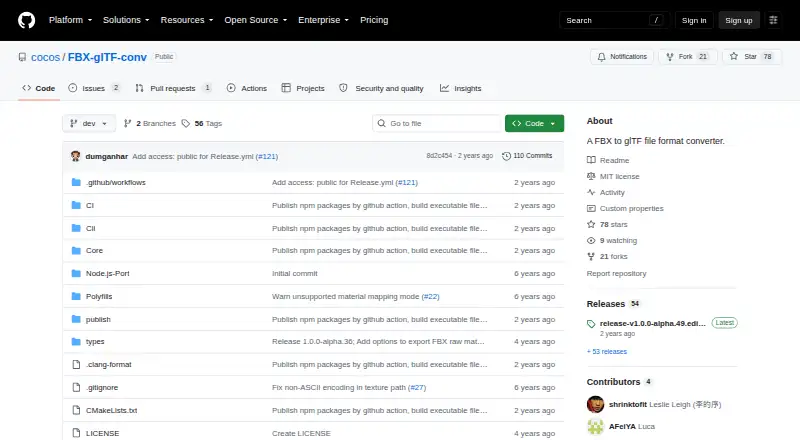
FBX-glTF-conv: A focused open-source converter for FBX geometry, materials, textures, and animation. Ranked #24 of 31 in 3D File Converter Software by our editors (6.9/10); pricing: Free plan; best for open-source FBX and glTF animation conversion.
At a glance
- Editor score6.9 / 10
- PricingFree plan
- Best forOpen-source FBX and glTF animation conversion
- Free planYes
- Paid fromFree
- Format scopeMesh
- Facts checked22 Sep 2026
Where it wins
- Converts FBX models to glTF or GLB with animation support
- Handles materials, JPEG and PNG textures, skinning, and morph targets
- Runs on Windows, macOS, and Linux
Where it doesn't
- Focused on FBX-to-glTF workflows rather than broad format conversion
- Uses a command-line interface instead of a visual application
- Ubuntu 20.04 is unsupported
Our verdict on FBX-glTF-conv
FBX-glTF-conv is an open-source command-line utility maintained by Cocos for converting Autodesk FBX model files into glTF or GLB output. It is aimed at developers, technical artists, and pipeline teams that need a focused conversion tool for mesh and animation workflows across Windows, macOS, and Linux. The converter covers geometry, scene hierarchies, materials, textures, skinning, blend shapes, and skeletal or morph animations.
Its strongest area is animation-aware conversion. The published feature set includes Lambert and Phong material conversion, JPEG and PNG texture support, skinning conversion, blend-shape and morph-target conversion, plus skeletal and morph animation export. Texture search and image path controls, unit conversion, and animation bake-rate options add control for projects where asset preparation needs more than a basic mesh export. glTF and GLB output also gives teams two supported delivery formats within the same workflow.
FBX-glTF-conv is available as open-source software with a free plan, making it suited to teams that prefer a focused utility over a commercial hosted service. Distribution is through an executable, while source builds use CMake, vcpkg, and the FBX SDK. Officially tested environments include Windows, macOS, and Ubuntu 22.04, while Ubuntu 20.04 is unsupported. Choose it when FBX-to-glTF conversion, animation, materials, and texture handling are the priority. Choose another converter when you need a broader format matrix or a graphical interface instead of command-line operation.
Your product? Our editors can test FBX-glTF-conv in depth and publish a review, labelled as paid · from $149/mo →
FBX-glTF-conv pricing
FBX-glTF-conv fact sheet
| Free plan | Yes |
|---|---|
| Paid from | Free |
| Format scope | Mesh |
| Animation conversion | Yes |
| Batch conversion | Not verified |
| API access | Not verified |
| Maximum file size | Not verified |
| Supported platforms | Windows, macOS, Linux |
| Deployment | Self-hosted, Desktop |
| Platforms | Windows, macOS, Linux |
| Support | Community |
| Built for | Solo, Small business, Mid-market, Enterprise (editorial estimate) |
| Pricing | Free plan |
| Website | github.com |
| Facts checked | 22 Sep 2026 |
Alternatives to FBX-glTF-conv
- 3D_EvolutionA professional CAD conversion suite for complex engineering workflows and enterprise validation.9.4
- 3D InterOpA broad engineering SDK for integrating high-volume CAD and BIM translation.9.3
- HOOPS ExchangeA broad CAD/BIM conversion SDK for engineering software teams.9.2



See all FBX-glTF-conv alternatives →
Used FBX-glTF-conv? Be the first to review it
The editor score above is our own research. What this page doesn't have yet is a reader's view — what you used FBX-glTF-conv for, what worked and what didn't. No stars are seeded and no review is paid for; an editor reads every one before it appears.
Write a reviewTwo minutes · verified accounts only · read by an editor before it appears
Featured on iTechGuides

FBX-glTF-conv is listed in our 3D File Converter Software directory. Add the badge to your site — it links back to this page.
<a href="https://www.itechguides.com/products/fbx-gltf-conv/"><img src="https://www.itechguides.com/best/badge/fbx-gltf-conv.svg" alt="Featured on iTechGuides" width="230" height="46"></a>
Reviewed by iTechGuides Editors · Editorial team · Updated Oct 2026
Advertiser disclosure: iTechGuides is reader-supported. Vendors can pay for top positions in our rankings and for a place on other products' pages, and we may earn a commission when you click some links. Bought places stand at the number bought; this page and our disclosure say so. Paying vendors may get a fuller, more detailed review from our editors, and that review can change their score. How we rank.
Last updated · How we research and update