
FaceSwap AI - Photo Editor
FaceSwap AI - Photo Editor: A focused desktop editor for private, batch photo face swaps without watermarks. Ranked #25 of 30 in Face Swap Software by our editors (6.8/10); pricing: Paid; best for offline batch photo editing on Windows or Mac.
At a glance
- Editor score6.8 / 10
- PricingPaid
- Best forOffline batch photo editing on Windows or Mac
- Free planNo
- Paid from$69.99 one-time
- Supported mediaPhoto
- Facts checked20 Sep 2026
Where it wins
- Processes images locally with offline, on-device AI
- Supports batch face swapping and GPU acceleration
- Exports without watermarks in multiple image formats and PDF
Where it doesn't
- Supports photos rather than video or other media
- Requires a $69.99 one-time purchase
- Desktop availability is limited to Windows and macOS
Our verdict on FaceSwap AI - Photo Editor
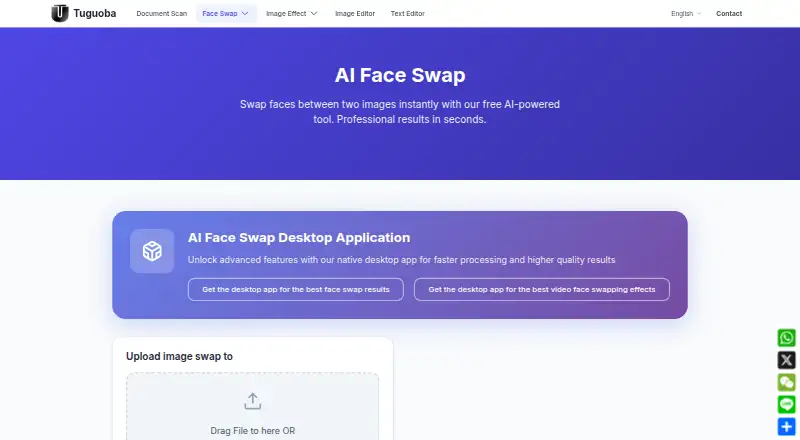
FaceSwap AI - Photo Editor is a desktop application for Windows and macOS that swaps faces in photos using on-device AI processing. It is aimed at personal photo projects, social-media content, and professional image work where local processing, batch editing, and control over the final image matter. The tool combines face swapping with partial-region selection, facial-expression controls, webcam-based face capture, annotation, editing, and export features.
The pricing model is straightforward: the FaceSwap AI plan costs $69.99 as a one-time purchase. The published plan includes offline processing, no watermark, batch processing, and GPU acceleration. That combination suits buyers who want a paid desktop application rather than a recurring subscription, especially when processing multiple images is part of the workflow. The standout capability is control over the swap itself: users can select facial regions and adjust expressions instead of relying only on a full-face replacement. GPU acceleration is included for supported desktop workflows.
Its platform fit is focused rather than broad. FaceSwap AI runs on Windows and macOS, supports photo editing, and can export to multiple image formats and PDF. Built-in annotation and editing tools reduce the need to move every image into a separate editor, while webcam capture adds another way to provide face imagery. Buyers seeking offline batch photo work, watermark-free exports, and selectable facial edits should consider it. It is less suitable for video projects, mobile-first workflows, or anyone looking for a free plan. The product is a focused photo editor, not a general face-swapping tool across every media type.
Your product? Our editors can test FaceSwap AI - Photo Editor in depth and publish a review, labelled as paid · from $149/mo →
FaceSwap AI - Photo Editor pricing
All 1 FaceSwap AI - Photo Editor plans and prices →
FaceSwap AI - Photo Editor fact sheet
| Free plan | No |
|---|---|
| Paid from | $69.99 one-time |
| Supported media | Photo |
| Platforms | windows, macos |
| Max video length | Not verified |
| Max output resolution | Not verified |
| Watermark-free exports | Yes |
| Batch processing | Yes |
| API access | Not verified |
| Deployment | Cloud, Desktop |
| Platforms | Windows, macOS |
| Support | Email, Docs |
| Built for | Solo, Small business (editorial estimate) |
| Pricing | Paid (source) |
| Website | tuguoba.com |
| Facts checked | 20 Sep 2026 |
Alternatives to FaceSwap AI - Photo Editor
- FaceFusionA capable free local face-swap tool for technically comfortable power users.9.4
- Remaker AIA flexible, low-cost choice for creators working across multiple media formats.9.2
- FaceswapA capable free desktop suite for technical users who want control over face-swap workflows.9.0

See all FaceSwap AI - Photo Editor alternatives →
Used FaceSwap AI - Photo Editor? Be the first to review it
The editor score above is our own research. What this page doesn't have yet is a reader's view — what you used FaceSwap AI - Photo Editor for, what worked and what didn't. No stars are seeded and no review is paid for; an editor reads every one before it appears.
Write a reviewTwo minutes · verified accounts only · read by an editor before it appears
Featured on iTechGuides

FaceSwap AI - Photo Editor is listed in our Face Swap Software directory. Add the badge to your site — it links back to this page.
<a href="https://www.itechguides.com/products/faceswap-ai-photo-editor/"><img src="https://www.itechguides.com/best/badge/faceswap-ai-photo-editor.svg" alt="Featured on iTechGuides" width="230" height="46"></a>
Reviewed by iTechGuides Editors · Editorial team · Updated Oct 2026
Advertiser disclosure: iTechGuides is reader-supported. Vendors can pay for top positions in our rankings and for a place on other products' pages, and we may earn a commission when you click some links. Bought places stand at the number bought; this page and our disclosure say so. Paying vendors may get a fuller, more detailed review from our editors, and that review can change their score. How we rank.
Last updated · How we research and update