ExifToolGUI
ExifToolGUI: A capable open-source ExifTool front end for batch metadata work on Windows. Ranked #11 of 31 in Photo Metadata Editors by our editors (8.1/10); pricing: Open source; best for windows users wanting an ExifTool graphical front end.
At a glance
- Editor score8.1 / 10
- PricingOpen source
- Best forWindows users wanting an ExifTool graphical front end
- Paid fromFree
- Batch editingYes
- Facts checked21 Sep 2026
Where it wins
- Batch-edit selected files and adjust EXIF/XMP date-time values
- GPS import, coordinate-based location updates, and metadata removal
- RAW preview handling, extensive exports, and reusable workspaces
Where it doesn't
- Windows is the only supported platform
- ExifTool is required for the application to function
- The interface focuses on ExifTool workflows rather than broader photo management
Our verdict on ExifToolGUI
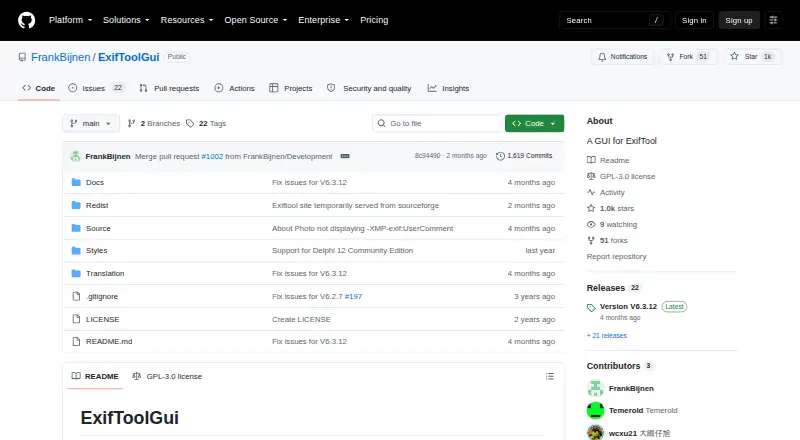
ExifToolGUI is an open-source Windows desktop graphical interface for ExifTool, aimed at photographers, archivists, and other users who need direct control over image metadata without working only from a command line. It handles EXIF, IPTC, and XMP metadata, displays fields recognized by ExifTool, and edits frequently used tags. The project provides both 32-bit and 64-bit Windows releases under the GPLv3 license.
Its strongest area is the range of metadata operations in one desktop interface. Users can apply edits to multiple selected files, remove selected metadata groups and tags, import GPS data from XMP sidecar files, and update city, province, and country from GPS coordinates. Date-time tools can shift and equalize EXIF/XMP values, which suits collections with inconsistent timestamps. RAW workflows are also covered through preview extraction and import, while exports to TXT, MIE, XMP, EXIF, and HTML support review, transfer, and archival tasks. Configurable workspaces and predefined tag lists add structure for recurring jobs.
ExifToolGUI is a focused choice for Windows users who want ExifTool's metadata scope through a graphical workflow. The main setup consideration is that ExifTool is required, and the OpenStreetMap view can use WebView2. Its desktop-only Windows focus makes it less suitable for users working across macOS, Linux, or mobile devices, or for anyone seeking a complete photo catalog, editing suite, or cloud-based metadata service. Choose it for batch metadata control, GPS handling, RAW previews, and repeatable tag workflows; choose an alternative when cross-platform access or broader photo-management features matter more.
Your product? Our editors can test ExifToolGUI in depth and publish a review, labelled as paid · from $149/mo →
ExifToolGUI pricing
ExifToolGUI fact sheet
| Free plan | Not verified |
|---|---|
| Paid from | Free |
| Metadata scope | Exif_iptc_xmp |
| Batch editing | Yes |
| RAW file support | Yes |
| Platform | Desktop |
| GPS metadata tools | Yes |
| Metadata templates | Yes |
| Documented file formats | Not verified |
| Deployment | Desktop |
| Platforms | Windows |
| Support | Community, Docs |
| Built for | Solo, Small business (editorial estimate) |
| Pricing | Open source |
| Website | github.com |
| Facts checked | 21 Sep 2026 |
Alternatives to ExifToolGUI
- ExifToolA free, open-source metadata toolkit for deep, cross-platform batch control.9.4
- PhotiniA complete open-source metadata editor with batch tools, geotagging, and RAW support.9.2
- GeoSetterA focused, free Windows tool for detailed metadata editing and GPS-based photo organization.9.0


See all ExifToolGUI alternatives →
Used ExifToolGUI? Be the first to review it
The editor score above is our own research. What this page doesn't have yet is a reader's view — what you used ExifToolGUI for, what worked and what didn't. No stars are seeded and no review is paid for; an editor reads every one before it appears.
Write a reviewTwo minutes · verified accounts only · read by an editor before it appears
Featured on iTechGuides

ExifToolGUI is listed in our Photo Metadata Editors directory. Add the badge to your site — it links back to this page.
<a href="https://www.itechguides.com/products/exiftoolgui/"><img src="https://www.itechguides.com/best/badge/exiftoolgui.svg" alt="Featured on iTechGuides" width="230" height="46"></a>
Reviewed by iTechGuides Editors · Editorial team · Updated Oct 2026
Advertiser disclosure: iTechGuides is reader-supported. Vendors can pay for top positions in our rankings and for a place on other products' pages, and we may earn a commission when you click some links. Bought places stand at the number bought; this page and our disclosure say so. Paying vendors may get a fuller, more detailed review from our editors, and that review can change their score. How we rank.
Last updated · How we research and update