
EuroCUT Professional XT
EuroCUT Professional XT: A mature Windows toolkit for signmakers needing layout, vector editing, and plotter output. Ranked #9 of 25 in Sign Design Software by our editors (8.4/10); pricing: Paid; best for mature Windows plotting and layout operations.
At a glance
- Editor score8.4 / 10
- PricingPaid
- Best forMature Windows plotting and layout operations
- Free planNo
- Vinyl cuttingYes
- Founded1993 · Grevenmacher, Luxembourg
- Facts checked21 Sep 2026
Where it wins
- More than 600 cutter and plotter drivers support varied output setups
- Combines typography, vector drawing, tracing, layout, and job calculation
- Supports LAN output and imports from major design applications
Where it doesn't
- Windows-only platform limits use across operating systems
- Paid software with no free plan
- Its verified output workflow is primarily focused on cutting
Our verdict on EuroCUT Professional XT
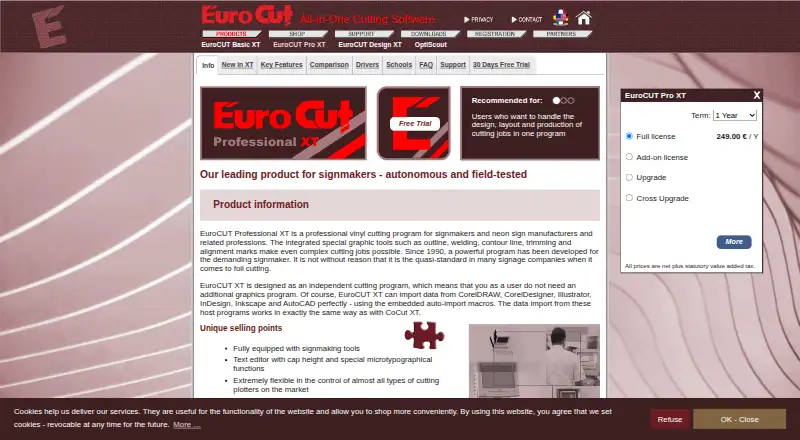
EuroCUT Professional XT is standalone Windows software for professional signmakers, screen printers, and related businesses. It brings text editing, vector drawing, bitmap tracing, layout, job calculation, post-processing, export, and plotter output into one application. Typography controls include cap-height handling, while vector tools cover node editing, alignment, fills, and gradients. Layout mode adds text and image placeholders, giving production teams a workflow that extends beyond basic lettering and vinyl cutting.
The software’s ecosystem fit is a key strength for established design operations. It supports automatic data import from CorelDRAW, CorelDesigner, Adobe Illustrator, Adobe InDesign, AutoCAD, and Inkscape. Plot Manager and LAN-based Plot Server output support networked production, while more than 600 cutter and plotter drivers broaden hardware compatibility. Manual cutting-path ordering and traverse-path simulation provide control over output planning, and job calculation supports material-cost estimation before production.
Pricing is presented as a paid full-license model. The official price page states prices in US dollars per piece, net of VAT, and the category listing gives a starting price of 79 USD. Sales are limited to entrepreneurs, tradespeople, public institutions, and freelancers. EuroCUT Professional XT fits businesses that want mature Windows-based plotting, sign layout, typography, and cutting tools with integrations into common design applications. It is less suitable for teams requiring a non-Windows platform, a free plan, or a workflow centered on output types beyond cutting.
Your product? Our editors can test EuroCUT Professional XT in depth and publish a review, labelled as paid · from $149/mo →
EuroCUT Professional XT pricing
All 1 EuroCUT Professional XT plans and prices →
EuroCUT Professional XT fact sheet
| Free plan | No |
|---|---|
| Paid from | Not verified |
| Vinyl cutting | Yes |
| Vehicle graphics | Not verified |
| Lettering tools | Yes |
| Production output | Cut |
| Supported platforms | Windows 7, 8, 10, 11 |
| Plotter support | Yes |
| Deployment | Desktop |
| Platforms | Windows |
| Support | Email, Phone |
| Built for | Small business, Mid-market, Enterprise (editorial estimate) |
| Integrations | 600+ integrations: CorelDRAW, CorelDesigner, Adobe Illustrator, Adobe InDesign, AutoCAD, Inkscape |
| Pricing | Paid (source) |
| Website | eurocut.com |
| Facts checked | 21 Sep 2026 |
EuroCUT Professional XT integrations
EuroCUT Professional XT lists 600+ integrations on its own site — the 6 named here are the ones its pages call out.
- CorelDRAW
- CorelDesigner
- Adobe Illustrator
- Adobe InDesign
- AutoCAD
- Inkscape
Alternatives to EuroCUT Professional XT
- SAi FlexiA full production suite for sign businesses that design, print and cut in-house.9.3
- VinylMasterA Windows-focused sign-production suite with affordable entry pricing and broad output support.9.1
- SignMasterA Windows-focused sign production suite with broad device support and low upgrade prices.9.0


See all EuroCUT Professional XT alternatives →
Used EuroCUT Professional XT? Be the first to review it
The editor score above is our own research. What this page doesn't have yet is a reader's view — what you used EuroCUT Professional XT for, what worked and what didn't. No stars are seeded and no review is paid for; an editor reads every one before it appears.
Write a reviewTwo minutes · verified accounts only · read by an editor before it appears
Featured on iTechGuides

EuroCUT Professional XT is listed in our Sign Design Software directory. Add the badge to your site — it links back to this page.
<a href="https://www.itechguides.com/products/eurocut-professional-xt/"><img src="https://www.itechguides.com/best/badge/eurocut-professional-xt.svg" alt="Featured on iTechGuides" width="230" height="46"></a>
Reviewed by iTechGuides Editors · Editorial team · Updated Oct 2026
Advertiser disclosure: iTechGuides is reader-supported. Vendors can pay for top positions in our rankings and for a place on other products' pages, and we may earn a commission when you click some links. Bought places stand at the number bought; this page and our disclosure say so. Paying vendors may get a fuller, more detailed review from our editors, and that review can change their score. How we rank.
Last updated · How we research and update