eBook Creator
eBook Creator: A free Mac app for turning DOCX files or Markdown into styled EPUB books. Ranked #27 of 28 in eBook Creation Software by our editors (6.3/10); pricing: Free plan; best for mac users wanting a simple free EPUB workflow.
At a glance
- Editor score6.3 / 10
- PricingFree plan
- Best forMac users wanting a simple free EPUB workflow
- Free planYes
- Paid fromFree
- EPUB exportYes
- Facts checked20 Sep 2026
Where it wins
- Imports DOCX formatting, headings, structure, and extracted images
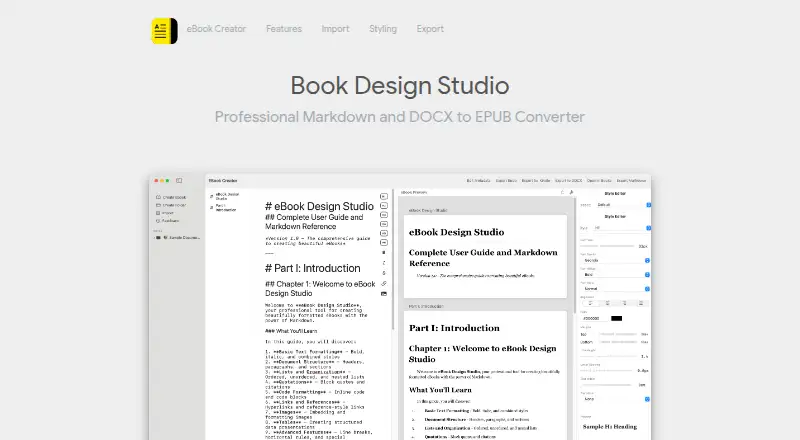
- Live split-view preview with chapter navigation
- Free EPUB export with five style presets
Where it doesn't
- Runs only on macOS 14.0 or later
- No PDF export is listed
- No collaboration or EPUB validation features are listed
Our verdict on eBook Creator
eBook Creator is a macOS application for authors, bloggers, technical writers, educators, and digital publishers who need a focused path from source content to EPUB. It accepts DOCX files while preserving formatting, headings, and structure, and it includes a native Markdown editor with syntax highlighting. The app runs locally on Macs with macOS 14.0 or later and supports both Apple Silicon and Intel processors. Its output is intended for platforms such as Apple Books, Kindle, Google Play Books, and Kobo.
The workflow centers on preview and presentation. A live split-view ebook preview lets writers see content while editing, while chapter navigation preview helps review the book’s structure. Typography and heading-style controls provide additional presentation options, and five style presets give the workflow a defined starting point. Image extraction and optimization from documents can also reduce the manual work involved in preparing visuals from imported files. These features make the product a practical fit for users who already have content in DOCX or prefer writing in Markdown.
The Free plan includes DOCX import, a Markdown editor, and EPUB export, making the core conversion workflow accessible without a paid tier. The product remains narrow in scope: it is Mac-only, and PDF export, collaboration, and EPUB validation are not part of the listed feature set. Choose eBook Creator if you want a local, straightforward EPUB workflow with live preview and basic styling. Consider another tool if you need cross-platform access, team editing, PDF output, or dedicated validation capabilities.
Your product? Our editors can test eBook Creator in depth and publish a review, labelled as paid · from $149/mo →
eBook Creator pricing
All 1 eBook Creator plans and prices →
eBook Creator fact sheet
| Free plan | Yes |
|---|---|
| Paid from | Free |
| EPUB export | Yes |
| PDF export | Not verified |
| Reflowable layout | Not verified |
| Fixed-layout support | Not verified |
| Ebook validation | Not verified |
| Accessibility tools | Not verified |
| Import formats | DOCX, Markdown |
| Deployment | Desktop |
| Platforms | macOS |
| Built for | Solo, Small business (editorial estimate) |
| Pricing | Free plan (source) |
| Website | ebookcreatorapp.com |
| Facts checked | 20 Sep 2026 |
Alternatives to eBook Creator
- KobergerA complete cross-platform workflow with free formatting and paid exports.9.3
- Reedsy StudioA low-cost book workspace with strong planning, collaboration, and export tools.9.1
- LeanpubA practical publishing workspace for technical authors with synced workflows and format generation.9.0


See all eBook Creator alternatives →
Used eBook Creator? Be the first to review it
The editor score above is our own research. What this page doesn't have yet is a reader's view — what you used eBook Creator for, what worked and what didn't. No stars are seeded and no review is paid for; an editor reads every one before it appears.
Write a reviewTwo minutes · verified accounts only · read by an editor before it appears
Featured on iTechGuides

eBook Creator is listed in our eBook Creation Software directory. Add the badge to your site — it links back to this page.
<a href="https://www.itechguides.com/products/ebook-creator/"><img src="https://www.itechguides.com/best/badge/ebook-creator.svg" alt="Featured on iTechGuides" width="230" height="46"></a>
Reviewed by iTechGuides Editors · Editorial team · Updated Oct 2026
Advertiser disclosure: iTechGuides is reader-supported. Vendors can pay for top positions in our rankings and for a place on other products' pages, and we may earn a commission when you click some links. Bought places stand at the number bought; this page and our disclosure say so. Paying vendors may get a fuller, more detailed review from our editors, and that review can change their score. How we rank.
Last updated · How we research and update