
Easy Cut Studio
Easy Cut Studio: A focused cross-platform toolkit for designing signs and controlling vinyl cutters. Ranked #10 of 25 in Sign Design Software by our editors (8.3/10); pricing: 15-day trial; best for cross-platform vinyl and sign design.
At a glance
- Editor score8.3 / 10
- Pricing15-day trial
- Best forCross-platform vinyl and sign design
- Free planNo
- Vinyl cuttingYes
- Founded2007
- Facts checked21 Sep 2026
Where it wins
- Windows and macOS editions support cross-platform desktop workflows.
- Print-and-cut, nesting, registration marks, and direct cutter controls.
- Vector tools, bitmap tracing, welding, node editing, and rhinestone templates.
Where it doesn't
- No free plan; ongoing access requires a paid license.
- The software is limited to Windows and macOS desktop platforms.
- Its focus is sign design and cutter output rather than broader creative work.
Our verdict on Easy Cut Studio
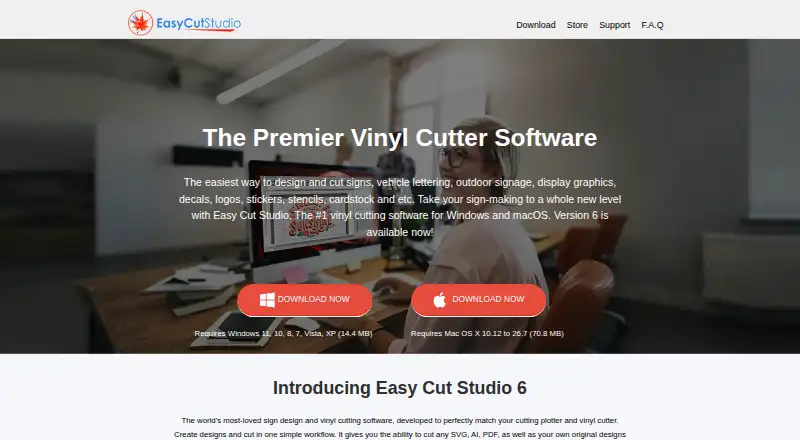
Easy Cut Studio is desktop software for creating sign designs and sending them to vinyl cutters and cutting plotters. It is aimed at sign makers, graphics professionals, small businesses, and hobbyists who need vector and bitmap workflows alongside production controls. Windows and macOS coverage gives it a practical fit for teams or individuals working across those two desktop platforms. The software also supports more than 800 listed cutters and plotters, plus imports for common vector and bitmap formats.
The product uses a paid model with a 15-day free trial and no free plan. Easy Cut Studio 6 for Windows and Easy Cut Studio 6 for Mac are separate plans, and both provide a one-time purchase, no subscription, a lifetime license, and free minor upgrades. The core feature set covers vector drawing, bitmap tracing and vectorization, text and shape welding, node editing, layers, and rhinestone template creation. For production, print-and-cut contour workflows include registration marks, while nesting helps optimize cut layouts.
Its strongest distinction is the connection between design work and cutter output. Layer-based controls support print, cut, draw, and score operations, and direct vinyl-cutter controls include speed, pressure, offsets, and multi-cut settings. That makes Easy Cut Studio a suitable choice for users who want design and machine control in one desktop application, particularly when Windows and macOS support matters. Users seeking browser-based software, a free ongoing plan, or a broader creative suite should look elsewhere.
Your product? Our editors can test Easy Cut Studio in depth and publish a review, labelled as paid · from $149/mo →
Easy Cut Studio pricing
All 2 Easy Cut Studio plans and prices →
Easy Cut Studio fact sheet
| Free plan | No |
|---|---|
| Paid from | Not verified |
| Vinyl cutting | Yes |
| Vehicle graphics | Not verified |
| Lettering tools | Yes |
| Production output | Print-and-cut |
| Supported platforms | Windows and macOS |
| Plotter support | Yes |
| Free trial | 15 days |
| Deployment | Desktop |
| Platforms | Windows, macOS |
| Support | Email, Docs |
| Built for | Solo, Small business, Mid-market (editorial estimate) |
| Pricing | 15-day trial (source) |
| Website | easycutstudio.com |
| Facts checked | 21 Sep 2026 |
Alternatives to Easy Cut Studio
- SAi FlexiA full production suite for sign businesses that design, print and cut in-house.9.3
- VinylMasterA Windows-focused sign-production suite with affordable entry pricing and broad output support.9.1
- SignMasterA Windows-focused sign production suite with broad device support and low upgrade prices.9.0


See all Easy Cut Studio alternatives →
Also Ranked In
Easy Cut Studio is ranked in 2 of our directories.
Used Easy Cut Studio? Be the first to review it
The editor score above is our own research. What this page doesn't have yet is a reader's view — what you used Easy Cut Studio for, what worked and what didn't. No stars are seeded and no review is paid for; an editor reads every one before it appears.
Write a reviewTwo minutes · verified accounts only · read by an editor before it appears
Featured on iTechGuides

Easy Cut Studio is listed in our Sign Design Software directory. Add the badge to your site — it links back to this page.
<a href="https://www.itechguides.com/products/easy-cut-studio/"><img src="https://www.itechguides.com/best/badge/easy-cut-studio.svg" alt="Featured on iTechGuides" width="230" height="46"></a>
Reviewed by iTechGuides Editors · Editorial team · Updated Oct 2026
Advertiser disclosure: iTechGuides is reader-supported. Vendors can pay for top positions in our rankings and for a place on other products' pages, and we may earn a commission when you click some links. Bought places stand at the number bought; this page and our disclosure say so. Paying vendors may get a fuller, more detailed review from our editors, and that review can change their score. How we rank.
Last updated · How we research and update