DrawDiff
DrawDiff: A free, focused tool for visual and text comparison of scanned or revised PDFs. Ranked #18 of 25 in Document Comparison Software by our editors (6.9/10); pricing: Free plan; best for free visual comparison of scanned PDFs.
At a glance
- Editor score6.9 / 10
- PricingFree plan
- Best forFree visual comparison of scanned PDFs
- Free planYes
- Paid fromFree
- PDF comparisonYes
- Facts checked20 Sep 2026
Where it wins
- Pixel-by-pixel overlays show additions, removals, and unchanged content
- OCR fallback and selected-region text comparison support scanned PDFs
- Local browser processing, offline continuation, and JPG/PDF exports
Where it doesn't
- Web-only, with processing centered in the local browser
- Focused on PDF comparison rather than a broad document-format set
- Offline use begins only after the application has loaded
Our verdict on DrawDiff
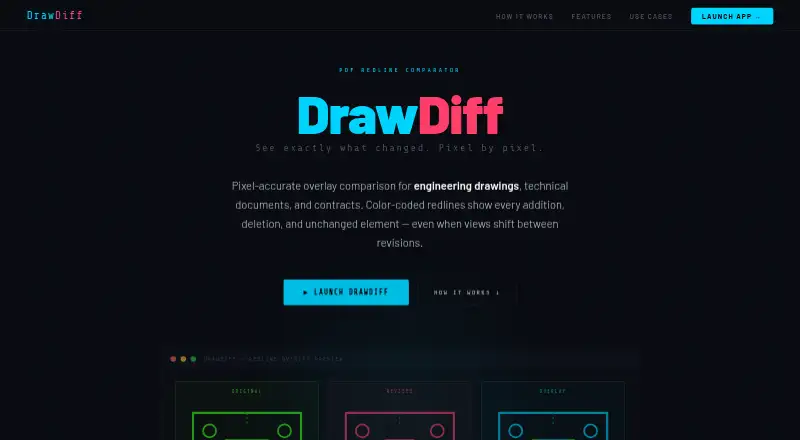
DrawDiff is a browser-based PDF comparison tool for engineering drawings, technical documents, contracts, and other revisions. It compares PDF pages pixel by pixel, using color-coded overlays to show additions, removals, and unchanged content. Its free plan includes PDF comparison, pixel-accurate overlays, local browser processing, and JPG or PDF export. Because it requires no account and can continue working offline after loading, it suits individuals and teams that need a focused way to inspect document revisions without a subscription.
Its standout capability is visual inspection at the page and region level. An alignment tool helps account for shifted views, while automatic detection and numbering identify difference regions. The region inspector can show the overlay, original, and revised views together. For selected areas, DrawDiff adds word-level text comparison, and OCR fallback supports scanned or image-based PDFs. Together, these features make the product useful when formatting changes, drawing revisions, or image-based content matter as much as extracted text.
DrawDiff keeps its scope narrow: the published feature set centers on PDF comparison, visual overlays, OCR fallback, region inspection, and export. It is a strong fit for buyers who want free, browser-based PDF review with local processing and no account requirement. It is less suitable for teams looking for a broader document-comparison system spanning multiple file formats or a centralized platform workflow. Buyers who primarily compare PDFs, especially scanned documents, should find its focused approach aligned with that task.
Your product? Our editors can test DrawDiff in depth and publish a review, labelled as paid · from $149/mo →
DrawDiff pricing
All 1 DrawDiff plans and prices →
DrawDiff fact sheet
| Free plan | Yes |
|---|---|
| Paid from | Free |
| PDF comparison | Yes |
| Office file comparison | Not verified |
| Formatting changes | Yes |
| Redline output | Yes |
| Deployment | Web |
| Maximum file size | Not verified |
| Deployment | Cloud, Self-hosted |
| Platforms | Web |
| Support | Docs |
| Built for | Solo, Small business, Mid-market, Enterprise (editorial estimate) |
| Pricing | Free plan (source) |
| Website | drawdiff.com |
| Facts checked | 20 Sep 2026 |
Alternatives to DrawDiff
- DiffcheckerA broad comparison toolkit with free access and a $15 monthly desktop tier.9.3
- Litera CompareA broad comparison toolkit for redlines, scanned PDFs, and server-side workflows.9.2
- UltraCompareA broad desktop comparison suite for technical teams that need three-way merges.9.0


See all DrawDiff alternatives →
Used DrawDiff? Be the first to review it
The editor score above is our own research. What this page doesn't have yet is a reader's view — what you used DrawDiff for, what worked and what didn't. No stars are seeded and no review is paid for; an editor reads every one before it appears.
Write a reviewTwo minutes · verified accounts only · read by an editor before it appears
Featured on iTechGuides

DrawDiff is listed in our Document Comparison Software directory. Add the badge to your site — it links back to this page.
<a href="https://www.itechguides.com/products/drawdiff/"><img src="https://www.itechguides.com/best/badge/drawdiff.svg" alt="Featured on iTechGuides" width="230" height="46"></a>
Reviewed by iTechGuides Editors · Editorial team · Updated Oct 2026
Advertiser disclosure: iTechGuides is reader-supported. Vendors can pay for top positions in our rankings and for a place on other products' pages, and we may earn a commission when you click some links. Bought places stand at the number bought; this page and our disclosure say so. Paying vendors may get a fuller, more detailed review from our editors, and that review can change their score. How we rank.
Last updated · How we research and update