DocxLens
DocxLens: A free offline-capable comparator for up to five PDFs, Office files, and code documents. Ranked #17 of 25 in Document Comparison Software by our editors (7.0/10); pricing: Free plan; best for free multi-file offline comparison.
At a glance
- Editor score7.0 / 10
- PricingFree plan
- Best forFree multi-file offline comparison
- Free planYes
- Paid fromFree
- PDF comparisonYes
- Facts checked20 Sep 2026
Where it wins
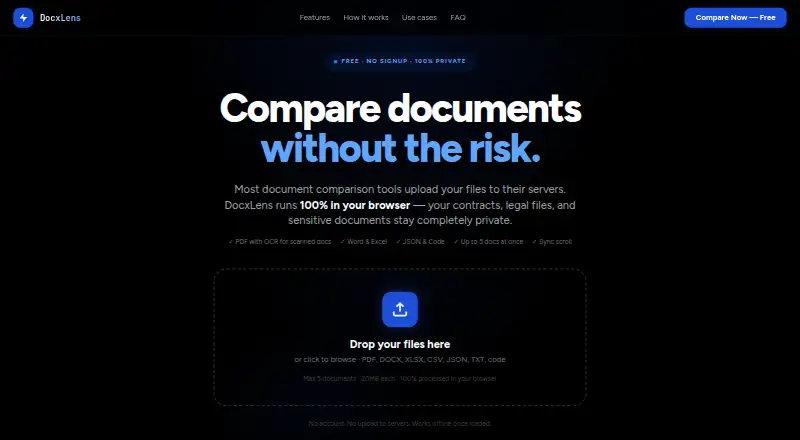
- Compares PDFs, Office files, spreadsheets, JSON, text, Markdown, and code
- OCR support handles scanned PDFs alongside standard document formats
- Local browser processing, synchronized scrolling, and five-document comparison
Where it doesn't
- Each file is limited to 20MB
- Plain-text diff-summary export may not suit formatted review workflows
- Web-based access depends on page initialization before offline processing
Our verdict on DocxLens
DocxLens is a free, browser-based document comparison tool for lawyers, finance teams, developers, HR teams, and operations users. It compares PDFs, DOCX and DOC files, XLSX, XLS and CSV spreadsheets, plus JSON, text, Markdown and code files. Files are processed locally in the browser using WebAssembly, without uploads or an account. The comparison view supports up to five documents simultaneously, with side-by-side synchronized scrolling and line-level and word-level difference highlighting. Scanned PDFs are supported through OCR, and each file can be up to 20MB.
The pricing structure is straightforward: the Free plan costs $0, requires no signup, has no hidden limits, and provides browser-based processing. There are no paid tiers described. That makes DocxLens a practical fit for users who need recurring comparisons across mixed file types without adding a subscription or account requirement. Its multi-document view is particularly relevant when reviewing several versions or related files at once, while support for spreadsheets and code broadens its use beyond conventional Word and PDF review.
Its main trade-off is focus. DocxLens emphasizes local comparison, synchronized viewing, and readable difference highlighting rather than a broader document-review workflow. The published features include plain-text diff-summary export, but they do not establish formatted redlines or other markup-oriented review capabilities. The browser model also means the page must initialize before offline processing is available, and the 20MB per-file limit may constrain larger documents. Choose DocxLens for free, local, multi-format comparison; choose another tool if formatted redlines or larger-file handling are central requirements.
Your product? Our editors can test DocxLens in depth and publish a review, labelled as paid · from $149/mo →
DocxLens pricing
All 1 DocxLens plans and prices →
DocxLens fact sheet
| Free plan | Yes |
|---|---|
| Paid from | Free |
| PDF comparison | Yes |
| Office file comparison | Yes |
| Formatting changes | Not verified |
| Redline output | Not verified |
| Deployment | Web |
| Maximum file size | Not verified |
| Deployment | Cloud |
| Platforms | Web |
| Built for | Solo, Small business, Mid-market (editorial estimate) |
| Pricing | Free plan (source) |
| Website | docxlens.com |
| Facts checked | 20 Sep 2026 |
Alternatives to DocxLens
- DiffcheckerA broad comparison toolkit with free access and a $15 monthly desktop tier.9.3
- Litera CompareA broad comparison toolkit for redlines, scanned PDFs, and server-side workflows.9.2
- UltraCompareA broad desktop comparison suite for technical teams that need three-way merges.9.0


See all DocxLens alternatives →
Used DocxLens? Be the first to review it
The editor score above is our own research. What this page doesn't have yet is a reader's view — what you used DocxLens for, what worked and what didn't. No stars are seeded and no review is paid for; an editor reads every one before it appears.
Write a reviewTwo minutes · verified accounts only · read by an editor before it appears
Featured on iTechGuides

DocxLens is listed in our Document Comparison Software directory. Add the badge to your site — it links back to this page.
<a href="https://www.itechguides.com/products/docxlens/"><img src="https://www.itechguides.com/best/badge/docxlens.svg" alt="Featured on iTechGuides" width="230" height="46"></a>
Reviewed by iTechGuides Editors · Editorial team · Updated Oct 2026
Advertiser disclosure: iTechGuides is reader-supported. Vendors can pay for top positions in our rankings and for a place on other products' pages, and we may earn a commission when you click some links. Bought places stand at the number bought; this page and our disclosure say so. Paying vendors may get a fuller, more detailed review from our editors, and that review can change their score. How we rank.
Last updated · How we research and update