
digiKam
digiKam: A free desktop catalog and editor with strong RAW, metadata, AI, and batch tools. Ranked #5 of 37 in Photo Management Software by our editors (9.0/10); pricing: Free plan; best for free desktop cataloging and editing.
At a glance
- Editor score9.0 / 10
- PricingFree plan
- Best forFree desktop cataloging and editing
- Free planYes
- Paid fromFree
- Face recognitionYes
- Facts checked20 Sep 2026
Where it wins
- RAW support, face recognition, AI tagging, and natural-language search
- Detailed EXIF, IPTC, XMP, and ExifTool metadata editing
- Runs on Windows, macOS, and Linux with batch workflows
Where it doesn't
- No cloud synchronization
- Desktop-focused rather than a cloud photo-management service
- Remote web-service publishing depends on optional plugins
Our verdict on digiKam
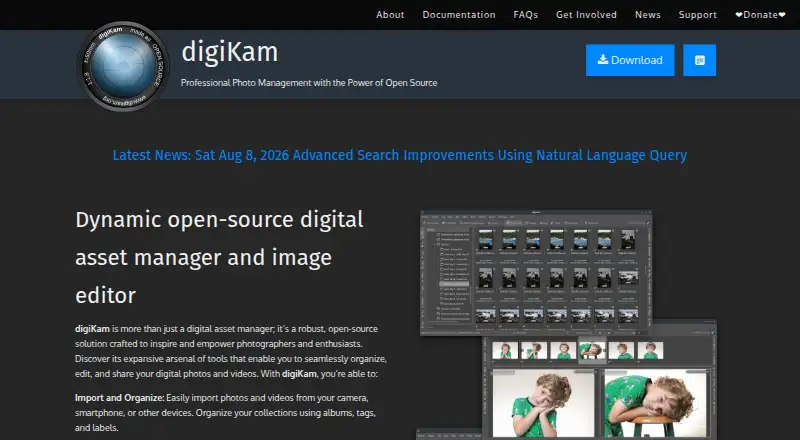
digiKam is a free, open-source desktop application for photographers, hobbyists, and professionals who want to manage photo and video collections locally. It imports media from cameras, smartphones, and other devices, then organizes collections with albums, tags, labels, dates, geolocation, and metadata. The application supports Windows, macOS, and Linux, making it suitable for users who want a cross-platform cataloging and editing tool rather than a browser-first service.
Its strongest area is the depth of its desktop workflow. digiKam supports RAW images through LibRaw and includes image editing, color correction, cropping, retouching, and filters. Face detection and face recognition help organize people-focused libraries, while AI auto-tagging, aesthetic detection, advanced search, and natural-language search add discovery options beyond folders and filenames. Metadata work is also detailed, with viewing and editing for EXIF, IPTC, XMP, and ExifTool data. Batch processing and queue-based workflows are useful for handling repeated operations across larger collections.
The pricing model is straightforward: digiKam is free and open source. Collections can be stored on local or removable media, network storage, or remote database-backed media, and the application can export to remote computers and network storage protocols. Optional plugins can export to remote web services. The main boundary is its local desktop orientation: it is not a cloud photo-management service and does not provide cloud synchronization. Choose digiKam if you want extensive cataloging, metadata, RAW, recognition, AI, and editing capabilities without a paid desktop plan. Look elsewhere if synchronized cloud access is central to your workflow.
Your product? Our editors can test digiKam in depth and publish a review, labelled as paid · from $149/mo →
digiKam pricing
digiKam fact sheet
| Free plan | Yes |
|---|---|
| Paid from | Free |
| Primary platform | Multi-platform |
| RAW photo support | Yes |
| Face recognition | Yes |
| AI-powered search | Yes |
| Metadata tools | Yes |
| Cloud sync | No |
| Included storage | Not verified |
| Deployment | Desktop |
| Platforms | Windows, macOS, Linux |
| Compliance & security | GDPR |
| Support | Docs |
| Built for | Solo, Small business (editorial estimate) |
| Pricing | Free plan |
| Website | digikam.org |
| Facts checked | 20 Sep 2026 |
Alternatives to digiKam
- Google PhotosA capable photo library for automatic backup, smart search, editing, and sharing.9.4
- Apple PhotosA capable Apple-centered photo library with flexible storage and family sharing.9.3
- Amazon PhotosA capable photo library for Prime members who want full-resolution storage and broad device access.9.2



See all digiKam alternatives →
digiKam vs the competition
- digiKam vs Google Photos
- digiKam vs Apple Photos
- digiKam vs Amazon Photos
- digiKam vs Synology Photos
- digiKam vs Zoner Photo Studio X
- digiKam vs Flickr



Compare digiKam with any tool side by side →
Also Ranked In
digiKam is ranked in 3 of our directories.
Used digiKam? Be the first to review it
The editor score above is our own research. What this page doesn't have yet is a reader's view — what you used digiKam for, what worked and what didn't. No stars are seeded and no review is paid for; an editor reads every one before it appears.
Write a reviewTwo minutes · verified accounts only · read by an editor before it appears
Featured on iTechGuides

digiKam is listed in our Photo Management Software directory. Add the badge to your site — it links back to this page.
<a href="https://www.itechguides.com/products/digikam/"><img src="https://www.itechguides.com/best/badge/digikam.svg" alt="Featured on iTechGuides" width="230" height="46"></a>
Reviewed by iTechGuides Editors · Editorial team · Updated Oct 2026
Advertiser disclosure: iTechGuides is reader-supported. Vendors can pay for top positions in our rankings and for a place on other products' pages, and we may earn a commission when you click some links. Bought places stand at the number bought; this page and our disclosure say so. Paying vendors may get a fuller, more detailed review from our editors, and that review can change their score. How we rank.
Last updated · How we research and update