
Dhub
Dhub: A focused Markdown and MDX CMS for teams working in GitHub. Ranked #12 of 23 in Git-Based CMS by our editors (8.2/10); pricing: Free plan · 14-day trial; best for documentation teams using Docusaurus or Next.js.
At a glance
- Editor score8.2 / 10
- PricingFree plan · 14-day trial
- Best forDocumentation teams using Docusaurus or Next.js
- Free planYes
- Paid from$16/mo
- Visual editorYes
- Facts checked22 Sep 2026
Where it wins
- Visual WYSIWYG editing for Markdown and MDX
- Two-way GitHub sync with commits and pull requests
- Navigation, media, frontmatter, and MDX component management
Where it doesn't
- GitHub is the only listed integration
- Web is the only listed platform
- Hobby is limited to personal, non-commercial public repositories
Our verdict on Dhub
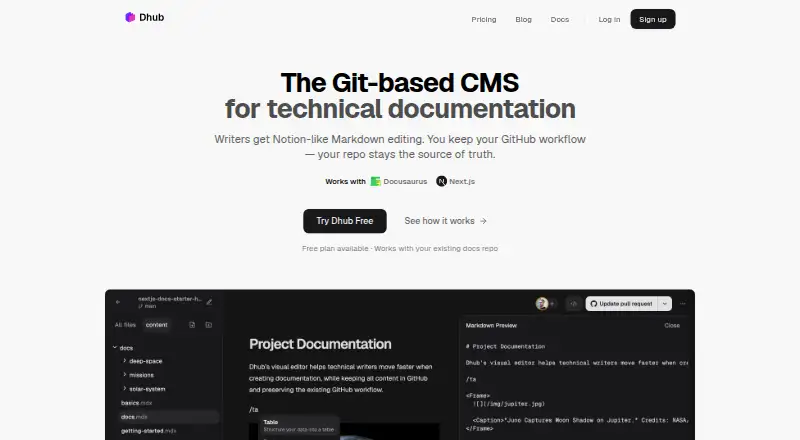
Dhub is a cloud content management system for technical documentation stored as Markdown or MDX in GitHub repositories. It is aimed at writers, product managers, and developers who want visual editing while keeping GitHub as the source of truth. Its feature set fits documentation projects built with Docusaurus, Next.js, TanStack Start, and other Markdown-based systems. Editors can work with formatted content without giving up repository-based workflows.
The free Hobby tier is for personal, non-commercial use with personal GitHub accounts and public repositories. A 14-day free trial is also available without requiring payment details. Starter costs $16 per month or $192 per year and adds real-time collaboration, GitHub Organizations support, and private repositories. Team costs $50 per month or $600 per year and includes everything in Starter, along with the listed collaboration and organization features. The plan structure makes Hobby suitable for individual public projects, while Starter is the practical entry point for teams and private documentation.
Dhub’s strongest fit is a GitHub-centered workflow that needs more than raw Markdown editing. It supports two-way synchronization, direct commits to a branch, pull request creation, image upload and management, frontmatter editing, custom MDX components, and visual documentation navigation management. Those capabilities give documentation teams a way to involve non-developer contributors while preserving review through Git. The tradeoff is a narrow ecosystem: GitHub is the listed integration and web is the listed platform. Teams using another Git provider or needing broader platform coverage should choose a different CMS. Dhub suits documentation teams already committed to GitHub, Markdown, and MDX; it is less suitable for projects outside that workflow.
Your product? Our editors can test Dhub in depth and publish a review, labelled as paid · from $149/mo →
Dhub pricing
Dhub fact sheet
| Free plan | Yes |
|---|---|
| Paid from | $16/mo |
| Visual editor | Yes |
| Live preview | Not verified |
| Git providers | Github |
| Content workflow | Draft_review |
| Media management | Library |
| Deployment method | Both |
| Hosting model | Vendor_hosted |
| Free trial | 14 days |
| Deployment | Cloud |
| Platforms | Web |
| Support | Email, Community |
| Built for | Solo, Small business, Mid-market (editorial estimate) |
| Integrations | 5 integrations: GitHub, Docusaurus, Next.js, Fumadocs, TanStack Start |
| Pricing | Free plan · 14-day trial (source) |
| Website | dhub.dev |
| Facts checked | 22 Sep 2026 |
Dhub integrations
Dhub lists 5 integrations on its own site.
- GitHub
- Docusaurus
- Next.js
- Fumadocs
- TanStack Start
Alternatives to Dhub
- CloudCannonA full editorial layer for teams managing static sites through Git.9.4
- CrafterCMSA broad Git-based CMS for enterprise teams that need APIs, workflows, and localization.9.2
- Decap CMSA flexible free Git CMS for teams building and editing static-site content.9.1



Used Dhub? Be the first to review it
The editor score above is our own research. What this page doesn't have yet is a reader's view — what you used Dhub for, what worked and what didn't. No stars are seeded and no review is paid for; an editor reads every one before it appears.
Write a reviewTwo minutes · verified accounts only · read by an editor before it appears
Featured on iTechGuides

Dhub is listed in our Git-Based CMS directory. Add the badge to your site — it links back to this page.
<a href="https://www.itechguides.com/products/dhub/"><img src="https://www.itechguides.com/best/badge/dhub.svg" alt="Featured on iTechGuides" width="230" height="46"></a>
Reviewed by iTechGuides Editors · Editorial team · Updated Oct 2026
Advertiser disclosure: iTechGuides is reader-supported. Vendors can pay for top positions in our rankings and for a place on other products' pages, and we may earn a commission when you click some links. Bought places stand at the number bought; this page and our disclosure say so. Paying vendors may get a fuller, more detailed review from our editors, and that review can change their score. How we rank.
Last updated · How we research and update