
CubbyCAD
CubbyCAD: A free browser tool that combines solid modeling, sculpting, scripting, and print export. Ranked #84 of 147 in 3D Modeling Software by our editors (3.0/10); pricing: Free plan; best for beginners wanting free browser-based modeling.
At a glance
- Editor score3.0 / 10
- PricingFree plan
- Best forBeginners wanting free browser-based modeling
- Free planYes
- Platform accessBrowser
- Facts checked22 Sep 2026
Where it wins
- Free plan includes core modeling, sculpting, sketching, and STL export
- Combines solids, sculpting, modifiers, scripting, rigging, and mesh workflows
- Browser access includes an integrated experimental slicer
Where it doesn't
- Free plan is limited to 10 documents and 50 MB of cloud workspace
- The integrated slicer is experimental
- Browser-only access may not suit desktop-first workflows
Our verdict on CubbyCAD
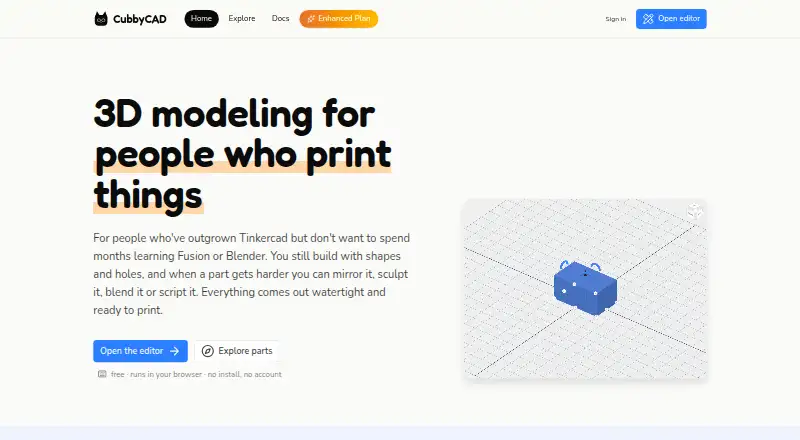
CubbyCAD is a browser-based 3D modeling tool for people designing parts for 3D printing. It is aimed at users who have outgrown beginner modeling tools but do not want the complexity of professional CAD. The workspace combines direct solid modeling, live boolean operations, sculpting, 3D sketching, extrude, revolve, loft, editable modifiers, scripted parts, mesh import, reference images, rigging, posing, and print-oriented exports. It supports browser, local-folder, and cloud workspaces.
The free plan covers core modeling and booleans, sculpting tools, a 3D sketcher, STL export, up to 10 documents, and a 50 MB cloud workspace. The Enhanced plan adds the full sculpting toolset, advanced modifiers, STL, STEP, glTF/GLB, and PLY export, unlimited documents, an AI Assistant, and skeleton and posing tools. An annual-billing version of Enhanced is also listed. This makes the product’s plan structure easy to understand: the free tier supports fundamental modeling and STL-based printing, while Enhanced expands file-format coverage, document capacity, sculpting depth, and character-oriented workflows.
Its breadth is the main reason to consider it. Direct solids and parametric scripting support precise parts, while sculpting, mesh import, modifiers, rigging, and reference images extend the tool beyond a single modeling method. The integrated slicer keeps printing in the same browser workflow, although it is described as experimental. CubbyCAD should suit beginners and developing makers who want a free starting point with room to explore different techniques. Users who need desktop software, established integrations, or a production-focused slicing workflow should look elsewhere.
Your product? Our editors can test CubbyCAD in depth and publish a review, labelled as paid · from $149/mo →
CubbyCAD pricing
All 2 CubbyCAD plans and prices →
CubbyCAD fact sheet
| Free plan | Yes |
|---|---|
| Paid from | Not verified |
| Platform access | Browser |
| Sculpting tools | Yes |
| Animation tools | Yes |
| Parametric modeling | Yes |
| Render engine | Not verified |
| 3D print export | Yes |
| Deployment | Cloud, Desktop |
| Platforms | Web |
| Support | Docs |
| Built for | Solo, Small business (editorial estimate) |
| Pricing | Free plan (source) |
| Website | cubbycad.com |
| Facts checked | 22 Sep 2026 |
Alternatives to CubbyCAD
- BlenderA broad free 3D suite covering modeling, animation, rendering, scripting, and print export.9.3
- HoudiniA deep procedural 3D suite for VFX, animation, games, and technical art.9.1
- Autodesk MayaA mature desktop suite for studios handling modeling, animation, VFX, and rendering.9.0



See all CubbyCAD alternatives →
Used CubbyCAD? Be the first to review it
The editor score above is our own research. What this page doesn't have yet is a reader's view — what you used CubbyCAD for, what worked and what didn't. No stars are seeded and no review is paid for; an editor reads every one before it appears.
Write a reviewTwo minutes · verified accounts only · read by an editor before it appears
Featured on iTechGuides

CubbyCAD is listed in our 3D Modeling Software directory. Add the badge to your site — it links back to this page.
<a href="https://www.itechguides.com/products/cubbycad/"><img src="https://www.itechguides.com/best/badge/cubbycad.svg" alt="Featured on iTechGuides" width="230" height="46"></a>
Reviewed by iTechGuides Editors · Editorial team · Updated Oct 2026
Advertiser disclosure: iTechGuides is reader-supported. Vendors can pay for top positions in our rankings and for a place on other products' pages, and we may earn a commission when you click some links. Bought places stand at the number bought; this page and our disclosure say so. Paying vendors may get a fuller, more detailed review from our editors, and that review can change their score. How we rank.
Last updated · How we research and update