
Cubbily
Cubbily: A flexible family organizer for schedules, shifts, care notes, and household lists. Ranked #11 of 43 in Family Calendar Apps by our editors (7.0/10); pricing: Free plan · 7-day trial; best for families needing shifts, care notes, and lists.
At a glance
- Editor score7.0 / 10
- PricingFree plan · 7-day trial
- Best forFamilies needing shifts, care notes, and lists
- Free planYes
- Shared tasksYes
- Facts checked21 Sep 2026
Where it wins
- Day, week, month, and task calendar views
- Shift scheduling for rotating, night, and on-duty work
- Shared chores, shopping, grocery, and meal-planning tools
Where it doesn't
- Advanced features are reserved for Pro plans
- The product focuses on household coordination rather than broad productivity
- Calendar synchronization centers on Apple and Google calendars
Our verdict on Cubbily
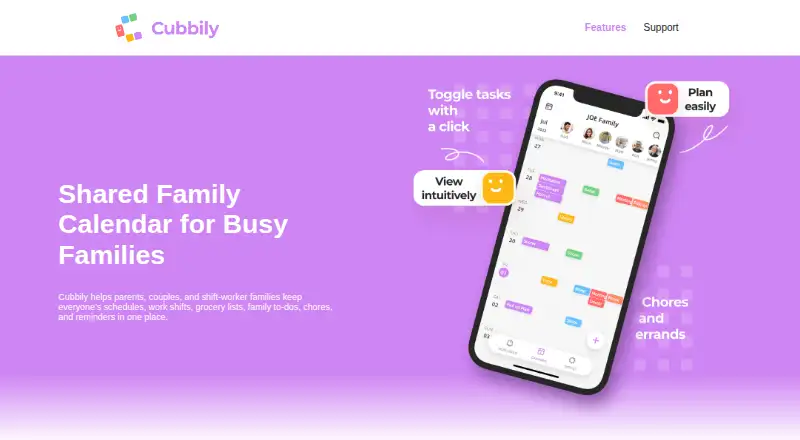
Cubbily is a shared family calendar and household organizer for parents, couples, caregivers, and shift-worker households. It brings schedules, work shifts, recurring events, reminders, chores, shopping, groceries, meal plans, milestones, care notes, and household information into one mobile app. Families can switch between day, week, month, and task views while coordinating responsibilities across iOS and Android devices.
The pricing structure starts with a free plan and includes a seven-day free trial. Paid access is offered through Cubbily Calendar Pro Monthly and Cubbily Calendar Pro Yearly. Both Pro plans include the same listed additions: a multi-view calendar, an ad-free experience, widgets, multiple reminders, search, and selected-member event visibility. This makes the choice primarily about billing frequency rather than a different feature set. Families wanting core shared scheduling can begin with the free plan, while households needing more reminders, filtering, and control over event visibility have a clear reason to consider Pro.
Cubbily’s strongest fit is households managing more than appointments. Rotating, night, and on-duty shift scheduling support work patterns that ordinary family calendars may not represent well, while shared to-do, grocery, shopping, and chore lists keep household tasks alongside events. Apple Calendar and Google Calendar synchronization also helps connect existing calendars. However, its focus is specifically family and household coordination. Choose Cubbily if shifts, care notes, recurring responsibilities, and shared lists belong in the same system; choose a narrower calendar app if you only need basic event planning or do not need household organization features.
Your product? Our editors can test Cubbily in depth and publish a review, labelled as paid · from $149/mo →
Cubbily pricing
All 2 Cubbily plans and prices →
Cubbily fact sheet
| Free plan | Yes |
|---|---|
| Paid from | Not verified |
| Member limit | Not verified |
| Shared tasks | Yes |
| Reminders | Yes |
| Meal planning | Yes |
| Shared shopping lists | Yes |
| Location sharing | Not verified |
| Free trial | 7 days |
| Deployment | Mobile |
| Platforms | iOS, Android |
| Support | |
| Built for | Solo, Small business (editorial estimate) |
| Integrations | 3 integrations: Apple Calendar, Google Calendar, other third-party calendars |
| Pricing | Free plan · 7-day trial (source) |
| Website | cubbily.com |
| Facts checked | 21 Sep 2026 |
Cubbily integrations
Cubbily lists 3 integrations on its own site.
- Apple Calendar
- Google Calendar
- other third-party calendars
Alternatives to Cubbily
- CoziA mature family organizer that combines calendars, lists, meals, and chores.8.8
- TimeTreeA focused shared-calendar app for families that need clear schedule communication.8.6
- FamilyWallA broad family organizer with shared calendars, planning tools, and safety features.7.9



See all Cubbily alternatives →
Used Cubbily? Be the first to review it
The editor score above is our own research. What this page doesn't have yet is a reader's view — what you used Cubbily for, what worked and what didn't. No stars are seeded and no review is paid for; an editor reads every one before it appears.
Write a reviewTwo minutes · verified accounts only · read by an editor before it appears
Featured on iTechGuides

Cubbily is listed in our Family Calendar Apps directory. Add the badge to your site — it links back to this page.
<a href="https://www.itechguides.com/products/cubbily/"><img src="https://www.itechguides.com/best/badge/cubbily.svg" alt="Featured on iTechGuides" width="230" height="46"></a>
Reviewed by iTechGuides Editors · Editorial team · Updated Oct 2026
Advertiser disclosure: iTechGuides is reader-supported. Vendors can pay for top positions in our rankings and for a place on other products' pages, and we may earn a commission when you click some links. Bought places stand at the number bought; this page and our disclosure say so. Paying vendors may get a fuller, more detailed review from our editors, and that review can change their score. How we rank.
Last updated · How we research and update