
csprite
csprite: A focused open-source canvas for simple pixel-art drawing on desktop. Ranked #68 of 70 in Pixel Art Software by our editors (5.5/10); pricing: Free plan; best for minimal open-source pixel drawing.
At a glance
- Editor score5.5 / 10
- PricingFree plan
- Best forMinimal open-source pixel drawing
- Free planYes
- Paid fromFree
- Facts checked22 Sep 2026
Where it wins
- Free and open-source across Windows, Linux, and macOS
- Includes brushes, eraser, fill, palette, eyedropper, and zoom tools
- Supports creating, opening, and saving pixel-art projects
Where it doesn't
- Desktop deployment only
- Export format is limited to .csprite
- Documentation includes legacy v0.1.x interface pages
Our verdict on csprite
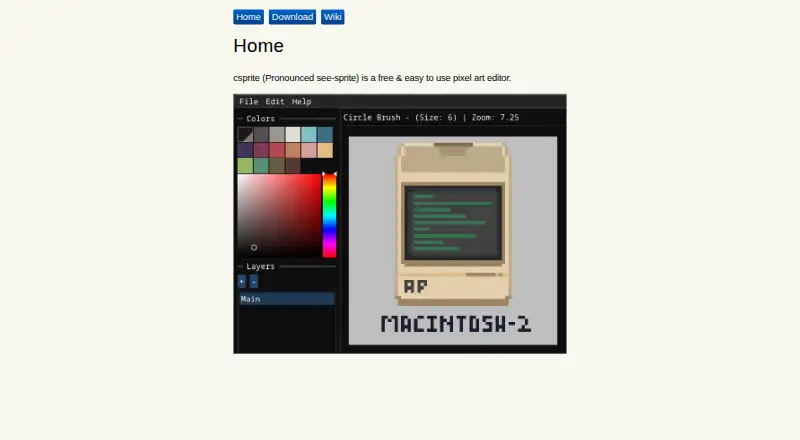
csprite is a free, open-source desktop editor for creating and editing pixel art. It is aimed at solo creators and small teams that want a straightforward canvas rather than a broad production suite. Users can create a new pixel-art canvas, open existing files, draw with square and circle brushes, erase, fill enclosed areas, select colors from a palette, use an eyedropper, adjust brush size, and zoom the workspace. Projects can be saved through Save and Save As commands.
The main strength is its focused drawing workflow across Windows, Linux, and macOS. Palette-based color selection and indexed color support suit sprite work that depends on controlled colors, while the core brush, fill, eraser, and zoom tools cover essential editing tasks. Open-source availability also makes csprite a practical option for users who prefer software they can inspect and work with as a desktop project. Its narrow scope keeps the feature set centered on pixel drawing instead of surrounding production workflows.
csprite is a sensible pick for basic sprite creation, small illustrations, and editing projects that can remain in the .csprite format. Buyers looking for animation-oriented features, onion-skinning, spritesheet export, or broader production capabilities should choose a different pixel-art application. The project documentation also includes pages describing the legacy v0.1.x interface, so users should expect to consult a relatively focused documentation set. Choose csprite when free desktop drawing is the priority; look elsewhere when pipeline integration or advanced sprite production is central.
Your product? Our editors can test csprite in depth and publish a review, labelled as paid · from $149/mo →
csprite pricing
csprite fact sheet
| Free plan | Yes |
|---|---|
| Paid from | Free |
| Animation timeline | Not verified |
| Indexed color tools | Yes |
| Sprite-sheet export | Not verified |
| Onion skinning | Not verified |
| Tilemap tools | Not verified |
| Supported platforms | Windows, Linux, macOS |
| Export formats | .csprite |
| Deployment | Desktop |
| Platforms | Windows, Linux, macOS |
| Support | Docs |
| Built for | Solo, Small business (editorial estimate) |
| Pricing | Free plan |
| Website | csprite.github.io |
| Facts checked | 22 Sep 2026 |
Alternatives to csprite
- PixeloramaA capable free pixel art editor with broad platform support and automation tools.9.4
- PixelWallA capable free pixel-art editor with broad platform support and $15 Pro exports.9.3
- Pix2DA capable free pixel art editor for artists working across web, desktop, and Android.9.1



See all csprite alternatives →
Used csprite? Be the first to review it
The editor score above is our own research. What this page doesn't have yet is a reader's view — what you used csprite for, what worked and what didn't. No stars are seeded and no review is paid for; an editor reads every one before it appears.
Write a reviewTwo minutes · verified accounts only · read by an editor before it appears
Featured on iTechGuides

csprite is listed in our Pixel Art Software directory. Add the badge to your site — it links back to this page.
<a href="https://www.itechguides.com/products/csprite/"><img src="https://www.itechguides.com/best/badge/csprite.svg" alt="Featured on iTechGuides" width="230" height="46"></a>
Reviewed by iTechGuides Editors · Editorial team · Updated Oct 2026
Advertiser disclosure: iTechGuides is reader-supported. Vendors can pay for top positions in our rankings and for a place on other products' pages, and we may earn a commission when you click some links. Bought places stand at the number bought; this page and our disclosure say so. Paying vendors may get a fuller, more detailed review from our editors, and that review can change their score. How we rank.
Last updated · How we research and update