
Cosmos Video
Cosmos Video: A feature-rich virtual study space for teams that need more than a focus timer. Ranked #28 of 37 in Virtual Study Room Apps by our editors (6.6/10); pricing: Free plan · 14-day trial; best for teams needing rich virtual spaces.
At a glance
- Editor score6.6 / 10
- PricingFree plan · 14-day trial
- Best forTeams needing rich virtual spaces
- Free planYes
- Paid from$8.80/user/mo
- Accountability toolsYes
- Facts checked21 Sep 2026
Where it wins
- Free plan supports unlimited members and up to 4 online users
- Focus Rooms combine muted video, task status, and timed sessions
- Persistent spaces include messaging, AI transcription, and embedded apps
Where it doesn't
- Free spaces are limited to 4 concurrent online users
- Premium billing is based on concurrent users, not total members
- Its broad workspace features may exceed the needs of simple study groups
Our verdict on Cosmos Video
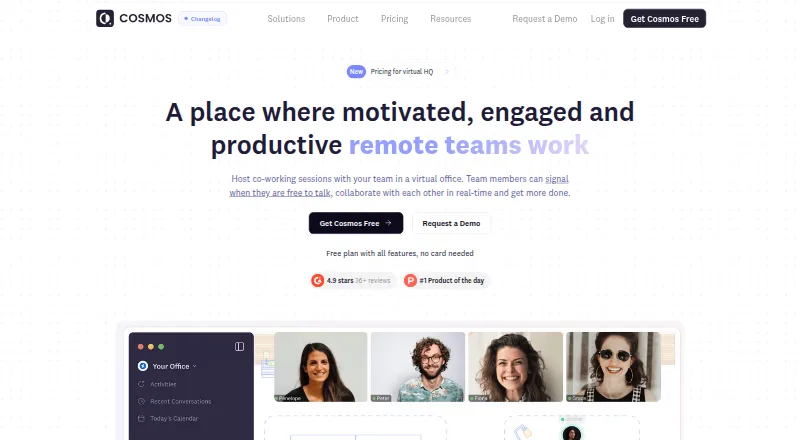
Cosmos Video is a browser, desktop, and mobile virtual office for remote teams, communities, and educators. It combines live coworking Focus Rooms, persistent spaces with spatial audio, private rooms, Meeting Rooms, messaging, screen sharing, recordings, and embedded apps. Focus Rooms are designed for visible, quiet co-working, with cameras enabled, microphones muted, shared tasks, and timed sessions. That makes Cosmos Video a fit for teams that want an ongoing digital place to work together rather than a standalone timer or video call.
The Free plan includes unlimited members, up to 4 online users in a space, calls with up to 4 participants, AI transcription, and 7-day recording retention. Premium costs $8.80 per concurrent user per month and raises capacity to 150 online users and 150 call participants, while adding HD video and 4K screen sharing. Enterprise supports up to 500 online users and call participants, with SSO and secure access, an uptime SLA, and dedicated support. The capacity-based structure suits teams that need predictable room limits, but smaller groups should weigh whether the broader workspace is worth moving beyond the Free plan.
Platform coverage spans web, Windows, macOS, iOS, and Android. Calendar connections include Google Calendar and Outlook Calendar, while Slack, Spotify, Miro, Figma, Google Docs, and YouTube extend the workspace around communication, media, design, and documents. Customizable floor plans, room types, private room locking, knock-to-enter access, breakout rooms, AI transcription, and summaries give the product unusual breadth for a study-room app. Choose Cosmos Video if your group values persistent spaces, video presence, collaboration tools, and room customization. Groups seeking only lightweight, private study sessions may find its wider feature set unnecessary.
Your product? Our editors can test Cosmos Video in depth and publish a review, labelled as paid · from $149/mo →
Cosmos Video pricing
All 3 Cosmos Video plans and prices →
Cosmos Video fact sheet
| Free plan | Yes |
|---|---|
| Paid from | $8.80/user/mo |
| Live coworking rooms | Yes |
| Private rooms | Yes |
| Video presence | Yes |
| Focus timer | Yes |
| Accountability tools | Yes |
| Room capacity | 150 users |
| Mobile app | Yes |
| Free trial | 14 days · card required |
| Deployment | Cloud, Desktop, Mobile |
| Platforms | Web, Windows, macOS, iOS, Android |
| Compliance & security | SOC 2, GDPR |
| Support | Email, Docs |
| Built for | Small business, Mid-market, Enterprise (editorial estimate) |
| Integrations | 8 integrations: Google Calendar, Outlook Calendar, Slack, Spotify, Miro, Figma … |
| Pricing | Free plan · 14-day trial (source) |
| Website | cosmos.video |
| Facts checked | 21 Sep 2026 |
Cosmos Video integrations
Cosmos Video lists 8 integrations on its own site.
- Google Calendar
- Outlook Calendar
- Slack
- Spotify
- Miro
- Figma
- Google Docs
- YouTube
Alternatives to Cosmos Video
- AcademyNCA broad study workspace combining live rooms, planning, accountability and AI tools.9.4
- OdakooA free, feature-rich browser study room with timers, planning, chat, and gamification.9.3
- BuggyverseA free web study room for accountability, planning, and focused group work.9.2



See all Cosmos Video alternatives →
Used Cosmos Video? Be the first to review it
The editor score above is our own research. What this page doesn't have yet is a reader's view — what you used Cosmos Video for, what worked and what didn't. No stars are seeded and no review is paid for; an editor reads every one before it appears.
Write a reviewTwo minutes · verified accounts only · read by an editor before it appears
Featured on iTechGuides

Cosmos Video is listed in our Virtual Study Room Apps directory. Add the badge to your site — it links back to this page.
<a href="https://www.itechguides.com/products/cosmos-video/"><img src="https://www.itechguides.com/best/badge/cosmos-video.svg" alt="Featured on iTechGuides" width="230" height="46"></a>
Reviewed by iTechGuides Editors · Editorial team · Updated Oct 2026
Advertiser disclosure: iTechGuides is reader-supported. Vendors can pay for top positions in our rankings and for a place on other products' pages, and we may earn a commission when you click some links. Bought places stand at the number bought; this page and our disclosure say so. Paying vendors may get a fuller, more detailed review from our editors, and that review can change their score. How we rank.
Last updated · How we research and update