
CombinePDF
CombinePDF: A straightforward free web tool for occasional PDF and image merging. Ranked #21 of 36 in PDF Merger Software by our editors (7.3/10); pricing: Free plan; best for occasional free browser merging.
At a glance
- Editor score7.3 / 10
- PricingFree plan
- Best forOccasional free browser merging
- Free planYes
- Paid fromFree
- Facts checked20 Sep 2026
Where it wins
- Merges PDFs with JPG, JPEG, PNG, and BMP images
- Supports up to 20 files per merge with file ordering
- No sign-up or watermark; files are deleted when leaving the page
Where it doesn't
- Web-only access limits it to browser-based workflows
- Each uploaded file must be 120 MB or smaller
- Focused on merging rather than broader PDF document tasks
Our verdict on CombinePDF
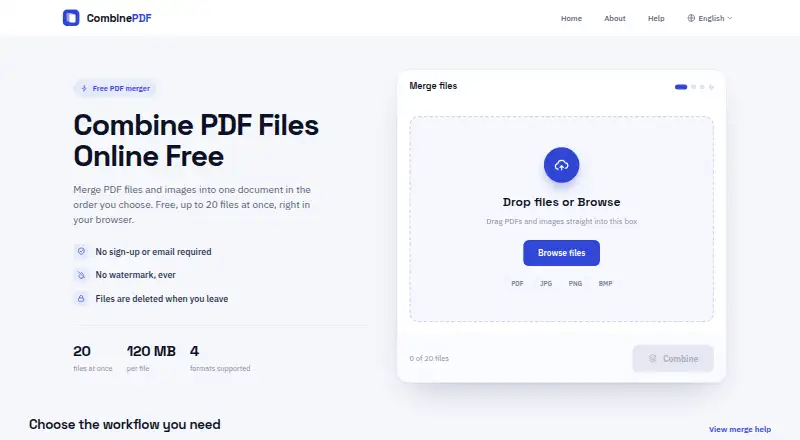
CombinePDF is a free web-based PDF merger for people who need to combine multiple PDF files or images into one downloadable PDF. It supports PDF, JPG, JPEG, PNG, and BMP inputs, and lets users arrange uploaded files before merging. No registration is required, and the generated PDF can be downloaded after processing. Its straightforward scope makes it a practical fit for occasional document combining rather than a broader PDF management workflow.
The Free plan costs nothing and includes PDF and image merging, no watermark, no sign-up requirement, support for up to 20 files per merge, and a 120 MB maximum per file. The plan covers the complete published offering, with no paid tier described. That makes the product easy to evaluate for one-off tasks or light recurring use, while the 20-file and per-file size limits define its practical ceiling. Users handling larger or more extensive batches may need a different tool.
CombinePDF’s main strength is its narrow, browser-first workflow: upload files, arrange them, merge them, and download the result. It also automatically deletes uploaded files and generated PDFs when the user leaves the page. The trade-off is equally clear: it is available through the web, and its documented feature set centers on combining files rather than editing or managing PDFs more broadly. Choose CombinePDF for occasional free merging without an account or watermark. Choose an alternative when your workflow requires capabilities beyond file combination, larger inputs, or more than 20 files at once.
Your product? Our editors can test CombinePDF in depth and publish a review, labelled as paid · from $149/mo →
CombinePDF pricing
All 1 CombinePDF plans and prices →
CombinePDF fact sheet
| Free plan | Yes |
|---|---|
| Paid from | Free |
| Batch merging | Not verified |
| Page selection | Yes |
| Files per merge | Not verified |
| Maximum file size | Not verified |
| Primary platform | Web |
| Cloud storage support | Not verified |
| Deployment | Cloud |
| Platforms | Web |
| Support | Email, Docs |
| Pricing | Free plan (source) |
| Website | combinepdf.app |
| Facts checked | 20 Sep 2026 |
Alternatives to CombinePDF
- PDFsam BasicA free, open-source PDF toolkit with detailed merging controls and offline processing.9.4
- PDF24 CreatorA mature free PDF toolkit that goes far beyond merging, but works only on Windows.9.3
- PDFtkA precise PDF toolkit for users who need page-level control and command-line processing.9.1


See all CombinePDF alternatives →
Used CombinePDF? Be the first to review it
The editor score above is our own research. What this page doesn't have yet is a reader's view — what you used CombinePDF for, what worked and what didn't. No stars are seeded and no review is paid for; an editor reads every one before it appears.
Write a reviewTwo minutes · verified accounts only · read by an editor before it appears
Featured on iTechGuides

CombinePDF is listed in our PDF Merger Software directory. Add the badge to your site — it links back to this page.
<a href="https://www.itechguides.com/products/combinepdf/"><img src="https://www.itechguides.com/best/badge/combinepdf.svg" alt="Featured on iTechGuides" width="230" height="46"></a>
Reviewed by iTechGuides Editors · Editorial team · Updated Oct 2026
Advertiser disclosure: iTechGuides is reader-supported. Vendors can pay for top positions in our rankings and for a place on other products' pages, and we may earn a commission when you click some links. Bought places stand at the number bought; this page and our disclosure say so. Paying vendors may get a fuller, more detailed review from our editors, and that review can change their score. How we rank.
Last updated · How we research and update